
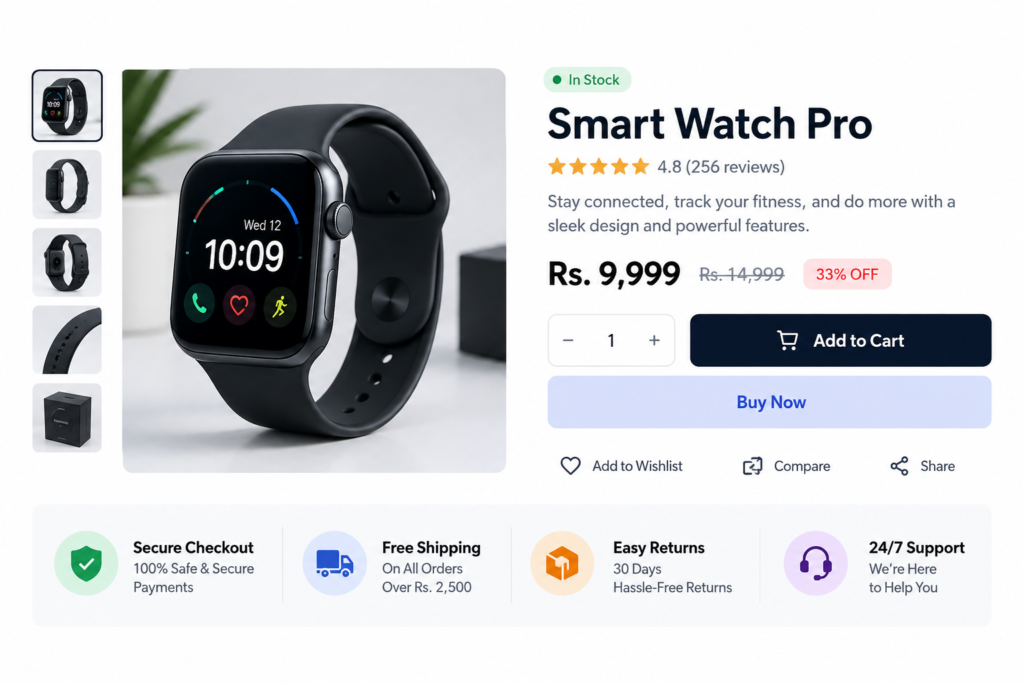
A Shopify Trust Badge on Product Page can give shoppers a quick summary of ratings and purchase confidence without taking up much space around the main buying area.
The supplied snippet is a compact Ratings & Trust block. It displays five gold stars, a 4.8 Rating out of 5, Based on 180+ reviews, and a rounded badge that says 180+ Successful Purchases. The styling is lightweight, responsive, and fully self-contained inside the Custom Liquid block.
There is no JavaScript, review-app integration, Shopify order lookup, or dynamic customer data. That means the visual design works immediately, but the rating, review count, and successful-purchase count are all hard-coded.
Before using the block on a live store, those numbers should match genuine store or product data.
Live Preview
Where to Paste This Shopify Code
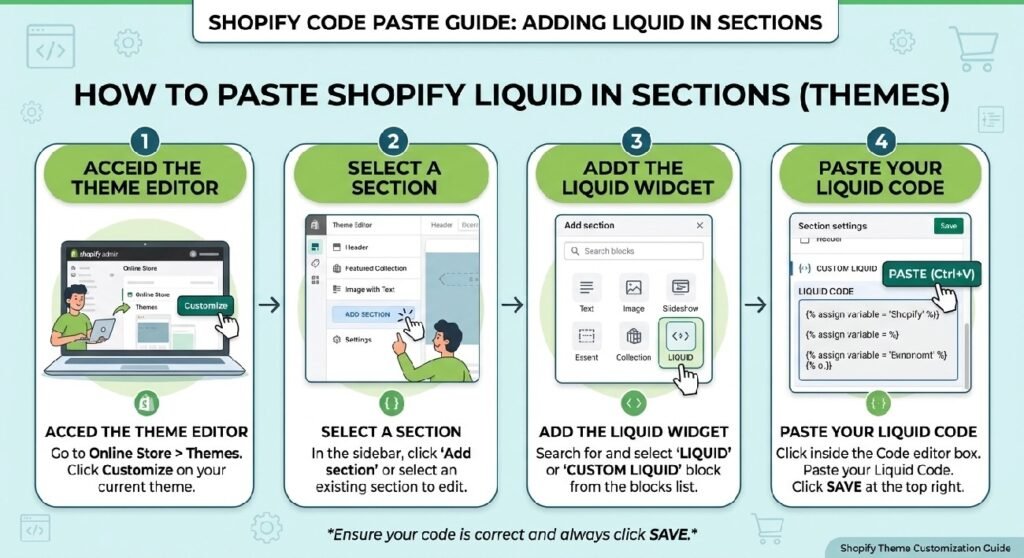
This snippet is designed specifically for a Shopify product detail page.
The easiest installation method is a Custom Liquid block:
- Open Shopify Admin → Online Store → Themes.
- Duplicate your live theme before editing.
- Open Customize.
- Select the relevant product template.
- Add a Custom Liquid block near the product title, price, Add to Cart button, or product benefits.
- Paste the complete code.
- Save and preview the product page on desktop and mobile.
You can also save the snippet as:
trust-badge-on-product-page.liquid
and render it from your product section.
Because the code contains no {% schema %}, it is not yet a standalone editable Shopify section. A future version could expose the rating, review count, purchase count, colors, and badge text as Theme Editor settings.
How This Shopify Code Works
The snippet begins with Liquid variables for colors and border radius.
It defines values for:
- background
- border
- heading text
- secondary text
- badge background
- pill radius
The visible component contains two areas.
The first is .pdpx-rev-rating.
It displays:
★★★★★
beside:
4.8 Rating out of 5
Based on 180+ reviews
The second area is .pdpx-rev-badge, which contains the rounded pill:
✅ 180+ Successful Purchases
The gold star effect is created with a CSS linear gradient clipped to the star characters.
A mobile media query reduces the star and rating text sizes below 768px.
No JavaScript is required.
Shopify Liquid Code
{%- comment -%}
============================================================
PDP — REVIEWS ("Ratings & Trust")  (Custom Liquid block)
  Star rating + trust badge. Edit colours below.
============================================================
{%- endcomment -%}
{%- liquid
  assign c_bg      = '#fafafa'
  assign c_border  = '#e6e7eb'
  assign c_title   = '#1a1a1a'
  assign c_sub     = '#5a6a6a'
  assign c_badge   = '#d9e5e5'
  assign radius    = '50px'
-%}
{%- style -%}
  .pdpx-rev-wrap{ margin-top:18px; }
  .pdpx-rev-rating{ display:flex; align-items:center; gap:12px; margin:8px 0; }
  .pdpx-rev-stars{
    font-size:2.5rem;
    background:linear-gradient(135deg,#FFD700 0%,#FDB813 40%,#FFA500 70%,#E6B800 100%);
    -webkit-background-clip:text;
    -webkit-text-fill-color:transparent;
    letter-spacing:2px;
    line-height:1;
  }
  .pdpx-rev-text strong{ font-size:1.35rem; color:{{ c_title }}; display:block; }
  .pdpx-rev-text span{ color:{{ c_sub }}; font-size:0.95rem; }
  .pdpx-rev-badge{ margin:12px 0; }
  .pdpx-rev-pill{
    display:inline-block;
    background:{{ c_badge }};
    color:{{ c_title }};
    padding:10px 20px;
    border-radius:{{ radius }};
    font-size:1.1rem;
    font-weight:600;
  }
  @media(max-width:768px){
    .pdpx-rev-stars{ font-size:1.9rem; }
    .pdpx-rev-text strong{ font-size:1.2rem; }
  }
{%- endstyle -%}

<div class="pdpx-rev-wrap">
  <div class="pdpx-rev-rating">
    <div class="pdpx-rev-stars">★★★★★</div>
    <div class="pdpx-rev-text">
      <strong>4.8 Rating out of 5</strong>
      <span>Based on 180+ reviews</span>
    </div>
  </div>
  <div class="pdpx-rev-badge">
    <div class="pdpx-rev-pill">✅ <strong>180+</strong> Successful Purchases</div>
  </div>
</div>
The Main Limitation: The Trust Data Is Static
The design looks like it is reporting store performance, but the numbers are simply written into the HTML.
The code does not read data from:
- Shopify orders
- a review app
- customer accounts
- product metafields
- analytics
- an API
So every product using this block will show:
4.8 Rating out of 5
Based on 180+ reviews
180+ Successful Purchases
even if that product has never received a review or purchase.
That is the most important issue to fix before publishing.
1. Use the Real Product Rating
A rating such as 4.8 out of 5 is a specific factual claim.
If your review platform reports 4.6, the block should show 4.6.
If the product has no reviews yet, do not display 4.8 simply because the section looks better with a number.
A better final version would connect the rating to your actual review provider or hide the rating block when no genuine score is available.
This matters even more if the same product template is shared across the catalog.
2. Keep the Review Count Accurate
The text:
Based on 180+ reviews
is also hard-coded.
Review counts change over time.
If you manually maintain the number, it can quickly become outdated.
If your review system exposes a real count, use it.
Otherwise, consider a neutral label such as:
Customer Reviews
and link or scroll to the real review section.
The [INTERNAL LINK NEEDED: Shopify Scrolling Reviews Liquid] is a useful companion if you want to display full review cards rather than only an aggregate score.
3. “Successful Purchases” Needs a Clear Source
The trust pill says:
180+ Successful Purchases
That sounds like verified order data.
The snippet itself does not calculate completed orders.
It also does not clarify whether the number means:
- purchases of this product
- total store orders
- delivered orders
- paid orders
- all historical transactions
If you keep the metric, define it internally and make sure the number is genuinely supportable.
For many stores, a non-numeric trust badge is easier to maintain.
For example:
Secure Checkout
Easy Returns
Tracked Shipping
These should still match real store policies, but they do not require constant numerical updates.
4. The Star Rating Needs Better Accessibility
The stars are displayed as five decorative star characters inside:
.pdpx-rev-stars
Visually, that is clear.
For screen readers, however, there is no explicit accessible description attached to the star group.
A stronger implementation would provide text such as:
Rated 4.8 out of 5
for assistive technology.
You can make the visual stars decorative with aria-hidden="true" and provide the rating in accessible text, or give the star container an appropriate label.
The visible 4.8 Rating out of 5 text helps, but explicit semantics make the component more reliable.
5. Two Liquid Color Variables Are Currently Unused
The code assigns:
c_bg
and:
c_border
but neither variable is actually used in the supplied CSS.
That is not harmful, but it suggests the snippet may have been simplified from an earlier design.
Unused variables make code harder to maintain because a merchant may change the value expecting something on the storefront to change.
Either use them in the component or remove them.
For example, c_bg could become the block background and c_border could be used for a subtle outer border.
6. The CSS Is Nicely Scoped
The selectors use a consistent pdpx-rev- prefix:
.pdpx-rev-wrap
.pdpx-rev-rating
.pdpx-rev-stars
.pdpx-rev-text
.pdpx-rev-pill
That is a good Shopify pattern.
The CSS does not style generic elements such as all div, span, or strong tags across the page.
This reduces the chance of the Custom Liquid block affecting unrelated theme components.
I would keep that structure.
7. Make the Data Editable Instead of Editing Code
The current rating, review count, and purchase count are written directly into the HTML.
For a reusable product-page component, those values should ideally be editable from Shopify.
A more advanced version could use section or block settings for:
- rating
- review count
- purchase count
- badge wording
- star color
- badge background
- secondary text color
- show/hide purchase badge
Even better, connect the rating and count to real product review data when your review platform supports it.
That gives you the same design without manually editing Liquid every time the numbers change.
Why the Compact Layout Works
The block does not try to become a complete review section.
That is useful.
A product page already has many competing elements:
- product title
- price
- variants
- quantity controls
- Add to Cart
- shipping information
- benefits
- reviews
This component only gives the shopper a fast confidence signal.
The stars attract attention first.
The numeric rating explains the score.
The review count gives context.
The pill adds a second trust signal.
That hierarchy is easy to scan.
Trust Badge vs. Full Scrolling Reviews
The [INTERNAL LINK NEEDED: Shopify Scrolling Reviews Liquid] is better when you want customers to read full testimonials.
This compact badge is better near the buying controls.
A useful product-page flow could be:
Title → Price → Rating & Trust → Product Benefits → Add to Cart
Then the full review slider can appear farther down the page.
That prevents the purchase area from becoming too tall.
Trust Badge vs. Live Review Widget
The [INTERNAL LINK NEEDED: Shopify Live Review Widget Liquid] creates a rotating chat-style review experience.
This block is much quieter.
There is no animation, changing content, or JavaScript.
If you want a calm product page, the compact rating block is easier to maintain.
If you want more visible review content, the live review widget gives shoppers more information.
In both cases, ratings and verified-purchase claims should come from genuine data.
Pair It With Product Benefits
The [INTERNAL LINK NEEDED: Shopify Product Benefits Liquid] fits naturally underneath this trust block.
The trust section answers:
Do other shoppers seem satisfied?
The benefits section answers:
Why might I like this product?
That creates a useful sequence without repeating the same information.
Pair It With Shipping Information
You can also place [INTERNAL LINK NEEDED: Shopify Free Shipping Notice Liquid] or [INTERNAL LINK NEEDED: Shopify Estimated Delivery Section] near this component.
Keep each block focused.
The rating block should handle ratings and trust.
The shipping block should handle shipping.
Trying to put reviews, delivery, returns, guarantees, and payments into one small badge usually makes the product page harder to scan.
Frequently Asked Questions
Does this code use real Shopify review data?
No. The rating and review count are hard-coded.
Does 180+ Successful Purchases update automatically?
No. It is static text.
Does the snippet require JavaScript?
No. It uses Liquid, HTML, and CSS only.
Can I change the star color?
Yes. The gold effect is controlled by the gradient in .pdpx-rev-stars.
Can I use this on every product?
Yes technically, but the rating and purchase claims must be accurate for every product where the block appears.
Is it mobile responsive?
Yes. A media query reduces the star and rating text sizes below 768px.
Can I connect it to a review app?
Yes, but the exact method depends on the review provider. The supplied snippet does not include that integration.
Explore More Shopify Code
Shopify Compact Trust Section Liquid
A Shopify Compact Trust Section Liquid can place several trust signals into a very small area of the storefront.
https://css-liquids-for-shopify.site/shopify-compact-trust-section-liquid/
Shopify Scrolling Reviews Liquid
A Shopify Scrolling Reviews Liquid section can give a product page or homepage a more dynamic review experience without relying on a slider library.
https://css-liquids-for-shopify.site/shopify-scrolling-reviews-liquid/
For more help, you can read Shopify’s official theme customization guide :Shopify Theme Customization Guide
For Shopify’s Liquid section you can visit over Shopify Liquid Code Library: https://css-liquids-for-shopify.site/shopify-liquid-code-library/
One Response