
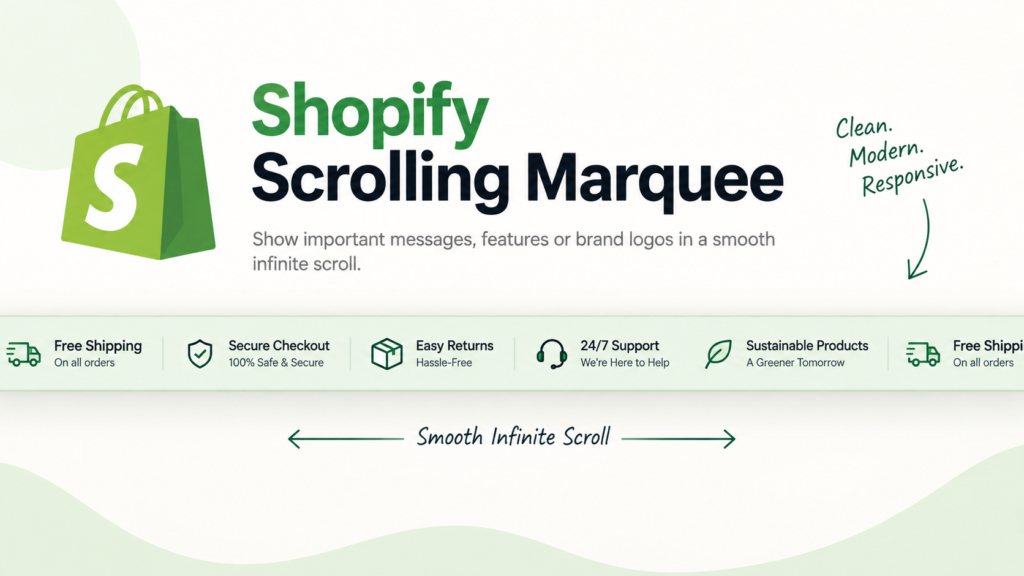
A Shopify Scrolling Marquee Liquid section is a good fit when you want to add movement to a storefront without bringing in a slider library or extra JavaScript.
The supplied section is more complete than a basic one-line marquee. It has two independently scrolling lanes, separate directions and speeds, editable text blocks, badge blocks, a skewed frame, edge fades, pause-on-hover support, color controls, spacing controls, and a full Shopify section schema. It is also built as a real Online Store 2.0 section, so merchants can edit it from the Theme Editor instead of changing the code every time.
The top lane is intended for short marketing phrases. The lower lane uses styled badges for labels such as Bestseller, New Arrival, or Sale.
There are still a few things worth adjusting before publishing, especially motion accessibility and any promotional claims used in the default preset.
Live Preview
Where to Paste This Shopify Code
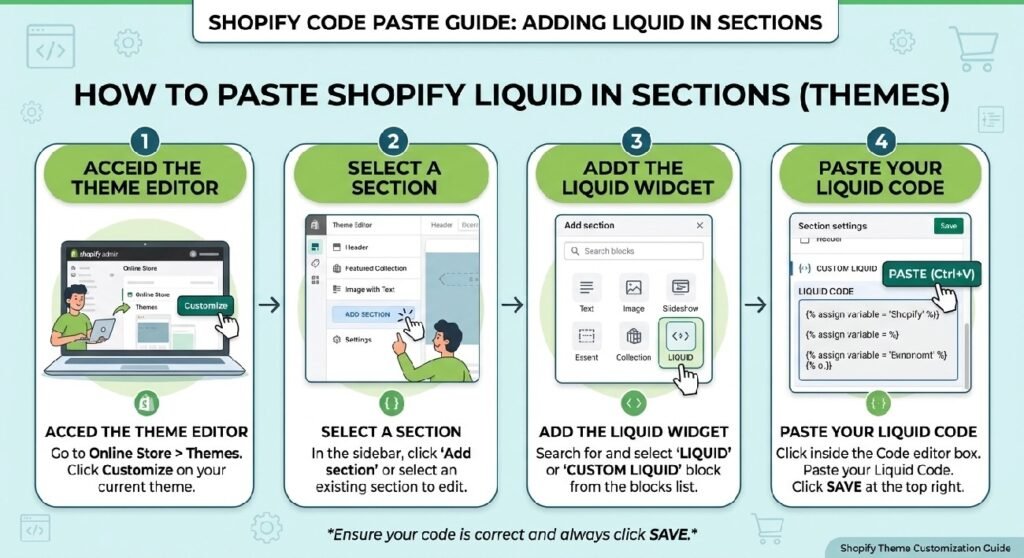
Because this snippet includes a full {% schema %} block, it should be saved as a Shopify section, not pasted into theme.liquid.
Use a filename such as:
scrolling-marquee.liquid
Then:
- Open Shopify Admin → Online Store → Themes.
- Duplicate your live theme before making changes.
- Open Edit code.
- Go to the Sections folder.
- Create a new file named
scrolling-marquee.liquid. - Paste the complete code.
- Save the file.
- Open Customize and add Scrolling Marquee where you want it to appear.
The preset included in the code means the section should appear as an addable section in compatible Online Store 2.0 themes.
This works well on a homepage, collection landing page, promotional page, or between larger content sections.
How This Shopify Code Works
The section first reads values from Shopify settings, including:
- skew angle
- top-lane speed
- bottom-lane speed
- scroll direction for each lane
- colors
- spacing
- pause-on-hover behavior
It also separates the section blocks into two groups.
The top lane uses blocks of type:
marquee_text
The bottom lane uses:
badge
That is a clean structure because each lane can be managed independently in the Theme Editor.
The top marquee lane
The top lane displays short text items such as:
Comfort Meets Culture
Wear The Vibe
Premium Oversized Tees
Each text item can optionally include a divider dot.
The bottom badge lane
The second row uses small styled labels.
The code includes badge styles for:
- default
- hot
- new
- sale
Each badge can also include an optional emoji or small text icon.
The looping animation
The section duplicates every set of blocks twice.
That matters.
The CSS animation moves the track from 0 to -50% for left scrolling, or from -50% back to 0 for right scrolling.
Because the content is duplicated, the second copy replaces the first as it moves off-screen, creating the continuous-loop effect without JavaScript.
Shopify Liquid Code
{%- liquid
  assign section_id = section.id
  assign skew = section.settings.skew_angle
  assign top_speed = section.settings.top_speed
  assign bottom_speed = section.settings.bottom_speed
  assign top_dir = section.settings.top_direction
  assign bottom_dir = section.settings.bottom_direction

  assign top_blocks = section.blocks | where: 'type', 'marquee_text'
  assign bottom_blocks = section.blocks | where: 'type', 'badge'
-%}

{% style %}
  #marquee-{{ section_id }} .mq-wrap {
    transform: skewY({{ skew }}deg);
    overflow: hidden;
    background: {{ section.settings.bg_color }};
    margin: {{ section.settings.margin_top }}px 0 {{ section.settings.margin_bottom }}px;
    border-top: 1px solid {{ section.settings.border_color }};
    border-bottom: 1px solid {{ section.settings.border_color }};
  }
  #marquee-{{ section_id }} .mq-inner { transform: skewY({{ skew | times: -1 }}deg); }
  #marquee-{{ section_id }} .mq-lane {
    display: flex;
    align-items: center;
    overflow: hidden;
    position: relative;
    width: 100%;
  }
  #marquee-{{ section_id }} .mq-lane--top {
    padding: 18px 0 10px;
    border-bottom: 2px solid {{ section.settings.accent_color }};
  }
  #marquee-{{ section_id }} .mq-lane--bot { padding: 10px 0 18px; }
  #marquee-{{ section_id }} .mq-track {
    display: flex;
    flex-wrap: nowrap;
    width: max-content;
    align-items: center;
    animation-timing-function: linear;
    animation-iteration-count: infinite;
  }
  #marquee-{{ section_id }} .mq-lane--top .mq-track {
    animation-name: scroll-{{ section_id }}-{{ top_dir }};
    animation-duration: {{ top_speed }}s;
  }
  #marquee-{{ section_id }} .mq-lane--bot .mq-track {
    animation-name: scroll-{{ section_id }}-{{ bottom_dir }};
    animation-duration: {{ bottom_speed }}s;
  }
  @keyframes scroll-{{ section_id }}-left {
    from { transform: translateX(0); }
    to   { transform: translateX(-50%); }
  }
  @keyframes scroll-{{ section_id }}-right {
    from { transform: translateX(-50%); }
    to   { transform: translateX(0); }
  }
  {% if section.settings.pause_on_hover %}
  #marquee-{{ section_id }} .mq-wrap:hover .mq-track { animation-play-state: paused; }
  {% endif %}
  #marquee-{{ section_id }} .mq-item {
    display: inline-flex;
    align-items: center;
    white-space: nowrap;
    padding: 0 36px;
    font-family: var(--font-body-family, Arial, sans-serif);
    font-weight: 800;
    font-size: 15px;
    letter-spacing: 2px;
    text-transform: uppercase;
    color: {{ section.settings.text_color }};
    gap: 10px;
    line-height: 1;
  }
  #marquee-{{ section_id }} .mq-dot {
    color: {{ section.settings.accent_color }};
    font-size: 8px;
    flex-shrink: 0;
  }
  #marquee-{{ section_id }} .mq-badge {
    display: inline-flex;
    align-items: center;
    gap: 6px;
    background: #1a1a1a;
    border: 1px solid {{ section.settings.border_color }};
    border-radius: 4px;
    padding: 4px 12px;
    font-family: var(--font-body-family, Arial, sans-serif);
    font-size: 12px;
    font-weight: 600;
    letter-spacing: 1.5px;
    text-transform: uppercase;
    color: #888;
    white-space: nowrap;
  }
  #marquee-{{ section_id }} .mq-badge.hot {
    border-color: {{ section.settings.accent_color }};
    color: {{ section.settings.accent_color }};
    background: #1a0d0a;
  }
  #marquee-{{ section_id }} .mq-badge.new { border-color: #4dff91; color: #4dff91; background: #0a1a10; }
  #marquee-{{ section_id }} .mq-badge.sale { border-color: #ffd24d; color: #ffd24d; background: #1a1500; }
  #marquee-{{ section_id }} .mq-badge-wrap {
    padding: 0 20px;
    display: inline-flex;
    align-items: center;
  }
  #marquee-{{ section_id }} .divider-dot {
    width: 4px;
    height: 4px;
    border-radius: 50%;
    background: {{ section.settings.accent_color }};
    display: inline-block;
    flex-shrink: 0;
  }
  #marquee-{{ section_id }} .mq-edge {
    position: absolute;
    top: 0; bottom: 0;
    width: 80px;
    z-index: 2;
    pointer-events: none;
  }
  #marquee-{{ section_id }} .mq-edge--l { left: 0; background: linear-gradient(to right, {{ section.settings.bg_color }}, transparent); }
  #marquee-{{ section_id }} .mq-edge--r { right: 0; background: linear-gradient(to left, {{ section.settings.bg_color }}, transparent); }
  #marquee-{{ section_id }} .label {
    font-size: 12px;
    color: {{ section.settings.muted_color }};
    letter-spacing: 1px;
    text-transform: uppercase;
    text-align: center;
    margin: 0.5rem 0 0;
    font-family: var(--font-body-family, Arial, sans-serif);
  }
  @media screen and (max-width: 749px) {
    #marquee-{{ section_id }} .mq-item { font-size: 12px; padding: 0 20px; }
    #marquee-{{ section_id }} .mq-badge { font-size: 10px; padding: 3px 10px; }
  }
{% endstyle %}

<div id="marquee-{{ section_id }}">
  {% if section.settings.show_label and section.settings.label_text != blank %}
    <p class="label">{{ section.settings.label_text }}</p>
  {% endif %}

  <div class="mq-wrap">
    <div class="mq-inner">

      {% if top_blocks.size > 0 %}
        <div class="mq-lane mq-lane--top">
          <div class="mq-edge mq-edge--l"></div>
          <div class="mq-edge mq-edge--r"></div>
          <div class="mq-track">
            {% for i in (1..2) %}
              {% for block in top_blocks %}
                <span class="mq-item" {{ block.shopify_attributes }}>
                  {{ block.settings.text | escape }}
                  {% if block.settings.show_dot %}<span class="mq-dot divider-dot"></span>{% endif %}
                </span>
              {% endfor %}
            {% endfor %}
          </div>
        </div>
      {% endif %}

      {% if bottom_blocks.size > 0 %}
        <div class="mq-lane mq-lane--bot">
          <div class="mq-edge mq-edge--l"></div>
          <div class="mq-edge mq-edge--r"></div>
          <div class="mq-track">
            {% for i in (1..2) %}
              {% for block in bottom_blocks %}
                <div class="mq-badge-wrap" {{ block.shopify_attributes }}>
                  <div class="mq-badge {{ block.settings.style }}">
                    {% if block.settings.icon != blank %}{{ block.settings.icon }}{% endif %}
                    {{ block.settings.text | escape }}
                  </div>
                </div>
              {% endfor %}
            {% endfor %}
          </div>
        </div>
      {% endif %}

    </div>
  </div>
</div>

{% schema %}
{
  "name": "Scrolling Marquee",
  "settings": [
    {
      "type": "header",
      "content": "Layout & Style"
    },
    {
      "type": "range",
      "id": "skew_angle",
      "label": "Skew angle",
      "min": -10,
      "max": 10,
      "step": 1,
      "unit": "deg",
      "default": -2
    },
    {
      "type": "checkbox",
      "id": "pause_on_hover",
      "label": "Pause on hover",
      "default": true
    },
    {
      "type": "range",
      "id": "margin_top",
      "label": "Top spacing",
      "min": 0,
      "max": 100,
      "step": 4,
      "unit": "px",
      "default": 32
    },
    {
      "type": "range",
      "id": "margin_bottom",
      "label": "Bottom spacing",
      "min": 0,
      "max": 100,
      "step": 4,
      "unit": "px",
      "default": 32
    },
    {
      "type": "header",
      "content": "Top Lane"
    },
    {
      "type": "select",
      "id": "top_direction",
      "label": "Scroll direction",
      "options": [
        { "value": "left", "label": "Left" },
        { "value": "right", "label": "Right" }
      ],
      "default": "left"
    },
    {
      "type": "range",
      "id": "top_speed",
      "label": "Scroll speed (lower = faster)",
      "min": 5,
      "max": 60,
      "step": 1,
      "unit": "s",
      "default": 22
    },
    {
      "type": "header",
      "content": "Bottom Lane"
    },
    {
      "type": "select",
      "id": "bottom_direction",
      "label": "Scroll direction",
      "options": [
        { "value": "left", "label": "Left" },
        { "value": "right", "label": "Right" }
      ],
      "default": "right"
    },
    {
      "type": "range",
      "id": "bottom_speed",
      "label": "Scroll speed (lower = faster)",
      "min": 5,
      "max": 60,
      "step": 1,
      "unit": "s",
      "default": 18
    },
    {
      "type": "header",
      "content": "Caption Label"
    },
    {
      "type": "checkbox",
      "id": "show_label",
      "label": "Show caption above marquee",
      "default": true
    },
    {
      "type": "text",
      "id": "label_text",
      "label": "Caption text",
      "default": "Hover to pause · Dual-direction · Skewed frame"
    },
    {
      "type": "header",
      "content": "Colors"
    },
    {
      "type": "color",
      "id": "bg_color",
      "label": "Background",
      "default": "#0f0f0f"
    },
    {
      "type": "color",
      "id": "accent_color",
      "label": "Accent color",
      "default": "#FF4D2E"
    },
    {
      "type": "color",
      "id": "border_color",
      "label": "Border color",
      "default": "#2a2a2a"
    },
    {
      "type": "color",
      "id": "text_color",
      "label": "Text color",
      "default": "#ffffff"
    },
    {
      "type": "color",
      "id": "muted_color",
      "label": "Muted/caption color",
      "default": "#555555"
    }
  ],
  "blocks": [
    {
      "type": "marquee_text",
      "name": "Text Item (top lane)",
      "settings": [
        {
          "type": "text",
          "id": "text",
          "label": "Text",
          "default": "Comfort Meets Culture"
        },
        {
          "type": "checkbox",
          "id": "show_dot",
          "label": "Show divider dot after text",
          "default": true
        }
      ]
    },
    {
      "type": "badge",
      "name": "Badge (bottom lane)",
      "settings": [
        {
          "type": "text",
          "id": "text",
          "label": "Badge text",
          "default": "Bestseller"
        },
        {
          "type": "text",
          "id": "icon",
          "label": "Icon / emoji (optional)",
          "default": "🔥"
        },
        {
          "type": "select",
          "id": "style",
          "label": "Badge style",
          "options": [
            { "value": "", "label": "Default (grey)" },
            { "value": "hot", "label": "Hot (accent color)" },
            { "value": "new", "label": "New (green)" },
            { "value": "sale", "label": "Sale (yellow)" }
          ],
          "default": "hot"
        }
      ]
    }
  ],
  "presets": [
    {
      "name": "Scrolling Marquee",
      "blocks": [
        { "type": "marquee_text", "settings": { "text": "Comfort Meets Culture", "show_dot": true } },
        { "type": "marquee_text", "settings": { "text": "Wear The Vibe", "show_dot": true } },
        { "type": "marquee_text", "settings": { "text": "Premium Oversized Tees", "show_dot": true } },
        { "type": "marquee_text", "settings": { "text": "Free Shipping Worldwide", "show_dot": true } },
        { "type": "marquee_text", "settings": { "text": "New Drop Every Friday", "show_dot": true } },
        { "type": "badge", "settings": { "text": "Bestseller", "icon": "🔥", "style": "hot" } },
        { "type": "badge", "settings": { "text": "Street Edition", "icon": "", "style": "" } },
        { "type": "badge", "settings": { "text": "New Arrival", "icon": "✦", "style": "new" } },
        { "type": "badge", "settings": { "text": "Limited Run", "icon": "", "style": "" } },
        { "type": "badge", "settings": { "text": "20% Off Today", "icon": "", "style": "sale" } },
        { "type": "badge", "settings": { "text": "Drop 004", "icon": "", "style": "" } }
      ]
    }
  ]
}
{% endschema %}
1. This Is a Real Shopify Section, Not a Static Demo
One of the strongest parts of this snippet is that it already uses Shopify section settings and blocks.
The merchant can change:
- background color
- text color
- accent color
- border color
- top and bottom spacing
- skew angle
- top scrolling direction
- bottom scrolling direction
- speed for each lane
- caption visibility
- caption text
- pause on hover
That makes it much more reusable than a hard-coded <div> copied into Custom Liquid.
The section can be adjusted from the Theme Editor without touching CSS.
2. The Two Lanes Can Move in Opposite Directions
The default settings use:
Top lane → left
Bottom lane → right
That creates a stronger visual effect than two rows moving in the same direction.
Each lane also has its own duration setting.
The top lane defaults to 22 seconds.
The bottom lane defaults to 18 seconds.
A smaller duration means the track completes the movement faster, so the schema correctly describes the control as:
lower = faster
This gives merchants useful control without adding JavaScript.
3. Add Reduced-Motion Support
This is the biggest technical improvement I would make.
The marquee runs continuously with CSS animation.
The section supports pause on hover, but there is no:
@media (prefers-reduced-motion: reduce)
rule.
Visitors who have asked their device to reduce motion should not be forced to watch two continuously moving rows.
A better version should disable the animation for those users or present the content in a static layout.
For example, the track could simply stop moving when reduced motion is enabled.
That keeps every message readable while respecting the visitor’s accessibility preference.
4. Verify the Default Marketing Claims
The preset includes phrases such as:
Free Shipping Worldwide
New Drop Every Friday
Bestseller
Limited Run
20% Off Today
Those are not calculated from Shopify.
They are simply default block content.
Before using the preset on a live store, replace or verify every claim.
For example:
Free Shipping Worldwide should only remain if the store genuinely offers free shipping in all markets covered by that statement.
20% Off Today should only appear while that promotion is real.
Bestseller should not be used merely because the badge style looks good.
A moving promotional strip attracts attention, which makes inaccurate claims more noticeable, not less.
5. The Seamless Loop Depends on Duplicate Content
The section runs:
{% for i in (1..2) %}
around both block groups.
That means every sequence is printed twice.
The animation then moves exactly half of the track width.
This is why the loop can repeat without an obvious jump.
It is a smart CSS-only technique, but it depends on both halves being identical.
If you modify the code so the second copy has different content, the -50% translation will no longer line up cleanly.
For this structure, duplication is intentional.
6. Be Careful With Too Many Blocks
The section can technically support many text and badge blocks.
That does not mean every store needs ten or fifteen messages.
A marquee becomes harder to absorb when the visitor sees too many phrases moving past.
Three to five meaningful text items are often enough.
For example:
Free shipping over your threshold
New collection available
Easy returns
Secure checkout
Those messages are easier to scan than a long stream of generic slogans.
The same applies to badges.
Keep them useful rather than filling the lane for decoration.
7. Keep the Caption Only if It Helps the Storefront
The default caption says:
Hover to pause · Dual-direction · Skewed frame
That sounds more like a design-demo label than customer-facing storefront copy.
For a live store, I would usually turn the caption off.
If you keep it, replace it with something relevant to the shopper.
For example:
What’s happening now
or:
Store updates
The section schema already includes a toggle, so merchants can hide the caption completely.
The CSS Is Nicely Scoped
The code uses:
#marquee-{{ section_id }}
before its component selectors.
That is a good pattern.
Every section instance gets a unique ID based on Shopify’s section.id.
This helps prevent one marquee instance from changing another.
It also allows the code to generate section-specific animation names such as:
scroll-SECTIONID-left
and:
scroll-SECTIONID-right
That is especially useful if the same section appears more than once on a page.
The Edge Fade Helps the Loop Feel Cleaner
Both lanes include left and right overlay elements.
These use gradients from the section background color into transparency.
The effect hides some of the hard visual entry and exit points as text moves in and out of view.
It is a small detail, but it makes the continuous animation feel more polished.
Because the overlays use:
pointer-events: none
they do not block interaction with the content underneath.
No JavaScript Is Required
This entire section works with:
- Liquid
- HTML
- CSS
- Shopify schema
There is no JavaScript.
That means there are no intervals, observers, event listeners, or library dependencies to manage.
The only interaction is optional pause-on-hover, handled through:
animation-play-state: paused
For a decorative scrolling section, CSS-only animation is a sensible choice.
Shopify Scrolling Marquee vs. Announcement Bar
The [INTERNAL LINK NEEDED: Announcement Bar Pro Liquid] and this marquee both communicate short messages, but they serve different roles.
An announcement bar is usually compact and persistent near the top of the site.
The scrolling marquee is more visual and can sit inside the page between larger sections.
Use an announcement bar for one important message.
Use the marquee when you have several short phrases or promotional labels worth rotating continuously.
Putting both directly beside each other may feel repetitive.
Pairing It With a Hero Section
The [INTERNAL LINK NEEDED: Premium Hero Banner Liquid] is a natural companion.
A homepage could use:
Hero → Scrolling Marquee → Featured Collections
The hero handles the main headline and CTA.
The marquee then gives the page movement and lets you introduce secondary messages without making the hero overcrowded.
This also works well before [INTERNAL LINK NEEDED: Collection Showcase Liquid] if you want the marquee to act as a visual separator.
Marquee Badges and Trust Claims
Some of the badge styles could also communicate trust-related information.
For example:
Tracked Delivery
Easy Returns
Secure Checkout
But if you already use [INTERNAL LINK NEEDED: Premium Footer Trust Liquid], avoid repeating the exact same messages in both places.
The marquee is stronger for short promotional or brand messages.
The trust section is better for stable reassurance.
Performance Considerations
The section is fairly lightweight.
It does not load images, video, external fonts, or JavaScript.
The continuous animation does mean the browser is always updating the transform while the section is visible.
Using transform is much better than animating layout properties such as left or margin.
Still, reduced-motion support is worth adding, and excessively fast speeds should be avoided.
A slower marquee is usually easier to read and feels less distracting.
FAQ
Does this Shopify marquee use JavaScript?
No. The scrolling effect is created entirely with CSS keyframe animations.
Can I change the scroll direction?
Yes. The top and bottom lanes each have separate left/right direction settings.
Can I change the marquee speed?
Yes. Each lane has its own duration setting from 5 to 60 seconds.
Can I add my own text and badges?
Yes. The section uses Shopify blocks, so text items and badge items can be edited from Theme Customize.
Why is every item duplicated?
The code prints the content twice so the track can move by 50% and create a continuous looping effect.
Does the section pause on hover?
Yes, if the Pause on hover setting is enabled.
Does it support reduced-motion preferences?
Not in the supplied version. I would add a prefers-reduced-motion rule before publishing.
Explore More Shopify Code
- Shopify Free Shipping Notice Liquid
A Shopify Free Shipping Notice Liquid block provides the consumers with a fast reminder of the days on which they can get free shipping or free returns.https://css-liquids-for-shopify.site/shopify-free-shipping-notice-liquid/ - Shopify Live Review Widget Liquid
A Shopify Live Review Widget Liquid can make a product page feel more active by showing customer-style comments in a rotating chat bubble.https://css-liquids-for-shopify.site/shopify-live-review-widget-liquid/
2 Responses