
A Shopify Live Review Widget Liquid can make a product page feel more active by showing customer-style comments in a rotating chat bubble.
The supplied live-comment.liquid snippet is designed for a product detail page. It includes a “Let Our Customers Speak For Us!” heading, a 5-star aggregate line, a verified-buyer badge, customer initials, review text, timestamps such as “Just now”, and an animated typing state between reviews.
Visually, the idea is strong. The implementation is also more polished than a simple static review card: the JavaScript rotates entries, avoids showing the same review twice in a row, pauses while the customer hovers or focuses the widget, supports right-to-left Arabic review text, and cleans up its interval when Shopify Theme Editor sections unload.
The important issue is the review data itself.
The names, comments, 4.9 rating, 1,240+ verified reviews, “Verified purchase” badge, and recent-time labels are all hard-coded. They are not pulled from a review app or Shopify order data. That means the widget should be treated as a demo until those claims are replaced with genuine review information.
Where to Paste This Shopify Code
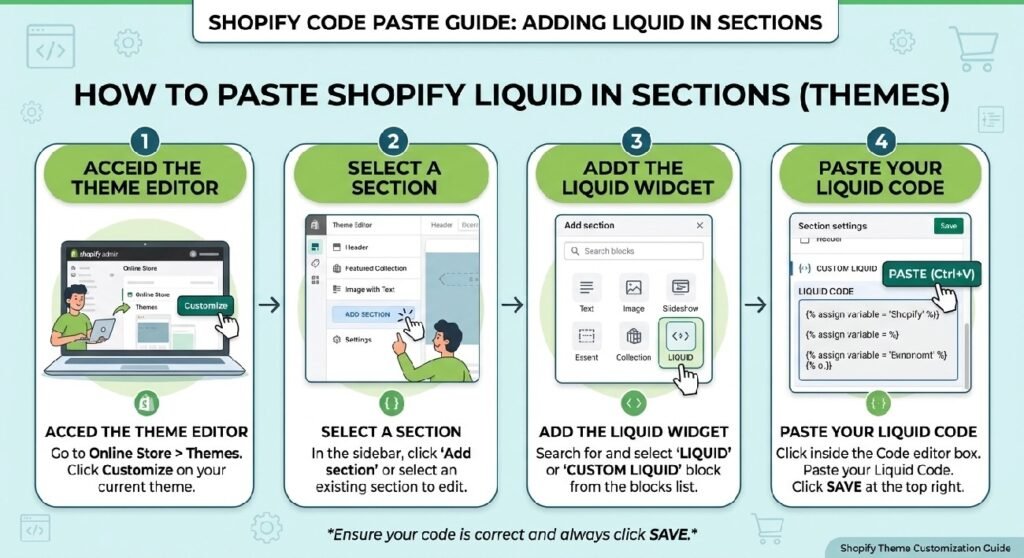
This snippet is clearly intended for a Shopify product page.
The markup is already wrapped in product-section classes:
main-product__block
and:
main-product__block-custom_liquid
A practical installation method is:
- Open Shopify Admin → Online Store → Themes.
- Duplicate the live theme before editing.
- Open the product template in Customize.
- Add a Custom Liquid block where your theme supports one.
- Paste the cleaned widget code.
- Place it below product information, around the Add to Cart area, or near your real review section.
- Test it on desktop and mobile.
You can also save it as:
live-comment.liquid
inside the Snippets folder and render it from the product section.
If your store already uses a review platform, a better final version would use that platform’s real review data instead of maintaining a separate hard-coded review list.
How Shopify Live Review Widget Liquid Works
The widget is made of three main pieces:
- HTML for the review card
- scoped CSS
- JavaScript that rotates reviews
The review header contains:
Let Our Customers Speak For Us!
Below that is an aggregate rating line displaying:
4.9 out of 5 · from 1,240+ verified reviews
The chat card contains:
- customer initials
- customer name
- verified-buyer badge
- star rating
- recent-time label
- review text
- chat bubble styling
The supplied review list contains ten hard-coded customer entries, most with Arabic review text.
The script picks a random review, switches the bubble into a leaving state, briefly shows a typing animation, and then renders the next review.
It also detects Arabic characters and changes the message direction to RTL when appropriate.
Shopify Liquid Code
<div class="main-product__block main-product__block-custom_liquid">
  <div class="m-product-text">

    <div class="cl-reviews" data-cl-reviews aria-live="polite" aria-atomic="true">

      <div class="cl-reviews__header">
        <h3 class="cl-reviews__title">
          <span class="cl-reviews__title-icon" aria-hidden="true">
            <svg viewBox="0 0 24 24" width="20" height="20" fill="currentColor">
              <path d="M4 4h16a2 2 0 0 1 2 2v10a2 2 0 0 1-2 2H9l-5 4v-4H4a2 2 0 0 1-2-2V6a2 2 0 0 1 2-2z"/>
            </svg>
          </span>
          <span class="cl-reviews__title-shine">Let Our Customers Speak For Us!</span>
        </h3>

        <div class="cl-reviews__aggregate">
          <span class="cl-reviews__aggregate-stars" aria-hidden="true">★★★★★</span>
          <span class="cl-reviews__aggregate-text" data-cl-agg-text>4.9 out of 5 · from 1,240+ verified reviews</span>
        </div>
      </div>

      <div class="cl-reviews__chat">
        <div class="cl-reviews__bubble" data-cl-review-card>

          <div class="cl-reviews__avatar-wrap">
            <div class="cl-reviews__avatar" data-cl-review-avatar role="img" aria-hidden="true">HA</div>
            <span class="cl-reviews__status-dot" aria-hidden="true"></span>
          </div>

          <div class="cl-reviews__bubble-body">

            <div class="cl-reviews__typing" data-cl-typing aria-hidden="true">
              <span></span><span></span><span></span>
            </div>

            <div class="cl-reviews__content" data-cl-content>
              <header class="cl-reviews__meta">
                <cite class="cl-reviews__name" data-cl-review-name>Hassan Al-Tamimi</cite>

                <span class="cl-reviews__badge" data-cl-review-badge title="Verified Buyer">
                  <svg viewBox="0 0 24 24" width="12" height="12" fill="currentColor" aria-hidden="true">
                    <path d="M12 2 9.9 4.1 7 3.5 6 6.3 3.3 7.7 4 10.6 2 13l2 2.4-.7 2.9 2.7 1.4 1 2.8 2.9-.6L12 23l2.1-2.1 2.9.6 1-2.8 2.7-1.4-.7-2.9L22 15l-2-2.4.7-2.9-2.7-1.4-1-2.8-2.9.6L12 2zm-1.2 13.6-3-3 1.2-1.2 1.8 1.8 4.6-4.6 1.2 1.2-5.8 5.8z"/>
                  </svg>
                  <span class="cl-reviews__visually-hidden">Verified purchase</span>
                </span>
              </header>

              <div class="cl-reviews__stars-row">
                <span class="cl-reviews__stars" data-cl-review-stars aria-hidden="true">★★★★★</span>
                <span class="cl-reviews__visually-hidden" data-cl-review-rating-text>Rated 5 out of 5 stars</span>
                <span class="cl-reviews__time" data-cl-review-time>Just now</span>
              </div>

              <p class="cl-reviews__text" data-cl-review-text>بنصح الكل بالموقع اكيد</p>
            </div>

          </div>

          <span class="cl-reviews__tail" aria-hidden="true"></span>
        </div>
      </div>

    </div>

    <style>
      /* =====================================================
         Custom Liquid Review Widget — Live Chat Notification style
         Prefix "cl-reviews" avoids collisions with theme CSS
         ===================================================== */

      .cl-reviews {
        --cl-bg: rgba(66, 133, 244, 0.12);
        --cl-bubble-bg: #ffffff;
        --cl-border: rgba(0, 0, 0, 0.06);
        --cl-text: #26302c;
        --cl-text-muted: #5c5c5c;
        --cl-star: #f5a623;
        --cl-badge: #1e9e5c;
        --cl-accent: #25b566;
        --cl-radius: 18px;
        --cl-avatar-size: 52px;
        --cl-avatar-bg: #3d6b52;
        --cl-gap: 14px;

        width: 100%;
        max-width: 100%;
        box-sizing: border-box;
        padding: 22px 18px;
        margin: 24px 0;
        background: var(--cl-bg);
        border-radius: var(--cl-radius);
        font-family: inherit;
      }

      .cl-reviews * { box-sizing: border-box; }

      /* ---------- Header ---------- */
      .cl-reviews__header {
        display: flex;
        flex-direction: column;
        align-items: center;
        gap: 6px;
        margin-bottom: 18px;
        text-align: center;
      }

      .cl-reviews__title {
        margin: 0;
        display: flex;
        align-items: center;
        gap: 8px;
        font-size: 1.3rem;
        font-weight: 700;
        line-height: 1.3;
      }

      .cl-reviews__title-icon { color: var(--cl-accent); flex: 0 0 auto; }

      .cl-reviews__title-shine {
        display: inline-block;
        background: linear-gradient(100deg, #2b2b2b 30%, #6fae83 45%, #2b2b2b 60%);
        background-size: 220% 100%;
        background-clip: text;
        -webkit-background-clip: text;
        color: transparent;
        animation: cl-reviews-shine 5s linear infinite;
      }

      @keyframes cl-reviews-shine {
        0% { background-position: 200% 0; }
        100% { background-position: -200% 0; }
      }

      .cl-reviews__aggregate {
        display: flex;
        align-items: center;
        gap: 6px;
        font-size: 0.85rem;
        color: var(--cl-text-muted);
      }

      .cl-reviews__aggregate-stars {
        color: var(--cl-star);
        letter-spacing: 1px;
        font-size: 0.8rem;
      }

      /* ---------- Chat wrapper ---------- */
      .cl-reviews__chat {
        display: flex;
        justify-content: center;
      }

      .cl-reviews__bubble {
        position: relative;
        display: flex;
        align-items: flex-start;
        gap: var(--cl-gap);
        max-width: 560px;
        width: 100%;
        padding: 14px 16px;
        background: var(--cl-bubble-bg);
        border: 1px solid var(--cl-border);
        border-radius: var(--cl-radius);
        border-top-left-radius: 4px;
        box-shadow: 0 6px 18px rgba(0, 0, 0, 0.06);
        transition: opacity 0.3s ease, transform 0.3s ease;
        opacity: 1;
        transform: translateY(0) scale(1);
      }

      .cl-reviews__bubble.is-rtl {
        border-top-left-radius: var(--cl-radius);
        border-top-right-radius: 4px;
      }

      .cl-reviews__bubble.is-leaving {
        opacity: 0;
        transform: translateY(-6px) scale(0.99);
      }

      /* Chat tail */
      .cl-reviews__tail {
        position: absolute;
        top: 0;
        left: -6px;
        width: 14px;
        height: 14px;
        background: var(--cl-bubble-bg);
        border-left: 1px solid var(--cl-border);
        border-top: 1px solid var(--cl-border);
        clip-path: polygon(100% 0, 0 0, 100% 100%);
      }

      .cl-reviews__bubble.is-rtl .cl-reviews__tail {
        left: auto;
        right: -6px;
        border-left: none;
        border-right: 1px solid var(--cl-border);
        clip-path: polygon(0 0, 100% 0, 0 100%);
      }

      /* ---------- Avatar ---------- */
      .cl-reviews__avatar-wrap {
        position: relative;
        flex: 0 0 auto;
      }

      .cl-reviews__avatar {
        display: flex;
        align-items: center;
        justify-content: center;
        width: var(--cl-avatar-size);
        height: var(--cl-avatar-size);
        border-radius: 50%;
        background: var(--cl-avatar-bg);
        color: #fff;
        font-weight: 700;
        font-size: 1rem;
        letter-spacing: 0.5px;
        user-select: none;
        transition: background-color 0.3s ease;
      }

      .cl-reviews__status-dot {
        position: absolute;
        bottom: 1px;
        right: 1px;
        width: 12px;
        height: 12px;
        border-radius: 50%;
        background: var(--cl-accent);
        border: 2px solid var(--cl-bubble-bg);
        animation: cl-reviews-pulse 2s ease-in-out infinite;
      }

      .cl-reviews__bubble.is-rtl .cl-reviews__status-dot {
        right: auto;
        left: 1px;
      }

      @keyframes cl-reviews-pulse {
        0%, 100% { box-shadow: 0 0 0 0 rgba(37, 181, 102, 0.4); }
        50% { box-shadow: 0 0 0 4px rgba(37, 181, 102, 0); }
      }

      /* ---------- Bubble body ---------- */
      .cl-reviews__bubble-body {
        flex: 1 1 auto;
        min-width: 0;
      }

      /* Typing indicator */
      .cl-reviews__typing {
        display: none;
        align-items: center;
        gap: 4px;
        height: 28px;
      }

      .cl-reviews__typing.is-active { display: flex; }

      .cl-reviews__typing span {
        width: 7px;
        height: 7px;
        border-radius: 50%;
        background: var(--cl-text-muted);
        opacity: 0.5;
        animation: cl-reviews-typing 1.1s ease-in-out infinite;
      }

      .cl-reviews__typing span:nth-child(2) { animation-delay: 0.15s; }
      .cl-reviews__typing span:nth-child(3) { animation-delay: 0.3s; }

      @keyframes cl-reviews-typing {
        0%, 60%, 100% { transform: translateY(0); opacity: 0.5; }
        30% { transform: translateY(-4px); opacity: 1; }
      }

      .cl-reviews__content {
        display: flex;
        flex-direction: column;
        gap: 4px;
        opacity: 1;
        transition: opacity 0.25s ease;
      }

      .cl-reviews__content.is-hidden { display: none; }

      .cl-reviews__meta {
        display: flex;
        flex-wrap: wrap;
        align-items: center;
        gap: 6px;
      }

      .cl-reviews__name {
        font-style: normal;
        font-weight: 600;
        font-size: 0.95rem;
        color: var(--cl-text);
      }

      .cl-reviews__badge {
        display: inline-flex;
        align-items: center;
        color: var(--cl-badge);
      }

      .cl-reviews__stars-row {
        display: flex;
        align-items: center;
        gap: 8px;
      }

      .cl-reviews__stars {
        font-size: 0.82rem;
        letter-spacing: 1px;
        color: var(--cl-star);
        line-height: 1;
      }

      .cl-reviews__time {
        font-size: 0.75rem;
        color: var(--cl-text-muted);
        opacity: 0.75;
      }

      .cl-reviews__text {
        margin: 4px 0 0;
        font-size: 1rem;
        line-height: 1.5;
        color: var(--cl-text-muted);
      }

      .cl-reviews__visually-hidden {
        position: absolute;
        width: 1px;
        height: 1px;
        padding: 0;
        margin: -1px;
        overflow: hidden;
        clip: rect(0, 0, 0, 0);
        white-space: nowrap;
        border: 0;
      }

      /* ---------- Tablet ---------- */
      @media screen and (max-width: 989px) {
        .cl-reviews { padding: 20px 16px; }
        .cl-reviews__bubble { padding: 12px 14px; }
        .cl-reviews__avatar { --cl-avatar-size: 46px; }
        .cl-reviews__title { font-size: 1.2rem; }
      }

      /* ---------- Mobile ---------- */
      @media screen and (max-width: 749px) {
        .cl-reviews { padding: 16px 12px; margin: 16px 0; }
        .cl-reviews__title { font-size: 1.05rem; }
        .cl-reviews__aggregate { font-size: 0.78rem; }
        .cl-reviews__bubble { padding: 10px 12px; gap: 10px; }
        .cl-reviews__avatar { width: 40px; height: 40px; font-size: 0.85rem; }
        .cl-reviews__name { font-size: 0.88rem; }
        .cl-reviews__text { font-size: 0.9rem; }
      }

      @media (prefers-reduced-motion: reduce) {
        .cl-reviews__bubble,
        .cl-reviews__title-shine,
        .cl-reviews__status-dot,
        .cl-reviews__typing span {
          animation: none;
          transition: none;
        }
      }
    </style>

    <script>
      (() => {
        /* =====================================================
           Custom Liquid Review Widget — Script
           Live chat-notification style. Scoped, no globals leaked,
           Theme Editor safe.
           ===================================================== */

        /* -----------------------------------------------------
           REVIEW DATA — edit / add / remove entries here only.
           ----------------------------------------------------- */
        const REVIEWS = [
          { name: 'Ahmed Al-Farsi',      rating: 5, text: 'حبيييت 😍المنتج' },
          { name: 'Fatima Al-Mansouri',  rating: 5, text: 'اكيد رح ارجع اشتري وبنصح الكل يجرب' },
          { name: 'Omar Al-Zayani',      rating: 5, text: 'الكواليتي ممتازة ، مشكورين❤️' },
          { name: 'Layla Al-Nuaimi',     rating: 5, text: 'انا تفاجأت بهالشركة ، كواليتي وسريعين بالتوصيل' },
          { name: 'Hassan Al-Tamimi',    rating: 5, text: 'بنصح الكل بالموقع اكيد' },
          { name: 'Maha Al-Kuwaiti',     rating: 5, text: 'ولا مرة شفت هيك كواليتي اونلاين 😍' },
          { name: 'Saif Al-Shehri',      rating: 5, text: 'منتج رائع وخدمة ممتازة!' },
          { name: 'Noura Al-Ghamdi',     rating: 5, text: 'وصلني بسرعة وجودة مذهلة!' },
          { name: 'Abdullah Al-Mutairi', rating: 5, text: 'أفضل تجربة تسوق عبر الإنترنت!' },
          { name: 'Hind Al-Qahtani',     rating: 5, text: 'سعر مناسب وجودة عالية، شكراً لكم!' }
        ];

        /* Replace with real values from your review app if available */
        const AGGREGATE_RATING = 4.9;
        const AGGREGATE_COUNT = '1,240+';

        /* Rotating avatar background palette (no images needed) */
        const AVATAR_COLORS = ['#3d6b52', '#8a6d3b', '#3b5f8a', '#8a3b5f', '#5f7a3b', '#6b3d6b'];

        const ROTATION_INTERVAL_MS = 4500;
        const TYPING_DURATION_MS = 900;
        const LEAVE_DURATION_MS = 280;
        const ARABIC_RE = /[u0600-u06FF]/;
        const TIME_LABELS = ['Just now', '1 min ago', '2 min ago', '3 min ago', '5 min ago'];

        function getInitials(name) {
          return name
            .split(' ')
            .filter(Boolean)
            .slice(0, 2)
            .map((part) => part.charAt(0).toUpperCase())
            .join('');
        }

        function initReviewWidget(root) {
          if (!root || root.dataset.clInitialized === 'true') return;

          const bubble = root.querySelector('[data-cl-review-card]');
          const avatarEl = root.querySelector('[data-cl-review-avatar]');
          const nameEl = root.querySelector('[data-cl-review-name]');
          const starsEl = root.querySelector('[data-cl-review-stars]');
          const textEl = root.querySelector('[data-cl-review-text]');
          const timeEl = root.querySelector('[data-cl-review-time]');
          const ratingTextEl = root.querySelector('[data-cl-review-rating-text]');
          const typingEl = root.querySelector('[data-cl-typing]');
          const contentEl = root.querySelector('[data-cl-content]');
          const aggTextEl = root.querySelector('[data-cl-agg-text]');

          if (!bubble || !avatarEl || !nameEl || !starsEl || !textEl) return;

          if (aggTextEl) {
            aggTextEl.textContent = AGGREGATE_RATING + ' out of 5 · from ' + AGGREGATE_COUNT + ' verified reviews';
          }

          let lastIndex = -1;
          let isPaused = false;

          function renderReview(review) {
            const initials = getInitials(review.name);
            const color = AVATAR_COLORS[Math.floor(Math.random() * AVATAR_COLORS.length)];
            const isRtl = ARABIC_RE.test(review.text);

            avatarEl.textContent = initials;
            avatarEl.style.backgroundColor = color;
            avatarEl.setAttribute('aria-label', 'Initials of ' + review.name);

            nameEl.textContent = review.name;
            starsEl.textContent = '★★★★★★★★★★'.slice(0, review.rating) || '★★★★★';
            textEl.textContent = review.text;
            textEl.dir = isRtl ? 'rtl' : 'ltr';

            bubble.classList.toggle('is-rtl', isRtl);

            if (timeEl) {
              timeEl.textContent = TIME_LABELS[Math.floor(Math.random() * TIME_LABELS.length)];
            }

            if (ratingTextEl) {
              ratingTextEl.textContent = 'Rated ' + review.rating + ' out of 5 stars';
            }
          }

          function nextRandomIndex() {
            if (REVIEWS.length <= 1) return 0;
            let index;
            do {
              index = Math.floor(Math.random() * REVIEWS.length);
            } while (index === lastIndex);
            return index;
          }

          function updateReview() {
            if (isPaused) return;
            const index = nextRandomIndex();
            lastIndex = index;

            bubble.classList.add('is-leaving');

            window.setTimeout(() => {
              bubble.classList.remove('is-leaving');
              if (contentEl) contentEl.classList.add('is-hidden');
              if (typingEl) typingEl.classList.add('is-active');

              window.setTimeout(() => {
                renderReview(REVIEWS[index]);
                if (typingEl) typingEl.classList.remove('is-active');
                if (contentEl) contentEl.classList.remove('is-hidden');
              }, TYPING_DURATION_MS);
            }, LEAVE_DURATION_MS);
          }

          function startRotation() {
            stopRotation();
            root._clIntervalId = window.setInterval(updateReview, ROTATION_INTERVAL_MS);
          }

          function stopRotation() {
            if (root._clIntervalId) {
              window.clearInterval(root._clIntervalId);
              root._clIntervalId = null;
            }
          }

          /* Pause rotation on hover/focus so shoppers can read at their own pace */
          root.addEventListener('mouseenter', () => { isPaused = true; });
          root.addEventListener('mouseleave', () => { isPaused = false; });
          root.addEventListener('focusin', () => { isPaused = true; });
          root.addEventListener('focusout', () => { isPaused = false; });

          /* Render the first review immediately */
          renderReview(REVIEWS[0]);
          lastIndex = 0;

          root.dataset.clInitialized = 'true';
          startRotation();

          root._clDestroy = () => {
            stopRotation();
            root.dataset.clInitialized = 'false';
          };
        }

        function destroyReviewWidget(root) {
          if (root && typeof root._clDestroy === 'function') {
            root._clDestroy();
          }
        }

        function initAll(context) {
          const scope = context || document;
          scope.querySelectorAll('[data-cl-reviews]').forEach(initReviewWidget);
        }

        function ready(fn) {
          if (document.readyState === 'loading') {
            document.addEventListener('DOMContentLoaded', fn);
          } else {
            fn();
          }
        }

        ready(() => initAll(document));

        /* Shopify Theme Editor support: re-init on section load,
           clean up timers on section unload to avoid duplicate
           intervals piling up while editing. */
        document.addEventListener('shopify:section:load', (event) => {
          initAll(event.target);
        });

        document.addEventListener('shopify:section:unload', (event) => {
          event.target.querySelectorAll('[data-cl-reviews]').forEach(destroyReviewWidget);
        });

        document.addEventListener('shopify:section:reorder', () => {
          document.querySelectorAll('[data-cl-reviews]').forEach((root) => {
            destroyReviewWidget(root);
            initReviewWidget(root);
          });
        });
      })();
    </script>

    <style>
      .m-section__subheading,
      .m-richtext__subtitle {
        font-weight: 500;
        font-size: 18px;
      }
      .m-section__header {
        --m-section-header-spacing-bottom: 40px;
      }
      .m-button--link {
        --btn-link-border: 1px;
      }
    </style>

  </div>
</div>
The Biggest Issue: These Are Not Live Reviews
The widget looks like live customer activity.
But the review data is stored directly inside:
const REVIEWS = [...]
The snippet does not connect to Shopify orders, customer accounts, a review app, Storefront API review data, an app proxy, or a review database.
So names such as Ahmed Al-Farsi, Fatima Al-Mansouri, and Hassan Al-Tamimi are simply JavaScript strings in the demo.
The same applies to the comments.
Before publishing, replace the demo data with real reviews that you have permission to display, or change the component into a clearly labeled testimonial demo rather than implying these are verified purchases.
7 Safe Ways to Improve This Live Review Widget
1. Replace the hard-coded reviews with genuine customer reviews
This is the first change I would make.
A review widget only creates trust when the reviews are real.
If your review app provides an API, Liquid object, app block, or approved embed method, use that as the source.
If you manually curate testimonials, make sure they came from actual customers and keep records showing that the quotes are genuine.
Do not create realistic names and praise simply because they look good in the widget.
2. Remove the “Verified purchase” badge unless you can verify it
The supplied markup includes a badge with screen-reader text:
Verified purchase
That badge is always shown.
The script never checks whether the reviewer actually purchased the product.
That makes the badge a claim, not decoration.
A safe version should only render it when your real review source confirms purchase verification.
If you cannot verify that status, remove the badge.
3. Replace the hard-coded 4.9 and 1,240+ aggregate figures
The script contains:
AGGREGATE_RATING = 4.9
and:
AGGREGATE_COUNT = '1,240+'
The comment directly above those values even says:
Replace with real values from your review app if available
That is the correct direction.
These figures should not be published unless they match genuine review totals for the relevant store or product.
If your review platform provides 4.7 from 286 reviews, show that.
If no aggregate data is available, remove the aggregate line entirely.
A smaller real number is more credible than a larger invented one.
4. Stop generating fake “Just now” timestamps
The widget randomly assigns labels from:
Just now
1 min ago
2 min ago
3 min ago
5 min ago
Those timestamps are unrelated to when the reviews were written.
That creates the appearance of constant real-time review activity.
If the real review was submitted six months ago, showing Just now is misleading.
A better approach is to show the actual review date, show no date, or use neutral wording such as Customer review.
5. Keep the Arabic RTL handling
One part of the implementation is genuinely useful.
The script checks review text with an Arabic Unicode pattern and changes dir="rtl" when Arabic is detected.
It also moves the chat-tail styling to the opposite side for RTL content.
That is thoughtful.
If the store serves Arabic-speaking customers, keep this behavior.
6. Slow down the rotation if customers need time to read
The widget changes reviews every 4.5 seconds.
Each transition includes a leaving animation and roughly 900ms of typing animation.
For longer Arabic or English comments, that can feel rushed.
The code already does something smart: it pauses rotation while the visitor hovers over the widget or focuses inside it.
I would keep that feature and consider increasing the interval for longer comments.
7. Keep the Theme Editor cleanup logic
The script listens for Shopify events such as:
shopify:section:load
shopify:section:unload
and:
shopify:section:reorder
It also stores its interval ID on the widget root and clears it during cleanup.
That is a good implementation detail.
Without cleanup, repeatedly editing and reloading the section in Shopify Customize could create multiple intervals and make reviews rotate faster than intended.
The Widget Is Better Scoped Than Many Custom Liquid Snippets
The main CSS uses the cl-reviews prefix.
Examples include:
.cl-reviews__bubble
.cl-reviews__avatar
.cl-reviews__typing
.cl-reviews__stars
That reduces the chance of the styles colliding with common theme classes.
The script is also wrapped in an immediately invoked function expression, so most variables do not leak into the global browser scope.
Those are good habits for Shopify theme snippets.
One CSS Block Is Not Fully Scoped
At the end of the file, there is a second <style> block targeting:
.m-section__subheading
.m-richtext__subtitle
.m-section__header
.m-button--link
Those selectors are not part of the cl-reviews component.
They appear to modify wider theme styles.
That means the widget could unintentionally change headings, subtitles, section spacing, or button links elsewhere on the store.
I would remove that final style block unless those changes are deliberately required by the theme.
The Typing Animation Is Convincing — Maybe Too Convincing
The widget temporarily hides the current review and shows three animated dots before displaying the next one.
That looks like someone is actively typing a new message.
It is a clever visual treatment.
But when combined with fake recent timestamps and hard-coded names, it can create a much stronger impression of live activity than the code actually supports.
If the review source is static, consider treating the animation as a transition rather than pretending a customer is typing in real time.
Accessibility Details Are Thoughtful
The wrapper uses:
aria-live="polite"
and:
aria-atomic="true"
The star row also includes hidden text such as:
Rated 5 out of 5 stars
The widget includes a visually hidden utility class, hides decorative SVGs from assistive technology, and respects prefers-reduced-motion: reduce.
Those are useful accessibility details.
Because review content changes automatically, though, screen-reader users may receive repeated announcements. Slowing the interval or limiting the number of rotations can make the experience calmer.
Live Review Widget vs. Social Proof Popup
You already have [INTERNAL LINK NEEDED: Shopify Social Proof Popup Liquid].
That popup imitates recent purchases.
This widget imitates recent reviews.
Both can become misleading when the activity is fabricated.
The better distinction is:
Social Proof Popup → genuine recent purchase/activity signals
Live Review Widget → genuine customer review content
If you do not have reliable live data, use static trustworthy content instead of creating artificial urgency.
Pairing It With Product Benefits
The Shopify Product Benefits Liquid works well above a genuine review widget.
The benefits section explains the product from the merchant’s perspective, while the review widget shows what customers actually thought.
That creates a stronger product page because the two sections serve different purposes.
Just make sure both sets of claims are accurate.
Product Tabs Can Hold the Full Review Experience
A rotating widget should stay small.
If your store has dozens or hundreds of real reviews, do not try to squeeze them all into this chat bubble.
Use the widget as a preview and provide a full review section farther down the page.
You can also use Product Tabs Section Liquid for detailed product information while keeping reviews in their own dedicated area.
FAQ
Are the reviews in this snippet live?
No. The supplied reviews are stored in a hard-coded JavaScript array.
Does the widget connect to a Shopify review app?
No. There is no review-app API or Shopify review data source in the supplied code.
Is the 4.9 rating real?
The code does not establish that. 4.9 and 1,240+ are hard-coded values and should be replaced with genuine data before publishing.
Are the timestamps real?
No. The script randomly chooses labels such as “Just now” and “2 min ago.”
Does it support Arabic reviews?
Yes. The script detects Arabic characters and switches the message direction to RTL.
Does the animation stop while someone is reading?
Yes. Rotation pauses on hover and keyboard focus.
Is it safe in Shopify Theme Editor?
The code includes section load, unload, and reorder handling to prevent duplicate timers while editing.
Explore More Shopify Code
- Shopify Product Benefits Liquid
A Shopify Product Benefits Liquid block is a simple way to show the reasons someone may like a product without forcing them to read a long description.https://css-liquids-for-shopify.site/shopify-product-benefits-liquid/ - Shopify Free Shipping Notice Liquid
A Shopify Free Shipping Notice Liquid block provides the consumers with a fast reminder of the days on which they can get free shipping or free returns.https://css-liquids-for-shopify.site/shopify-free-shipping-notice-liquid/For more help, you can read Shopify’s official theme customization guide :Shopify Theme Customization Guide
For Shopify’s Liquid section you can visit over Shopify Liquid Code Library: https://css-liquids-for-shopify.site/shopify-liquid-code-library/
2 Responses