
A Shopify Compact Trust Section Liquid can place several trust signals into a very small area of the storefront. The supplied snippet combines two pieces: a dark social-proof header showing “10,000+ Happy Customers” with a pulsing Live badge, and a continuously scrolling trust bar underneath.
The marquee includes claims such as 3,541 orders in the last 30 days, 11K+ buyers, 5,000+ verified reviews, Best Selling Product, and 80K+ Daily Visitors.
Visually, the section is compact and modern. Technically, it is also simple: everything runs with HTML and CSS, with no JavaScript and no external library.
The important catch is that every number and status is hard-coded. The code does not read orders, analytics, reviews, customers, or product-sales data from Shopify. Before this goes live, the social-proof claims need to be replaced with real, supportable figures—or rewritten as neutral trust messages.
Where to Paste This Shopify Code
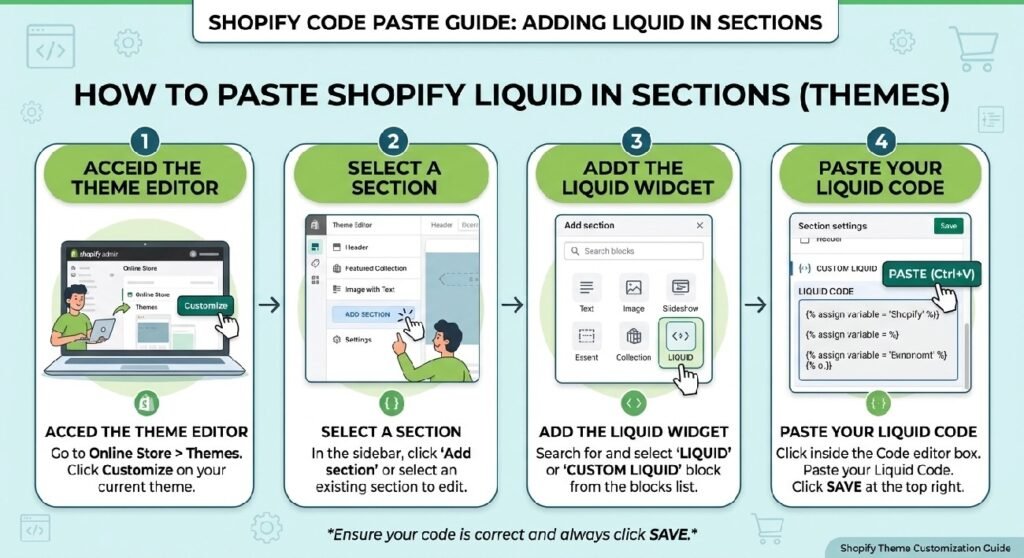
The supplied code does not contain a Shopify {% schema %} block, so it is not yet a fully configurable Online Store 2.0 section.
The easiest setup is through a Custom Liquid block:
- Open Shopify Admin → Online Store → Themes.
- Duplicate the live theme before making changes.
- Open Customize.
- Select the page or product template where you want the trust strip.
- Add a Custom Liquid block.
- Paste the code.
- Save and preview it on desktop and mobile.
If you want to manage it as a reusable theme file, you could save it as premium-compact-trust-section.liquid inside the Snippets folder, or convert it into a proper Section with schema settings and editable blocks.
The section works especially well near a product purchase area, below a hero, or between product information and reviews.
How This Shopify Code Works
The first layer is .shyd-social-proof, a black gradient card that displays 10,000+ Happy Customers alongside a small Live badge.
The green dot inside that badge uses a pulsing box-shadow animation.
The second part is .shyd-trust-bar. Inside it, .shyd-marquee contains several trust messages. The entire track moves from translateX(0) to translateX(-50%) over 28 seconds.
The content is duplicated once in the markup. As the first half moves away, the matching duplicate follows it, creating the appearance of a continuous loop.
The marquee pauses when a visitor hovers over it.
There is no JavaScript, no Liquid data lookup, and no API call.
Shopify Liquid Code
<style>
/* ================================
   Premium Compact Trust Section
================================ */

.Bg-review{
    width:100%;
    display:flex;
    flex-direction:column;
    gap:0;
    margin:0;
    padding:0;
}

/* ================================
   Happy Customers
================================ */

.shyd-social-proof{
    position:relative;
    display:flex;
    align-items:center;
    justify-content:space-between;
    gap:10px;
    width:100%;
    padding:6px 12px;
    margin:0;
    background:linear-gradient(135deg,#000000,#2f2f2f);
    border:1px solid rgba(255,255,255,.08);
    border-radius:12px 12px 0 0;
    overflow:hidden;
    transition:.3s ease;
}

.shyd-social-proof:hover{
    transform:translateY(-1px);
    box-shadow:0 8px 18px rgba(0,0,0,.25);
}

.shyd-social-proof::before{
    content:"";
    position:absolute;
    top:0;
    left:-120%;
    width:40%;
    height:100%;
    background:linear-gradient(
        120deg,
        transparent,
        rgba(255,255,255,.18),
        transparent
    );
    animation:shine 4s linear infinite;
}

@keyframes shine{
    100%{
        left:150%;
    }
}

.proof-content{
    flex:1;
}

.proof-title{
    font-size:14px;
    font-weight:700;
    color:#ffffff;
    line-height:1.2;
}

.proof-title strong{
    color:#22c55e;
}

.live-badge{
    display:flex;
    align-items:center;
    gap:5px;
    padding:3px 8px;
    border-radius:999px;
    background:rgba(255,255,255,.08);
    border:1px solid rgba(255,255,255,.12);
    color:#fff;
    font-size:10px;
    font-weight:600;
}

.live-dot{
    width:6px;
    height:6px;
    border-radius:50%;
    background:#22c55e;
    animation:livePulse 1.8s infinite;
}

@keyframes livePulse{

0%{
    box-shadow:0 0 0 0 rgba(34,197,94,.7);
}

70%{
    box-shadow:0 0 0 6px rgba(34,197,94,0);
}

100%{
    box-shadow:0 0 0 0 rgba(34,197,94,0);
}

}

/* ================================
   Trust Marquee
================================ */

.shyd-trust-bar{
    width:100%;
    overflow:hidden;
    background:transparent;
    border:1px solid rgba(255,255,255,.08);
    border-top:none;
    border-radius:0 0 12px 12px;
    padding:6px 0;
    margin:0;
    position:relative;
}

.shyd-trust-bar::before,
.shyd-trust-bar::after{
    content:"";
    position:absolute;
    top:0;
    width:30px;
    height:100%;
    z-index:2;
    pointer-events:none;
}

.shyd-trust-bar::before{
    left:0;
    background:linear-gradient(to right,#000,transparent);
}

.shyd-trust-bar::after{
    right:0;
    background:linear-gradient(to left,#000,transparent);
}

.shyd-marquee{
    display:flex;
    width:max-content;
    animation:trust-scroll 28s linear infinite;
}

.shyd-trust-bar:hover .shyd-marquee{
    animation-play-state:paused;
}

.shyd-item{
    display:flex;
    align-items:center;
    gap:8px;
    margin-right:28px;
    color:#000
;
    font-size:13px;
    font-weight:600;
    white-space:nowrap;
}

.shyd-item strong{
    color:#22c55e;
}

.shyd-dot{
    width:6px;
    height:6px;
    background:#22c55e;
    border-radius:50%;
    box-shadow:0 0 6px rgba(34,197,94,.5);
    flex-shrink:0;
}

@keyframes trust-scroll{
    from{
        transform:translateX(0);
    }
    to{
        transform:translateX(-50%);
    }
}

/* ================================
   Mobile
================================ */

@media(max-width:768px){

.shyd-social-proof{
    padding:5px 10px;
    gap:8px;
}

.proof-title{
    font-size:13px;
}

.live-badge{
    font-size:9px;
    padding:3px 7px;
}

.live-dot{
    width:5px;
    height:5px;
}

.shyd-trust-bar{
    padding:5px 0;
}

.shyd-item{
    font-size:12px;
    margin-right:22px;
    gap:6px;
}

.shyd-dot{
    width:5px;
    height:5px;
}

}
</style>

<div class="Bg-review">

    <div class="shyd-social-proof">

        <div class="proof-content">
            <div class="proof-title">
                <strong>10,000+</strong> Happy Customers
            </div>
        </div>

        <div class="live-badge">
            <span class="live-dot"></span>
            Live
        </div>

    </div>

    <div class="shyd-trust-bar">

        <div class="shyd-marquee">

            <div class="shyd-item"><span class="shyd-dot"></span>Last 30 Days Orders: <strong>3,541</strong></div>

            <div class="shyd-item"><span class="shyd-dot"></span>Total Buyers: <strong>11K+</strong></div>

            <div class="shyd-item"><span class="shyd-dot"></span>5,000+ Verified Reviews</div>

            <div class="shyd-item"><span class="shyd-dot"></span>Best Selling Product</div>

            <div class="shyd-item"><span class="shyd-dot"></span>10,000+ Happy Customers</div>

            <div class="shyd-item"><span class="shyd-dot"></span>80K+ Daily Visitors</div>

            <!-- Duplicate for seamless scrolling -->

            <div class="shyd-item"><span class="shyd-dot"></span>Last 30 Days Orders: <strong>3,541</strong></div>

            <div class="shyd-item"><span class="shyd-dot"></span>Total Buyers: <strong>11K+</strong></div>

            <div class="shyd-item"><span class="shyd-dot"></span>5,000+ Verified Reviews</div>

            <div class="shyd-item"><span class="shyd-dot"></span>Best Selling Product</div>

            <div class="shyd-item"><span class="shyd-dot"></span>10,000+ Happy Customers</div>

            <div class="shyd-item"><span class="shyd-dot"></span>80K+ Daily Visitors</div>

        </div>

    </div>

</div>
The Main Issue: None of the Trust Metrics Are Dynamic
The design looks data-driven, but the numbers are plain text.
The code includes:
10,000+ Happy Customers
Last 30 Days Orders: 3,541
Total Buyers: 11K+
5,000+ Verified Reviews
Best Selling Product
80K+ Daily Visitors
Those values are not calculated.
If the section is copied into a new Shopify store, it will still show the exact same figures.
1. Replace Hard-Coded Numbers With Real Figures
A trust section only helps when the trust signals are true.
If your store has 730 customers, do not display 10,000+ Happy Customers because the number looks more impressive.
Likewise, 3,541 orders in the last 30 days should only appear if that is genuinely what happened during the stated period.
Use a metric only when you can explain where it came from. Real review counts, completed-order totals, genuine customer counts, or actual product-sales rankings are all valid sources when used accurately.
If you cannot maintain a number reliably, use stable wording such as Tracked Delivery, Easy Returns, Secure Checkout, or Customer Support when those statements are true.
2. The “Live” Badge Is Not Actually Live
The green dot pulses, but the section is not connected to current visitors, orders, analytics, or review events.
The word Live is simply written into the HTML.
If the component remains static, replace the label with something more accurate such as Store Stats, Trusted by Customers, or Why Shoppers Choose Us.
A pulsing indicator should not imply a live feed when there is none.
3. “Last 30 Days Orders” Needs Ongoing Maintenance
This claim includes a rolling time window.
Even if 3,541 is correct today, it will become outdated as the next 30-day period changes.
If you want a truly rolling figure, it should come from real data. Otherwise, remove the time-based wording and use a stable metric that you can keep accurate.
4. Be Careful With “Verified Reviews”
5,000+ Verified Reviews makes two claims: the count and the verification status.
The snippet verifies neither.
If a real review platform confirms verified-purchase status and supplies the count, then it can be a useful trust signal. Otherwise, remove the verification wording.
This section can pair naturally with Shopify Live Review Widget Liquid but review counts and verification labels should always come from real review data.
5. “Best Selling Product” Should Match the Product Context
If this section appears on every product template, Best Selling Product will appear on every item.
That cannot be true across the catalog.
Use the label only on an actual best seller, or replace it with a neutral product message.
6. Add Reduced-Motion Support
There are three animated effects:
- the shine sweeping across the top card
- the pulsing green dot
- the continuously moving marquee
The marquee pauses on hover, which is useful.
The missing piece is a prefers-reduced-motion rule.
For visitors who request reduced motion, stop the marquee, disable the shine, and turn the pulse into a static dot.
That keeps the content available without forcing constant movement.
7. Fix the Trust Bar Background and Edge Fade Together
The top card uses a black gradient.
The trust bar below it uses background: transparent, but the left and right fade overlays start from solid black.
That can look correct on a dark background and awkward on a light one.
The trust-item text is also black, so the result depends heavily on the theme behind the component.
Use an explicit trust-bar background and make the fade overlays match it. That will make the design more predictable across themes.
The CSS Is Mostly Self-Contained
The class names are specific enough to reduce collisions:
.shyd-social-proof
.shyd-trust-bar
.shyd-marquee
.shyd-item
There are no broad body or p selectors changing unrelated parts of the store.
That is a good foundation for Custom Liquid.
Why the Duplicate Marquee Content Is Necessary
The trust sequence appears twice.
That is intentional.
The animation moves the track exactly halfway with translateX(-50%). Because both halves are identical, the animation can restart without an obvious jump.
If you edit one half but forget the duplicate, the loop can look uneven.
A future Shopify-section version could generate both copies from one set of Liquid blocks so merchants only edit each message once.
This Could Be a Proper Shopify Section
Right now, every message is hard-coded.
A better reusable version would expose settings for:
- heading
- top metric
- badge label
- accent color
- trust messages
- marquee speed
- pause-on-hover
- background color
Each trust item could become a Shopify block.
That would make the component much easier to maintain from Theme Customize.
Compact Trust Section vs. Statistics Counter
The Statistics Counter Liquid is a better choice when numbers are the main point.
This compact marquee is better when the metrics are secondary and you want to keep the page visually tight.
If one statistic is especially important, give it enough space instead of hiding it in a fast-moving ticker.
Compact Trust Section vs. Social Proof Popup
The Shopify Social Proof Popup Liquid presents social proof as temporary notifications.
This trust strip keeps the information in a fixed section of the page.
That can feel calmer and less intrusive.
The same rule applies to both: only display proof you can support.
Mobile Behavior
At widths below 768px, the snippet reduces padding, heading size, badge size, trust-item font size, spacing, and dot size.
That is sensible.
The marquee remains a single scrolling row rather than wrapping.
Test it with your longest real message because long phrases can pass too quickly on narrow screens.
Frequently Asked Questions
Does this section use real Shopify order data?
No. All metrics are hard-coded.
Is the “Live” badge connected to live traffic?
No. It is only a CSS animation.
Does the marquee need JavaScript?
No. It uses CSS keyframes.
Why are the trust messages duplicated?
The duplicate sequence creates the continuous loop.
Can I use this on product pages?
Yes, but product-specific claims such as Best Selling Product should only appear where they are accurate.
Does it respect reduced-motion settings?
Not in the supplied version. Adding reduced-motion support is recommended.
Explore More Shopify Code
Shopify Live Review Widget Liquid
A Shopify Live Review Widget Liquid can make a product page feel more active by showing customer-style comments in a rotating chat bubble.
Shopify Scrolling Marquee Liquid
A Shopify Scrolling Marquee Liquid section is a good fit when you want to add movement to a storefront without bringing in a slider library or extra JavaScript.
One Response