
A Shopify Free Shipping Notice Liquid block provides the consumers with a fast reminder of the days on which they can get free shipping or free returns.
This is a short piece of code that displays an icon as an “inline” SVG and this message: Free Shipping & Returns: For orders over 2,999 PKR. It is designed to be a lightweight version.
It’s just coded into the HTML, so that all visitors are presented with the same message.
Who knows, on the product page it might have a nice effect but only if the language is identical to what is actually being shipped/received by the store.
Where to Paste This Shopify Code
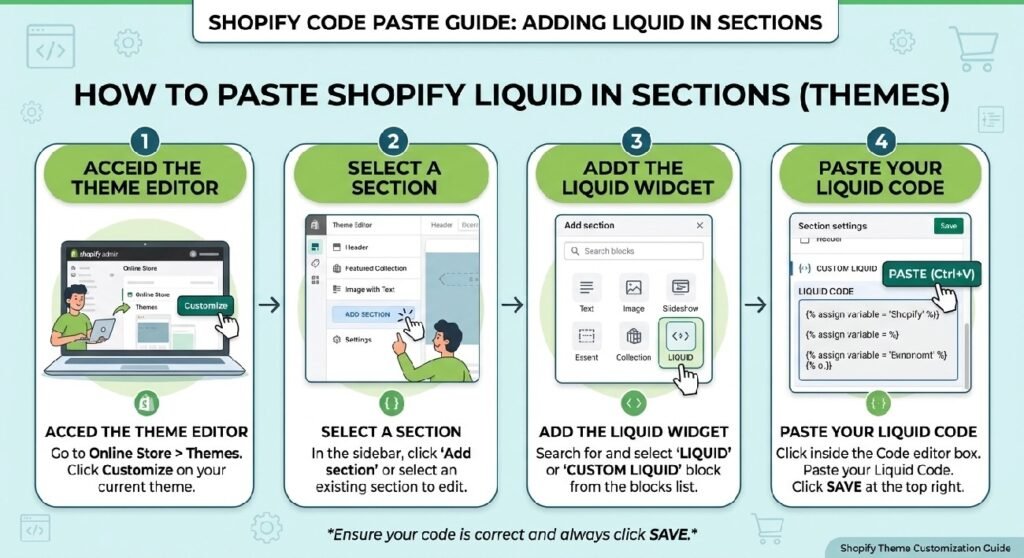
This snippet fits best on a Shopify product page, close to the price, Add to Cart button, bundle selector, or delivery information.
A simple setup is:
- Open Shopify Admin → Online Store → Themes.
- Duplicate the live theme before editing.
- Open Customize on the product template.
- Add a Custom Liquid block.
- Paste the snippet.
- Position it near the purchase area.
- Save and test on desktop and mobile.
You can also save it as free-shipping-notice.liquid.
That filename is more accurate than “policy” because this block is a short shipping notice rather than a complete Shipping Policy page.
How Shopify Free Shipping Notice Liquid Works
The code uses a wrapper class called .shyd-shipping-note.
That wrapper becomes a horizontal flex container with a light background, subtle border, rounded corners, and compact spacing.
The SVG icon appears on the left.
The text appears on the right:
Free Shipping & Returns:
On orders above 2,999 PKR
The bold wording gets a darker color and heavier font weight.
Below 480px, the block slightly reduces its padding, gap, icon dimensions, and text size.
There is no JavaScript because the snippet does not need interaction.
Shopify Liquid Code
<style>
  .shyd-shipping-note {
    display: flex;
    align-items: center;
    gap: 10px;
    background: #fafafa;
    border: 1px solid #e6e7eb;
    border-radius: 14px;
    padding: 10px 14px;
    margin: 14px 0;
    font-family: Arial, sans-serif;
  }
  .shyd-shipping-note svg {
    width: 24px;
    height: 18px;
    flex-shrink: 0;
    color: #1f7a4d;
  }
  .shyd-shipping-note .shipping-text {
    font-size: 12.5px;
    line-height: 1.5;
    color: #3a3a3c;
  }
  .shyd-shipping-note .shipping-text strong {
    color: #16181d;
    font-weight: 700;
  }
  @media (max-width: 480px) {
    .shyd-shipping-note { padding: 9px 12px; gap: 8px; }
    .shyd-shipping-note svg { width: 20px; height: 16px; }
    .shyd-shipping-note .shipping-text { font-size: 11.5px; }
  }
</style>
<p class="shyd-shipping-note">
  <svg xmlns="http://www.w3.org/2000/svg" width="27.969" height="21.5" viewbox="0 0 27.969 21.5">
    <g transform="translate(-1025.238 -1129.238)">
      <rect width="26.469" height="20" rx="3" transform="translate(1025.988 1129.988)" fill="none" stroke="currentColor" stroke-linecap="round" stroke-width="1.5"></rect>
      <line x2="26.469" transform="translate(1025.988 1134.55)" fill="none" stroke="currentColor" stroke-linecap="round" stroke-width="1.5"></line>
      <line x2="12.4" transform="translate(1031.041 1138.374)" fill="none" stroke="currentColor" stroke-linecap="round" stroke-width="1.5"></line>
      <line x2="16.364" transform="translate(1031.041 1142.115)" fill="none" stroke="currentColor" stroke-linecap="round" stroke-width="1.5"></line>
      <line x2="13.721" transform="translate(1031.041 1145.855)" fill="none" stroke="currentColor" stroke-linecap="round" stroke-width="1.5"></line>
    </g>
  </svg>
  <span class="shipping-text"><strong>Free Shipping & Returns:</strong> On orders above 2,999 PKR</span>
</p>
The Biggest Limitation: The Threshold Is Static
The code does not check:
cart.total_price
It does not know how much the customer has already added to the cart.
It also does not know whether the current product qualifies for the store’s shipping rules.
So a customer with 500 PKR in the cart sees exactly the same message as someone with 5,000 PKR in the cart.
That is fine if the goal is simply to communicate the policy.
It is not the same as a dynamic free-shipping progress bar.
7 Smart Setup Tips
1. Verify the 2,999 PKR threshold
The most important part of the block is the threshold itself.
If Shopify is configured to offer free shipping at 3,500 PKR while the product page says 2,999 PKR, the customer can reach checkout and see a different result.
That kind of mismatch damages trust quickly.
Before publishing, confirm that the visible threshold matches the real free-shipping rule configured in Shopify.
If the shipping rule changes later, remember to update this static message as well.
2. Check the wording around “above”
The snippet says:
On orders above 2,999 PKR
Technically, “above” means the total must be greater than 2,999.
If the real rule starts at exactly 2,999 PKR, clearer wording could be:
Free shipping on orders of 2,999 PKR or more
Small wording details matter when customers are trying to work out whether they qualify.
3. Verify the “Free Returns” claim separately
The message combines two promises:
Free Shipping & Returns
Those are not automatically the same policy.
A store may offer free shipping over a certain order value but still require customers to pay return shipping.
If returns are not genuinely free, change the message to:
Free Shipping: On orders above 2,999 PKR
Then place return details elsewhere, such as [INTERNAL LINK NEEDED: Product Tabs Section Liquid] or a dedicated Returns Policy page.
4. Keep the currency relevant
The threshold is hard-coded in PKR.
That is fine for a single-currency store using Pakistani rupees.
It becomes less accurate if the storefront supports other currencies through Shopify Markets.
This snippet does not detect the active customer currency or market.
For a multi-currency store, a dynamic version would be more appropriate.
5. Do not present it as a cart-aware shipping tool
This block does not know:
- cart total
- shipping zone
- customer location
- selected delivery method
- product weight
- excluded products
- whether the shopper already qualifies
That is not a problem as long as the article explains it clearly.
A small static message can be exactly what a product page needs.
6. Pair it with estimated delivery information
This snippet answers:
When is shipping free?
It does not answer:
When will the order arrive?
That is better handled by [INTERNAL LINK NEEDED: Shopify Estimated Delivery Section].
Using two compact components can be clearer than trying to put every shipping detail inside one box.
7. Upgrade to a progress bar only when you need it
A future dynamic version could show:
Add 499 PKR more for free shipping
then switch to:
You’ve unlocked free shipping
once the cart crosses the threshold.
That requires cart-aware logic.
For a simple product-page reminder, the static version is easier to maintain and less likely to conflict with theme scripts.
The Styling Is Nicely Scoped
The CSS is limited to:
.shyd-shipping-note
and its children.
There is no global body styling, no universal selector, and no :root block affecting the rest of the theme.
That makes this snippet safer than many standalone demos that include broad CSS rules.
For a Custom Liquid block, scoped selectors are exactly what you want.
The SVG Keeps the Block Lightweight
The icon is embedded directly in the HTML.
That means the component does not need:
- Font Awesome
- an external icon library
- an image file
- JavaScript
It inherits the green accent color through currentColor.
The icon is fairly neutral, so you could replace it later with a delivery-truck or parcel icon if you want the meaning to be more obvious.
The Mobile Treatment Is Sensible
Below 480px, the snippet reduces spacing and font size.
That keeps the message compact on smaller phones.
Because the notice contains only one short sentence, there is no need for a more complicated responsive layout.
Free Shipping Notice vs. Delivery Info Box
You already have [INTERNAL LINK NEEDED: Shopify Delivery Info Box].
If that post uses the same “Free Shipping & Returns: On orders above 2,999 PKR” message, avoid placing both blocks on the same product page.
Use whichever design is clearer.
For the code library, you can position this tutorial as the minimal one-line version and the Delivery Info Box as the more detailed option.
Pairing It With Shopify Bundle Selector Liquid
The [INTERNAL LINK NEEDED: Shopify Bundle Selector Liquid] can work naturally beside this block.
For example, if a single item costs less than the free-shipping threshold but a two-pack crosses it, the shipping message gives shoppers useful context while choosing a bundle.
Just make sure the bundle pricing and shipping rule are both real at checkout.
Keep the Full Shipping Policy Somewhere Else
This component should stay short.
Do not turn it into a long explanation covering couriers, delivery zones, returns, remote areas, international shipping, and dispatch times.
Use a dedicated policy page or [INTERNAL LINK NEEDED: Product Tabs Section Liquid] for those details.
The notice should communicate one important rule quickly.
FAQ
Does this code calculate the cart total?
No. The 2,999 PKR threshold is static text.
Does it automatically apply free shipping?
No. The actual free-shipping rate must be configured separately in Shopify.
Is this a free-shipping progress bar?
No. There is no progress calculation or JavaScript.
Can I change the threshold?
Yes. Edit the text directly, but make sure it matches the real Shopify shipping rule.
Does it support multiple currencies?
Not dynamically. PKR is hard-coded.
Is it mobile responsive?
Yes. The CSS includes a mobile rule below 480px.
Should I keep “Free Returns”?
Only if the store genuinely offers free returns under the conditions suggested by the message.
Explore More Shopify Code
- Shopify Social Proof Popup Liquid
A Shopify Social Proof Popup Liquid can create a small floating notification that appears near the bottom of the screen and rotates through recent activity messages.https://css-liquids-for-shopify.site/shopify-social-proof-popup-liquid/ - Shopify Product Benefits Liquid
A Shopify Product Benefits Liquid block is a simple way to show the reasons someone may like a product without forcing them to read a long description.https://css-liquids-for-shopify.site/shopify-product-benefits-liquid/
For more help, you can read Shopify’s official theme customization guide :Shopify Theme Customization Guide
For Shopify’s Liquid section you can visit over Shopify Liquid Code Library: https://css-liquids-for-shopify.site/shopify-liquid-code-library/
One Response