
A Pricing Table Section Liquid is useful when a Shopify store sells services, memberships, subscriptions, packages, or products that need side-by-side comparison. Instead of making visitors jump between separate pages, a pricing table puts the important differences in one place: plan name, price, included features, and the next action.
The supplied design uses three pricing cards: Basic, Premium, and Business. The Premium plan is visually highlighted with a Most Popular badge, while each card includes its own monthly price, feature list, and CTA button. The pricing grid is also responsive, switching from three columns on desktop to fewer columns as the screen becomes narrower.
There is one important detail to deal with before turning this into a Shopify snippet: the uploaded code is actually a complete standalone landing page, not just a pricing section. It contains a hero, features area, pricing table, statistics, CTA, and footer, along with full <html>, <head>, and <body> markup.
Where to Paste This Shopify Code
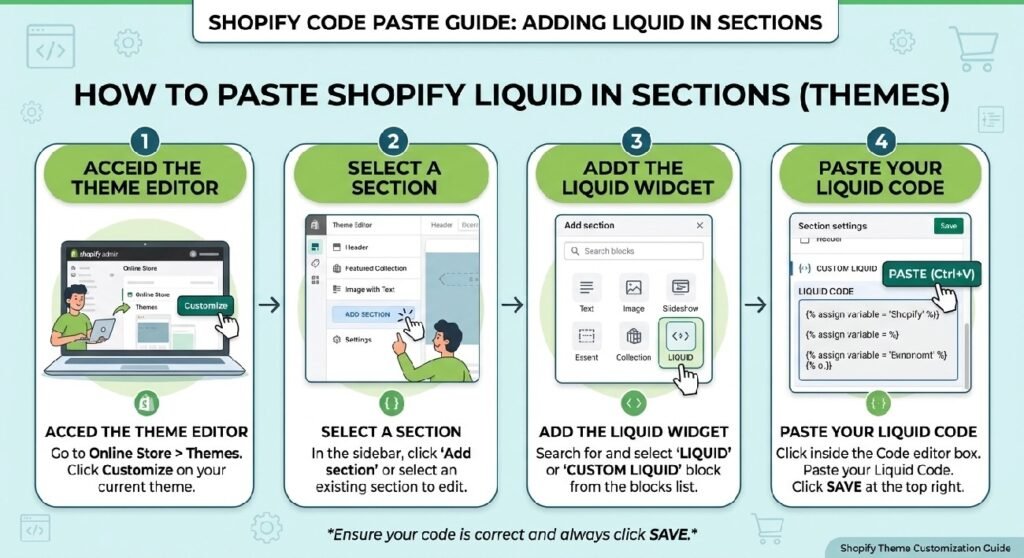
If your goal is a reusable Shopify pricing component, I would save it as:
pricing-table-section.liquid
Inside Shopify Admin:
- Go to Online Store → Themes.
- Duplicate the theme you plan to edit.
- Open Edit code.
- Open the Sections folder.
- Create a new section called
pricing-table-section.liquid. - Paste only the pricing-related HTML and scoped CSS into that file.
- Save your changes.
Do not paste the full standalone document into a Shopify section without cleaning it first.
Remove the document-level elements such as:
<!DOCTYPE html><html><head><meta><title><body><footer>
The pricing component itself starts around the pricing section markup and ends before the stats section.
How Pricing Table Section Liquid Works
The pricing area uses CSS Grid.
The main grid is defined as:
grid-template-columns: repeat(3, 1fr);
That gives the Basic, Premium, and Business cards equal width on larger screens.
Each .pricing-card has a white background, light border, 8px rounded corners, padding, and a hover effect. When someone moves over a card, it rises four pixels and receives a stronger box shadow.
The Premium card receives an additional featured class. That class gives it a stronger border, darker feature checkboxes, a filled CTA button, and the Most Popular badge.
On smaller screens, the pricing grid eventually changes to a single column, which keeps each plan readable on mobile.
Shopify Liquid Code
<!DOCTYPE html>
<html lang="en">
<head>
  <meta charset="UTF-8">
  <meta name="viewport" content="width=device-width, initial-scale=1.0">
  <title>Modron Design - Complete Page</title>
  <style>
    * {
      margin: 0;
      padding: 0;
      box-sizing: border-box;
    }

    body {
      font-family: -apple-system, BlinkMacSystemFont, 'Segoe UI', 'Roboto', sans-serif;
      background: #fafafa;
      color: #1a1a1a;
      line-height: 1.6;
    }

    .container {
      max-width: 1200px;
      margin: 0 auto;
      padding: 0 2rem;
    }

    /* HERO SECTION */
    .hero {
      padding: 6rem 2rem;
      text-align: center;
      background: linear-gradient(135deg, #fafafa 0%, #f5f5f5 100%);
    }

    .hero h1 {
      font-size: 48px;
      font-weight: 600;
      margin-bottom: 1rem;
      letter-spacing: -1px;
      line-height: 1.2;
    }

    .hero p {
      font-size: 18px;
      color: #666;
      max-width: 600px;
      margin: 0 auto 2rem;
      line-height: 1.8;
    }

    .hero-buttons {
      display: flex;
      gap: 1rem;
      justify-content: center;
      margin-top: 2.5rem;
    }

    .btn {
      padding: 12px 28px;
      border-radius: 6px;
      font-size: 14px;
      font-weight: 600;
      cursor: pointer;
      transition: all 0.3s ease;
      text-decoration: none;
      display: inline-flex;
      align-items: center;
      gap: 0.5rem;
      border: none;
    }

    .btn-primary {
      background: #1a1a1a;
      color: #fff;
    }

    .btn-primary:hover {
      background: #333;
    }

    .btn-secondary {
      background: transparent;
      color: #1a1a1a;
      border: 1px solid #1a1a1a;
    }

    .btn-secondary:hover {
      background: #1a1a1a;
      color: #fff;
    }

    /* FEATURES SECTION */
    .features {
      padding: 5rem 2rem;
    }

    .section-header {
      text-align: center;
      margin-bottom: 4rem;
    }

    .section-header h2 {
      font-size: 32px;
      font-weight: 500;
      margin-bottom: 1rem;
      letter-spacing: -0.6px;
    }

    .section-header p {
      font-size: 16px;
      color: #666;
      max-width: 500px;
      margin: 0 auto;
    }

    .features-grid {
      display: grid;
      grid-template-columns: repeat(3, 1fr);
      gap: 2rem;
    }

    .feature-card {
      background: #fff;
      border: 1px solid #e5e5e5;
      border-radius: 8px;
      padding: 2rem;
      transition: all 0.3s ease;
    }

    .feature-card:hover {
      border-color: #d0d0d0;
      transform: translateY(-4px);
    }

    .feature-icon {
      width: 48px;
      height: 48px;
      background: #f0f0f0;
      border-radius: 6px;
      display: flex;
      align-items: center;
      justify-content: center;
      font-size: 24px;
      margin-bottom: 1rem;
    }

    .feature-card h3 {
      font-size: 16px;
      font-weight: 600;
      margin-bottom: 0.75rem;
      color: #1a1a1a;
    }

    .feature-card p {
      font-size: 14px;
      color: #666;
      line-height: 1.7;
    }

    /* PRICING SECTION */
    .pricing {
      padding: 5rem 2rem;
      background: #fff;
    }

    .pricing-grid {
      display: grid;
      grid-template-columns: repeat(3, 1fr);
      gap: 2rem;
      margin-bottom: 3rem;
    }

    .pricing-card {
      background: #fff;
      border: 1px solid #e5e5e5;
      border-radius: 8px;
      padding: 2rem;
      transition: all 0.3s ease;
      position: relative;
    }

    .pricing-card:hover {
      border-color: #d0d0d0;
      transform: translateY(-4px);
      box-shadow: 0 8px 24px rgba(0, 0, 0, 0.08);
    }

    .pricing-card.featured {
      border: 2px solid #1a1a1a;
    }

    .badge {
      position: absolute;
      top: -12px;
      left: 2rem;
      background: #1a1a1a;
      color: #fff;
      padding: 4px 12px;
      border-radius: 4px;
      font-size: 11px;
      font-weight: 600;
      letter-spacing: 0.5px;
      text-transform: uppercase;
    }

    .plan-name {
      font-size: 18px;
      font-weight: 600;
      color: #1a1a1a;
      margin-top: 0.5rem;
      margin-bottom: 0.5rem;
    }

    .plan-description {
      font-size: 13px;
      color: #888;
      margin-bottom: 1.5rem;
    }

    .price-section {
      margin-bottom: 1.5rem;
      padding-bottom: 1.5rem;
      border-bottom: 1px solid #f0f0f0;
    }

    .price {
      font-size: 28px;
      font-weight: 600;
      color: #1a1a1a;
      display: flex;
      align-items: baseline;
      gap: 0.25rem;
    }

    .price-currency {
      font-size: 20px;
      font-weight: 400;
      color: #666;
    }

    .price-period {
      font-size: 13px;
      color: #999;
      font-weight: 400;
      margin-left: auto;
    }

    .features-list {
      list-style: none;
      margin-bottom: 2rem;
    }

    .features-list li {
      font-size: 14px;
      color: #555;
      padding: 0.75rem 0;
      display: flex;
      align-items: center;
      gap: 10px;
      border-bottom: 1px solid #f5f5f5;
    }

    .features-list li:last-child {
      border-bottom: none;
    }

    .feature-check {
      width: 18px;
      height: 18px;
      background: #f0f0f0;
      border-radius: 3px;
      display: flex;
      align-items: center;
      justify-content: center;
      font-size: 12px;
      color: #1a1a1a;
      font-weight: 600;
      flex-shrink: 0;
    }

    .pricing-card.featured .feature-check {
      background: #1a1a1a;
      color: #fff;
    }

    .cta-button {
      width: 100%;
      padding: 12px 0;
      border: 1px solid #1a1a1a;
      background: transparent;
      color: #1a1a1a;
      font-size: 14px;
      font-weight: 600;
      border-radius: 6px;
      cursor: pointer;
      transition: all 0.3s ease;
    }

    .pricing-card.featured .cta-button {
      background: #1a1a1a;
      color: #fff;
    }

    .cta-button:hover {
      background: #1a1a1a;
      color: #fff;
    }

    /* STATS SECTION */
    .stats {
      padding: 5rem 2rem;
      background: #1a1a1a;
      color: #fff;
    }

    .stats-grid {
      display: grid;
      grid-template-columns: repeat(4, 1fr);
      gap: 2rem;
      text-align: center;
    }

    .stat {
      padding: 2rem;
    }

    .stat-number {
      font-size: 36px;
      font-weight: 600;
      margin-bottom: 0.5rem;
    }

    .stat-label {
      font-size: 14px;
      color: #ccc;
    }

    /* CTA SECTION */
    .cta-section {
      padding: 4rem 2rem;
      text-align: center;
    }

    .cta-section h2 {
      font-size: 32px;
      font-weight: 500;
      margin-bottom: 1rem;
      letter-spacing: -0.6px;
    }

    .cta-section p {
      font-size: 16px;
      color: #666;
      margin-bottom: 2rem;
      max-width: 500px;
      margin-left: auto;
      margin-right: auto;
    }

    /* FOOTER */
    .footer {
      background: #1a1a1a;
      color: #ccc;
      padding: 3rem 2rem;
      border-top: 1px solid #333;
    }

    .footer-content {
      display: grid;
      grid-template-columns: repeat(4, 1fr);
      gap: 2rem;
      margin-bottom: 2rem;
      max-width: 1200px;
      margin-left: auto;
      margin-right: auto;
    }

    .footer-col h4 {
      color: #fff;
      font-size: 14px;
      font-weight: 600;
      margin-bottom: 1rem;
    }

    .footer-col a {
      display: block;
      color: #999;
      text-decoration: none;
      font-size: 13px;
      margin-bottom: 0.5rem;
      transition: color 0.2s ease;
    }

    .footer-col a:hover {
      color: #fff;
    }

    .footer-bottom {
      text-align: center;
      padding-top: 2rem;
      border-top: 1px solid #333;
      font-size: 13px;
      color: #999;
      max-width: 1200px;
      margin: 0 auto;
    }

    @media (max-width: 1024px) {
      .features-grid,
      .pricing-grid,
      .stats-grid {
        grid-template-columns: repeat(2, 1fr);
      }

      .footer-content {
        grid-template-columns: repeat(2, 1fr);
      }
    }

    @media (max-width: 768px) {
      .hero h1 {
        font-size: 32px;
      }

      .hero-buttons {
        flex-direction: column;
        align-items: center;
      }

      .features-grid,
      .pricing-grid,
      .stats-grid {
        grid-template-columns: 1fr;
      }

      .footer-content {
        grid-template-columns: 1fr;
      }

      .section-header h2 {
        font-size: 24px;
      }

      .badge {
        left: 2rem;
      }
    }
  </style>
</head>
<body>
  <!-- HERO SECTION -->
  <section class="hero">
    <div class="container">
      <h1>Build amazing things</h1>
      <p>A modern platform designed for teams who want to work smarter. Clean, minimal, and built to scale.</p>
      <div class="hero-buttons">
        <button class="btn btn-primary">Start free trial</button>
        <button class="btn btn-secondary">View demo</button>
      </div>
    </div>
  </section>

  <!-- FEATURES SECTION -->
  <section class="features">
    <div class="container">
      <div class="section-header">
        <h2>Powerful features</h2>
        <p>Everything you need to succeed in one intuitive platform</p>
      </div>

      <div class="features-grid">
        <div class="feature-card">
          <div class="feature-icon">⚡</div>
          <h3>Lightning fast</h3>
          <p>Optimized performance that keeps your team productive. No slowdowns, no compromises.</p>
        </div>

        <div class="feature-card">
          <div class="feature-icon">🔒</div>
          <h3>Secure & reliable</h3>
          <p>Enterprise-grade security with 99.9% uptime guarantee. Your data is always protected.</p>
        </div>

        <div class="feature-card">
          <div class="feature-icon">🤝</div>
          <h3>Built for teams</h3>
          <p>Seamless collaboration tools that bring your team together. Work together, win together.</p>
        </div>

        <div class="feature-card">
          <div class="feature-icon">📊</div>
          <h3>Deep analytics</h3>
          <p>Comprehensive insights that help you make better decisions. Data you can act on.</p>
        </div>

        <div class="feature-card">
          <div class="feature-icon">🔌</div>
          <h3>Integrations</h3>
          <p>Connect with your favorite tools. Seamless workflows that actually work.</p>
        </div>

        <div class="feature-card">
          <div class="feature-icon">🌍</div>
          <h3>Global scale</h3>
          <p>Deploy worldwide with confidence. Serve your customers everywhere.</p>
        </div>
      </div>
    </div>
  </section>

  <!-- PRICING SECTION -->
  <section class="pricing">
    <div class="container">
      <div class="section-header">
        <h2>Simple, transparent pricing</h2>
        <p>Choose the plan that works best for your needs</p>
      </div>

      <div class="pricing-grid">
        <!-- Basic -->
        <div class="pricing-card">
          <h3 class="plan-name">Basic</h3>
          <p class="plan-description">Perfect for getting started</p>

          <div class="price-section">
            <div class="price">
              <span class="price-currency">Rs.</span>
              <span>9,999</span>
              <span class="price-period">/ month</span>
            </div>
          </div>

          <ul class="features-list">
            <li>
              <div class="feature-check">✓</div>
              <span>Up to 5 projects</span>
            </li>
            <li>
              <div class="feature-check">✓</div>
              <span>Basic analytics</span>
            </li>
            <li>
              <div class="feature-check">✓</div>
              <span>Email support</span>
            </li>
            <li>
              <div class="feature-check">✓</div>
              <span>1 GB storage</span>
            </li>
          </ul>

          <button class="cta-button">Get started</button>
        </div>

        <!-- Premium -->
        <div class="pricing-card featured">
          <div class="badge">Most Popular</div>
          <h3 class="plan-name">Premium</h3>
          <p class="plan-description">Best for growing teams</p>

          <div class="price-section">
            <div class="price">
              <span class="price-currency">Rs.</span>
              <span>14,999</span>
              <span class="price-period">/ month</span>
            </div>
          </div>

          <ul class="features-list">
            <li>
              <div class="feature-check">✓</div>
              <span>Unlimited projects</span>
            </li>
            <li>
              <div class="feature-check">✓</div>
              <span>Advanced analytics</span>
            </li>
            <li>
              <div class="feature-check">✓</div>
              <span>Priority support</span>
            </li>
            <li>
              <div class="feature-check">✓</div>
              <span>50 GB storage</span>
            </li>
          </ul>

          <button class="cta-button">Get started</button>
        </div>

        <!-- Business -->
        <div class="pricing-card">
          <h3 class="plan-name">Business</h3>
          <p class="plan-description">For enterprises & large teams</p>

          <div class="price-section">
            <div class="price">
              <span class="price-currency">Rs.</span>
              <span>30,000</span>
              <span class="price-period">/ month</span>
            </div>
          </div>

          <ul class="features-list">
            <li>
              <div class="feature-check">✓</div>
              <span>Everything in Premium</span>
            </li>
            <li>
              <div class="feature-check">✓</div>
              <span>Custom integrations</span>
            </li>
            <li>
              <div class="feature-check">✓</div>
              <span>24/7 phone support</span>
            </li>
            <li>
              <div class="feature-check">✓</div>
              <span>Unlimited storage</span>
            </li>
          </ul>

          <button class="cta-button">Contact sales</button>
        </div>
      </div>
    </div>
  </section>

  <!-- STATS SECTION -->
  <section class="stats">
    <div class="container">
      <div class="stats-grid">
        <div class="stat">
          <div class="stat-number">10K+</div>
          <div class="stat-label">Happy customers</div>
        </div>
        <div class="stat">
          <div class="stat-number">99.9%</div>
          <div class="stat-label">Uptime guaranteed</div>
        </div>
        <div class="stat">
          <div class="stat-number">50+</div>
          <div class="stat-label">Integrations</div>
        </div>
        <div class="stat">
          <div class="stat-number">24/7</div>
          <div class="stat-label">Support ready</div>
        </div>
      </div>
    </div>
  </section>

  <!-- CTA SECTION -->
  <section class="cta-section">
    <div class="container">
      <h2>Ready to get started?</h2>
      <p>Join thousands of teams already using our platform to build amazing things.</p>
      <button class="btn btn-primary">Start your free trial</button>
    </div>
  </section>

  <!-- FOOTER -->
  <footer class="footer">
    <div class="footer-content">
      <div class="footer-col">
        <h4>Product</h4>
        <a href="#">Features</a>
        <a href="#">Pricing</a>
        <a href="#">Security</a>
        <a href="#">Roadmap</a>
      </div>
      <div class="footer-col">
        <h4>Company</h4>
        <a href="#">About</a>
        <a href="#">Blog</a>
        <a href="#">Careers</a>
        <a href="#">Press</a>
      </div>
      <div class="footer-col">
        <h4>Resources</h4>
        <a href="#">Docs</a>
        <a href="#">API</a>
        <a href="#">Help center</a>
        <a href="#">Community</a>
      </div>
      <div class="footer-col">
        <h4>Legal</h4>
        <a href="#">Privacy</a>
        <a href="#">Terms</a>
        <a href="#">Cookies</a>
        <a href="#">Compliance</a>
      </div>
    </div>
    <div class="footer-bottom">
      <p>© 2026 Modern Company. All rights reserved.</p>
    </div>
  </footer>
</body>
</html>
What Needs Fixing Before This Becomes a Real Shopify Section
The design is useful, but the current implementation is still static HTML and CSS.
There are no Liquid variables such as:
{{ product.title }}
There are no section settings.
There is no:
{% schema %}
block.
So even if you save this inside a .liquid file, Shopify merchants will not be able to change plans, prices, features, or buttons from the Theme Editor.
For a reusable version, those values should eventually become section settings and repeatable blocks.
1. Decide What the Pricing Table Is Actually Selling
The sample pricing is structured like SaaS or service packages.
It includes:
- Basic — Rs. 9,999/month
- Premium — Rs. 14,999/month
- Business — Rs. 30,000/month
Each plan has different limits and service levels.
That works well for:
- service packages
- maintenance plans
- consulting tiers
- subscriptions
- memberships
- digital-service bundles
It is less natural for a normal Shopify store selling individual physical products.
The section should match the business model rather than being added simply because pricing cards look professional.
2. Replace the Demo Prices With Real Offers
The prices in the code are hard-coded.
Changing a Shopify product price will not update this table.
If the Basic plan changes from Rs. 9,999 to Rs. 11,999, you would need to edit the markup unless you build a dynamic version.
That creates an obvious maintenance risk.
A customer should never see one price in the pricing table and another price later in checkout.
For a production store, either keep both systems carefully synchronized or connect the pricing section to real Shopify data.
3. Make the CTA Buttons Functional
The current cards use normal <button> elements.
Basic and Premium display:
Get started
Business displays:
Contact sales.
But the buttons are not inside forms and do not contain links.
Clicking them does not send the visitor to a product, cart, checkout, contact page, or booking flow.
That needs to change before publishing.
Depending on the offer, each CTA could point to:
- a Shopify product
- a service page
- a contact page
- a booking page
- a subscription product
- a dedicated checkout flow
The button text should also match the actual destination.
4. Be Careful With “Most Popular”
The Premium card contains a hard-coded:
Most Popular
badge.
That label should be genuine.
If Premium is not actually the plan customers choose most often, use something more neutral such as:
Recommended
or remove the badge entirely.
Even “Recommended” should have a reason behind it. Perhaps it has the best feature balance or suits the majority of your target customers.
Trust is easier to maintain when labels describe reality instead of trying to manufacture social proof.
5. Check Every Feature Claim
The demo plans contain claims such as:
Unlimited projects
Advanced analytics
Priority support
Custom integrations
24/7 phone support
Unlimited storage.
These should not remain as filler.
Each feature becomes part of the offer you are presenting to customers.
If you sell Shopify development packages, for example, the feature list could be rewritten around deliverables such as:
5 custom sections
Responsive design
Theme installation
30 days support
The pricing table becomes much stronger when every row helps the buyer compare something meaningful.
6. Keep the Featured Plan Visually Different
One design decision I would keep is the featured plan treatment.
Premium has:
- a stronger border
- a badge
- dark feature checkmarks
- a filled CTA
while the other plans are more understated.
That gives visitors a visual starting point without completely hiding the other options.
The important part is restraint.
If you add flashing labels, multiple badges, different colors, discounts, “best value,” countdown timers, and crossed-out prices all at once, the table starts feeling more like pressure than comparison.
One clear featured plan is usually enough.
7. Turn the Plans Into Shopify Blocks
This is the upgrade I would make first for a real theme.
Instead of writing three fixed cards directly into the HTML, make each pricing plan a Shopify block.
A merchant could then add or remove plans through the Theme Editor.
Each block could include:
- plan name
- description
- currency
- price
- billing period
- badge
- features
- CTA label
- CTA URL
- featured toggle
That would make the section useful across different Shopify stores without opening the code editor every time.
The Uploaded File Contains More Than a Pricing Table
This matters because the CSS is shared across an entire demo page.
The document also includes:
- a hero section
- six feature cards
- pricing
- statistics
- another CTA
- a four-column footer.
If your blog post is specifically about the Pricing Table Section Liquid, do not include all of that unrelated markup in the downloadable Shopify snippet.
Extract the pricing styles and markup only.
That keeps the snippet easier to understand and reduces the chance of CSS conflicts.
Watch Out for Global CSS
The uploaded file starts with:
* { margin: 0; padding: 0; box-sizing: border-box; }
and also applies styles directly to body.
That is normal for a standalone HTML demo.
Inside Shopify, it can be risky.
A universal reset can affect navigation, product forms, app widgets, footer elements, and other theme components.
For a reusable Shopify section, scope the styling to a unique wrapper such as:
.pricing-table-section
Then target elements inside that wrapper.
This is one of the most important differences between building a demo page and building a safe theme component.
Responsive Behavior
The desktop table starts at three columns.
Below 1024px, the pricing grid becomes two columns.
Below 768px, it becomes one column.
That means visitors on phones see one pricing plan at a time, which is easier to read than squeezing three cards across a narrow screen.
Before publishing, still test the real plan names and features.
“Business” fits easily.
Something like:
Enterprise Commerce Plus
takes considerably more space.
Real content is always the final responsive test.
Pricing Table vs. Product Comparison
A pricing table and a Shopify product comparison section are related, but they are not the same thing.
A pricing table is usually built around:
plan → price → features → CTA
A product comparison section may compare specifications across physical products.
For service plans, this pricing layout makes sense.
For three physical products with different colors, materials, or dimensions, a product comparison table may be clearer.
The content format should follow the buying decision.
Where This Section Fits on a Shopify Page
For a service-focused Shopify site, a useful page structure could be:
Hero → Benefits → Pricing Table → FAQ → Contact CTA
If your site already uses [INTERNAL LINK NEEDED: Contact CTA Section Liquid], that section can work well after pricing for visitors who need clarification before choosing a package.
You could also use [INTERNAL LINK NEEDED: Statistics Counter Liquid] above the pricing section, but only if the statistics are genuine and relevant to the service.
The pricing table should stay focused on comparing offers rather than trying to carry every trust message on the page.
What I Would Remove From the Demo
The stats area underneath the pricing table includes:
10K+ Happy customers
99.9% Uptime guaranteed
50+ Integrations
24/7 Support ready.
Those are demo claims.
Unless they belong to the real business, they should not be carried into your Shopify snippet or blog preview.
The same applies to phrases such as:
Enterprise-grade security with 99.9% uptime guarantee.
Your code library should teach implementation without encouraging people to publish fabricated business claims.
FAQ
Is this Pricing Table Section Liquid dynamic?
No. The supplied version is static HTML and CSS. Plan names, prices, features, and buttons are written directly into the markup.
Does it require JavaScript?
No. The pricing cards and hover effects use CSS only.
Can I add more pricing plans?
Yes, but the grid may need adjustment if you go beyond three plans.
Can the prices come from Shopify products?
Not in the current code. Liquid logic would need to be added to connect the section to Shopify products or other store data.
Why is Premium highlighted?
The Premium card has a featured class that adds a stronger border, a badge, dark checkmarks, and a filled CTA.
Do the CTA buttons work?
Not yet. They are plain buttons without links or form actions.
Is the section responsive?
Yes. The pricing grid changes from three columns to two and then one as the viewport becomes narrower.
Explore More Shopify Code
A pricing section can work naturally with several of your existing snippets:
- Upsell Recommendation Box Liquid
An Upsell Recommendation Box Liquid section gives Shopify stores a simple way to guide shoppers toward related products or collections without adding another full product grid to the page.https://css-liquids-for-shopify.site/upsell-recommendation-box-liquid/
- Customer Gallery Section Liquid
A Customer Gallery Section Liquid is a useful way to show real customer photos, project examples, user-generated content, or community submissions inside a Shopify store.https://css-liquids-for-shopify.site/customer-gallery-section-liquid/
For more help, you can read Shopify’s official theme customization guide :Shopify Theme Customization Guide
One Response