
An AI Video Showcase Liquid section can be useful when you want to give a Shopify homepage a strong visual break and direct attention toward a product demo, founder message, brand film, tutorial, or promotional video.
The supplied snippet has a polished dark-blue presentation: a large heading, a centered video-style box, and a circular play button with hover movement. The section also includes soft background glows, rounded corners, shadows, and responsive spacing for smaller screens.
There is one important technical detail to understand before publishing it: this code does not currently play a video, embed YouTube, load Shopify-hosted media, or use any AI feature. The element that looks like a video player is only a styled <div> with a CSS-generated play icon.
That makes the section a strong visual starting point, but not a working video showcase yet.
Where to Paste This Shopify Code
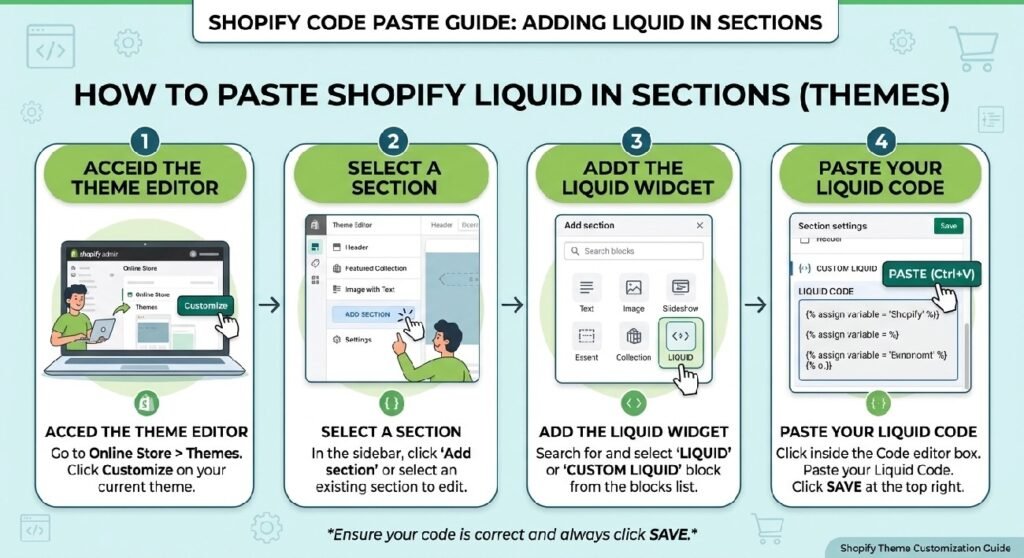
For a reusable Shopify section, save the cleaned version as:
ai-video-showcase.liquid
Open Shopify Admin → Online Store → Themes, duplicate your live theme, then choose Edit code.
Inside the Sections folder:
- Create a new file named
ai-video-showcase.liquid. - Paste the section markup and only the CSS required for this component.
- Save the file.
- Open Customize and add the section to the template where you want it to appear.
A homepage is the most natural placement for this design, especially when the video introduces the brand, demonstrates a product, or explains a key offer.
Before using it in a live store, I would also remove the large amount of unrelated CSS included in the snippet. The current stylesheet contains rules for grids, pricing cards, galleries, WhatsApp buttons, forms, announcement bars, FAQ cards, progress bars, and several other components that are not used by the actual video section.
Keeping only the styles needed for .zx-ai-video makes the snippet much cleaner.
How AI Video Showcase Liquid Works
The visible section is structurally very simple:
- a
<section>with the class.zx-ai-video - an
<h2>heading - a single inner
<div>
The dark background comes from a combination of a radial gradient and a linear gradient.
Two pseudo-elements, ::before and ::after, create soft glowing shapes in opposite corners. Because the section uses overflow:hidden, those large blurred shapes stay contained inside the rounded card.
The video-style box is controlled by:
.zx-ai-video div
It is given a fixed height, dark gradient background, rounded corners, centered alignment, and a pointer cursor.
The circular play button is not written as a separate HTML button. CSS creates it with:
.zx-ai-video div::before
and inserts the ▶ symbol.
When someone hovers over the box, the container moves upward slightly and the play circle scales up.
Visually, that works well. Functionally, though, nothing happens when the user clicks it.
Shopify Liquid Code
<style>
:root{
    --zx-bg:#f6f7fb;
    --zx-card:#ffffff;
    --zx-border:rgba(15,23,42,.08);
    --zx-text:#0f172a;
    --zx-muted:#64748b;
    --zx-primary:#111827;
    --zx-accent:#2563eb;
    --zx-radius:26px;
    --zx-shadow:
        0 12px 40px rgba(15,23,42,.08),
        0 2px 8px rgba(15,23,42,.04);
    --zx-transition:.4s cubic-bezier(.22,1,.36,1);
}

/* -----------------------------
   GLOBAL CARDS
------------------------------*/

.zx-premium-box,
.zx-faq,
.zx-progress,
.zx-size,
.zx-guarantee,
.zx-delivery,
.zx-upsell,
.zx-mega,
.zx-form{
    position:relative;
    overflow:hidden;
    background:rgba(255,255,255,.92);
    backdrop-filter:blur(14px);
    border:1px solid var(--zx-border);
    border-radius:24px;
    padding:30px;
    margin:28px 0;
    box-shadow:var(--zx-shadow);
    transition:var(--zx-transition);
}

.zx-premium-box:hover,
.zx-faq:hover,
.zx-progress:hover,
.zx-size:hover,
.zx-guarantee:hover,
.zx-delivery:hover,
.zx-upsell:hover,
.zx-mega:hover,
.zx-form:hover{
    transform:translateY(-5px);
    box-shadow:
    0 22px 60px rgba(15,23,42,.12),
    0 6px 20px rgba(15,23,42,.06);
}

/* -----------------------------
   GRID
------------------------------*/

.zx-grid,
.zx-benefits,
.zx-stats,
.zx-cats,
.zx-pricing,
.zx-footer-trust{
    display:grid;
    grid-template-columns:repeat(3,1fr);
    gap:18px;
    margin:30px 0;
}

.zx-grid div,
.zx-benefits div,
.zx-stats div,
.zx-cats a,
.zx-pricing div,
.zx-footer-trust div{

    background:linear-gradient(180deg,#fff,#fafbfc);

    border:1px solid rgba(0,0,0,.06);

    border-radius:22px;

    padding:24px;

    text-align:center;

    font-weight:700;

    color:var(--zx-text);

    text-decoration:none;

    transition:var(--zx-transition);

    box-shadow:
    0 8px 24px rgba(15,23,42,.05);
}

.zx-grid div:hover,
.zx-benefits div:hover,
.zx-stats div:hover,
.zx-cats a:hover,
.zx-pricing div:hover,
.zx-footer-trust div:hover{

    transform:translateY(-6px);

    border-color:rgba(37,99,235,.18);

    box-shadow:
    0 18px 42px rgba(15,23,42,.10);
}

/* -----------------------------
   BUTTONS
------------------------------*/

.zx-hero a,
.zx-cta a,
.zx-upsell a,
.zx-form button{

    display:inline-flex;
    align-items:center;
    justify-content:center;

    padding:15px 28px;

    border-radius:999px;

    background:linear-gradient(135deg,#111827,#1f2937);

    color:#fff;

    text-decoration:none;

    font-weight:700;

    letter-spacing:.3px;

    transition:var(--zx-transition);

    border:1px solid rgba(255,255,255,.08);

    box-shadow:
    0 12px 28px rgba(17,24,39,.22);
}

.zx-hero a:hover,
.zx-cta a:hover,
.zx-upsell a:hover,
.zx-form button:hover{

    transform:translateY(-3px) scale(1.02);

    box-shadow:
    0 20px 45px rgba(17,24,39,.28);
}

/* -----------------------------
   HERO
------------------------------*/

.zx-hero,
.zx-cta,
.zx-ai-video{

    position:relative;

    overflow:hidden;

    border-radius:30px;

    padding:70px 35px;

    text-align:center;

    color:#fff;

    background:
    radial-gradient(circle at top left,rgba(255,255,255,.12),transparent 40%),
    linear-gradient(135deg,#0f172a,#1e3a8a);

    box-shadow:
    0 25px 70px rgba(15,23,42,.25);

    isolation:isolate;
}

.zx-ai-video::before{
    content:"";
    position:absolute;
    width:340px;
    height:340px;
    background:rgba(255,255,255,.08);
    filter:blur(60px);
    border-radius:50%;
    top:-120px;
    right:-80px;
    z-index:-1;
}

.zx-ai-video::after{
    content:"";
    position:absolute;
    width:240px;
    height:240px;
    background:rgba(37,99,235,.35);
    filter:blur(80px);
    left:-100px;
    bottom:-120px;
    border-radius:50%;
    z-index:-1;
}

.zx-hero h1,
.zx-cta h2,
.zx-ai-video h2{

    color:#fff;

    font-size:clamp(32px,4vw,50px);

    line-height:1.15;

    font-weight:800;

    margin-bottom:18px;

    letter-spacing:-.03em;
}

/* -----------------------------
   VIDEO
------------------------------*/

.zx-video{

    background:#0f172a;

    border-radius:30px;

    padding:40px;

    color:#fff;

    text-align:center;

    box-shadow:var(--zx-shadow);
}

.zx-video h2{
    color:#fff;
}

.zx-video-box,
.zx-ai-video div{

    position:relative;

    width:min(440px,100%);

    height:250px;

    margin:35px auto 0;

    display:flex;

    align-items:center;

    justify-content:center;

    border-radius:28px;

    background:
    linear-gradient(180deg,#2b3446,#151d2c);

    border:1px solid rgba(255,255,255,.08);

    font-size:0;

    transition:var(--zx-transition);

    cursor:pointer;

    overflow:hidden;
}

.zx-ai-video div::before{

    content:"▶";

    width:88px;

    height:88px;

    border-radius:50%;

    background:#fff;

    color:#111827;

    display:flex;

    align-items:center;

    justify-content:center;

    font-size:34px;

    box-shadow:
    0 15px 45px rgba(255,255,255,.18);

    transition:var(--zx-transition);
}

.zx-ai-video div:hover{
    transform:translateY(-4px);
}

.zx-ai-video div:hover::before{
    transform:scale(1.08);
}

/* -----------------------------
   PROGRESS
------------------------------*/

.zx-progress span{

    display:block;

    height:12px;

    background:#edf2f7;

    border-radius:999px;

    overflow:hidden;

    margin-top:18px;
}

.zx-progress i{

    display:block;

    width:75%;

    height:100%;

    border-radius:999px;

    background:linear-gradient(90deg,#2563eb,#60a5fa);
}

/* -----------------------------
   POPUP
------------------------------*/

.zx-popup{

    left:20px;

    bottom:20px;

    border-radius:22px;

    background:rgba(255,255,255,.94);

    backdrop-filter:blur(18px);

    border:1px solid rgba(0,0,0,.06);

    padding:18px 20px;

    box-shadow:
    0 20px 50px rgba(15,23,42,.18);

    animation:popupFloat 4s ease-in-out infinite;
}

@keyframes popupFloat{
    0%,100%{transform:translateY(0);}
    50%{transform:translateY(-6px);}
}

/* -----------------------------
   FORM
------------------------------*/

.zx-form input,
.zx-form textarea{

    width:100%;

    margin:10px 0;

    padding:15px 18px;

    border-radius:16px;

    border:1px solid rgba(0,0,0,.08);

    background:#fff;

    transition:.3s;
}

.zx-form input:focus,
.zx-form textarea:focus{

    outline:none;

    border-color:#2563eb;

    box-shadow:
    0 0 0 4px rgba(37,99,235,.10);
}

/* -----------------------------
   ANNOUNCEMENT
------------------------------*/

.zx-ann{

    border-radius:18px;

    padding:16px 24px;

    background:linear-gradient(90deg,#111827,#1e3a8a);

    color:#fff;

    font-weight:700;

    letter-spacing:.4px;

    box-shadow:var(--zx-shadow);
}

/* -----------------------------
   GALLERY
------------------------------*/

.zx-gallery div{

    display:grid;

    grid-template-columns:repeat(4,1fr);

    gap:16px;
}

.zx-gallery span{

    border-radius:22px;

    background:#f8fafc;

    aspect-ratio:1;

    display:flex;

    align-items:center;

    justify-content:center;

    transition:var(--zx-transition);

    border:1px solid rgba(0,0,0,.05);
}

.zx-gallery span:hover{

    transform:translateY(-5px);

    box-shadow:
    0 18px 35px rgba(15,23,42,.08);
}

/* -----------------------------
   WHATSAPP
------------------------------*/

.zx-wa{

    right:22px;

    bottom:26px;

    padding:15px 22px;

    border-radius:999px;

    background:#25D366;

    font-weight:700;

    box-shadow:
    0 15px 35px rgba(37,211,102,.35);

    transition:var(--zx-transition);
}

.zx-wa:hover{
    transform:translateY(-4px);
}

/* -----------------------------
   RESPONSIVE
------------------------------*/

@media(max-width:991px){

.zx-grid,
.zx-benefits,
.zx-stats,
.zx-cats,
.zx-pricing,
.zx-footer-trust{
grid-template-columns:repeat(2,1fr);
}

.zx-ai-video{
padding:55px 24px;
}

}

@media(max-width:767px){

.zx-grid,
.zx-benefits,
.zx-stats,
.zx-cats,
.zx-pricing,
.zx-footer-trust,
.zx-ba{
grid-template-columns:1fr;
}

.zx-gallery div{
grid-template-columns:repeat(2,1fr);
}

.zx-premium-box,
.zx-faq,
.zx-progress,
.zx-size,
.zx-guarantee,
.zx-delivery,
.zx-upsell,
.zx-mega,
.zx-form{
padding:22px;
border-radius:22px;
}

.zx-ai-video{

padding:44px 20px;

border-radius:24px;
}

.zx-ai-video div{

height:200px;
}

}
</style>

<section class="zx-ai-video">
    <h2>Watch Business Video</h2>
    <div>▶</div>
</section>
The Biggest Issue: There Is No Video Yet
The section title says:
Watch Business Video
but the code contains no <video> element, <iframe>, Shopify media object, YouTube embed, Vimeo embed, or JavaScript click handler.
The inner markup is simply:
<div>▶</div>
Even the visible play symbol inside that element is effectively hidden because the CSS sets:
font-size: 0;
and creates another play icon through the ::before pseudo-element.
So if a customer clicks the video box, nothing will open.
That is the first thing I would fix before publishing this section.
7 Practical Ways to Improve This Shopify Video Showcase
1. Decide where the actual video will come from
Before changing the design, choose the video source.
A Shopify store might use:
- a Shopify-hosted video
- YouTube
- Vimeo
- an external video platform
- a manually hosted MP4
The right implementation depends on the source.
If you use YouTube or Vimeo, the section can embed an iframe.
If the video is uploaded through Shopify, a proper Liquid section can expose a video picker in the Theme Editor.
The current snippet does neither, so the visual player needs to be connected to a real source.
2. Do not call it “AI” unless AI is actually part of the feature
The filename is:
ai-video-showcase.liquid
but there is no AI logic in the code.
That does not stop you from using the filename, but the article and front-end copy should not suggest that the section automatically generates, edits, recommends, or personalizes video with AI.
If the actual video itself was created with an AI video tool, that is a content detail.
It is different from saying the Shopify section is AI-powered.
For technical accuracy, I would describe this as a video showcase section unless genuine AI behavior is added later.
3. Replace the generic heading
The current heading says:
Watch Business Video
It works as a placeholder, but it does not tell the customer why the video matters.
A better heading depends on the content.
For example:
See How It Works
Watch Our Story
Meet the Product in 60 Seconds
See the Collection in Motion
How We Make Every Order
A good video heading gives the visitor a reason to press play.
4. Add a real clickable control
The current player box has:
cursor:pointer
That makes it look interactive.
But because it is only a <div>, it does not behave like a real button.
If clicking should open or play a video, use an actual interactive element such as a <button> or a linked video thumbnail.
That is better for keyboard users and clearer from an accessibility point of view.
A styled <div> should not pretend to be a button.
5. Add a poster or thumbnail image
The current player area is just a dark gradient.
That keeps the design clean, but a real video section usually benefits from a thumbnail that tells the visitor what they are about to watch.
A product video could show the product.
A founder video could show the founder.
A brand-story film could use a workshop or lifestyle image.
The play button can sit over that thumbnail.
If you later add an image, remember to handle the image responsively and avoid uploading an unnecessarily large file.
6. Keep autoplay under control
If you turn this into a real video player, I would not automatically make it autoplay with sound.
Unexpected audio is distracting and can make a storefront feel aggressive.
If autoplay is genuinely useful, muted autoplay is the safer pattern. Even then, think about data use and whether the video is visible when it starts.
For a homepage showcase, a user-initiated play action is often the simplest experience.
7. Make the section editable in Shopify
Right now, the heading and video area are hard-coded.
A better Shopify version could expose settings for:
- section heading
- video URL or video picker
- poster image
- button label
- section background
- text color
- video aspect ratio
- optional description
That would let the merchant update the content through the Theme Editor instead of opening the code file.
For a reusable code library, that is a much stronger end result.
The Current CSS Is Much Larger Than the Section Needs
This is one of the most important technical observations in the supplied code.
The stylesheet contains classes such as:
.zx-premium-box
.zx-faq
.zx-progress
.zx-size
.zx-guarantee
.zx-delivery
.zx-upsell
.zx-mega
.zx-form
.zx-grid
.zx-benefits
.zx-stats
.zx-cats
.zx-pricing
.zx-footer-trust
.zx-gallery
.zx-wa
None of those are used by the final zx-ai-video markup.
That means the snippet is carrying a large shared design system when the visible component only needs a small part of it.
For a standalone demo, that is manageable.
For a Shopify section, it is unnecessary.
I would extract only:
- the relevant custom properties
.zx-ai-video.zx-ai-video::before.zx-ai-video::after.zx-ai-video h2.zx-ai-video div.zx-ai-video div::before- the hover rules
- the responsive rules for
.zx-ai-video
That makes maintenance easier and reduces the risk of unintended styling elsewhere.
Watch the :root Variables
The code places all custom properties on:
:root
That means the variables exist globally on the page.
Again, that is not automatically wrong, but a self-contained Shopify section is safer when its variables are scoped to the section wrapper.
For example, the section itself can hold:
--zx-primary
--zx-accent
--zx-transition
instead of defining them globally.
This matters more as the code library grows and multiple snippets start using similar variable names.
The Responsive Behavior Is Sensible
The section has two useful responsive changes.
Below 991px, the outer padding becomes smaller.
Below 767px, the section padding tightens again, the corner radius reduces, and the video box height changes from 250px to 200px.
That keeps the section from becoming oversized on smaller phones.
One thing I would improve in a real version is the video aspect ratio.
A fixed height works for the placeholder, but actual video is usually easier to manage with an aspect-ratio, such as 16:9.
That prevents strange cropping or letterboxing when the width changes.
AI Video Showcase vs. Instagram Reels Section
The [INTERNAL LINK NEEDED: Instagram Reels section Liquid] is built around multiple short-form social videos.
This section is better suited to one featured piece of video content.
Think of the difference like this:
Instagram Reels section → several fast social clips
AI Video Showcase → one primary brand, product, or explainer video
They can both appear on the same store if the content serves different purposes, but I would not place them directly beside each other unless the page is heavily video-led.
Too much motion can make a homepage harder to scan.
Pairing the Video With a Brand Story
The [INTERNAL LINK NEEDED: Brand Story Section Liquid] is a natural internal link for this post.
A brand story section explains the company through text, values, and milestones.
A video showcase can tell the same story visually.
For some stores, using both works well:
Short brand story → featured video → customer proof
For others, one may be enough.
The decision should depend on whether the video adds something the text cannot.
Customer Gallery as Supporting Visual Proof
The [INTERNAL LINK NEEDED: Customer Gallery Section Liquid] can work farther down the homepage after a featured video.
The video tells the story from the brand’s point of view.
A customer gallery shows the product or community from the customer’s point of view.
That gives the page a more balanced visual flow.
Accessibility Details Worth Adding
Once the placeholder becomes a real video player, think about more than appearance.
Useful improvements include:
- keyboard-accessible play controls
- meaningful button labels
- captions for spoken content
- transcripts when appropriate
- visible focus states
- controls that do not rely only on hover
The current snippet has a good visual starting point, but accessibility begins when the fake player becomes functional.
FAQ
Does this AI Video Showcase Liquid actually play a video?
No. The supplied version only creates a video-style placeholder with a CSS play button.
Does the section use AI?
No. There is no AI logic or API in the code.
Does it require JavaScript?
Not in its current form. It uses HTML and CSS only. JavaScript may be useful later if you build a modal player or custom playback behavior.
Can I embed YouTube?
Yes, but the current snippet does not include a YouTube iframe. You would need to add one or create a Theme Editor setting for the video URL.
Can I use Shopify-hosted video?
Yes. A proper Liquid version can be built around Shopify’s video settings and media output.
Is the section responsive?
Yes. The outer padding, border radius, and video-box height are reduced at smaller breakpoints.
Why does clicking the play area do nothing?
Because it is currently a styled <div> with no click behavior attached.
Explore More Shopify Code
These existing posts pair naturally with a featured video section:
- Brand Story Section Liquid
A Brand Story Section Liquid can give a Shopify store something product grids and discount banners cannot: context.https://css-liquids-for-shopify.site/brand-story-section-liquid/
- Premium Footer Trust Liquid
A Premium Footer Trust Liquid section can add a quiet layer of reassurance near the bottom of a Shopify store, especially when shoppers want quick answers about delivery, checkout security, support, or store credibility before they leave the page.https://css-liquids-for-shopify.site/premium-footer-trust-liquid/
For more help, you can read Shopify’s official theme customization guide :Shopify Theme Customization Guide
One Response