
A Brand Story Section Liquid can give a Shopify store something product grids and discount banners cannot: context. It explains why the brand exists, what it values, and how the business wants customers to remember it.
The supplied design goes well beyond a short “About us” paragraph. It combines a large editorial-style heading, a two-column story area, a highlighted quote, three brand values, a visual timeline, and a final call to action. The layout is polished enough to work as a substantial homepage story section or as the foundation for a dedicated brand page.
There is an important catch, though. This is not yet a true Shopify section. The code is a complete standalone HTML document with page-level tags, a global CSS reset, static brand claims, hard-coded dates, and buttons that do not lead anywhere. Before publishing it inside a theme, those parts need to be cleaned up.
Where to Paste This Shopify Code
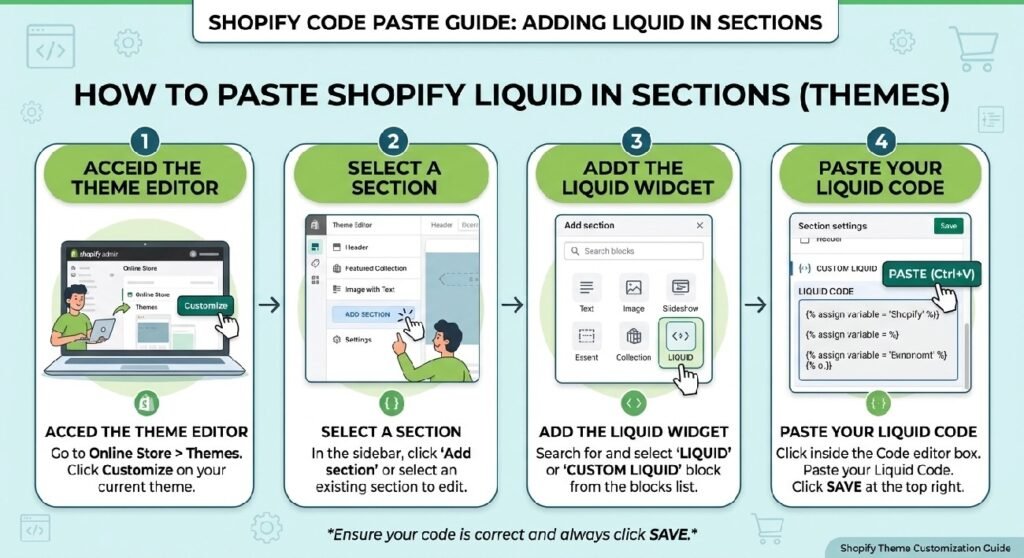
For Shopify, save the cleaned version as:
brand-story-section.liquid
From Shopify Admin → Online Store → Themes, duplicate the theme you want to edit, then open Edit code.
Inside the Sections folder, create a new section called:
brand-story-section.liquid
Do not paste the entire standalone document into Shopify unchanged.
Remove the document-level elements such as:
<!DOCTYPE html>
<html>
<head>
<meta>
<title>
<body>
A Shopify section should contain the component markup, its scoped styles, any Liquid logic it needs, and ideally a {% schema %} block if you want merchants to edit the content through the Theme Editor.
The safest version would also remove the global body styling and avoid using a universal * reset across the whole storefront.
How Brand Story Section Liquid Works
The main wrapper is .zx-story.
It creates a large editorial section with generous vertical spacing and a subtle background gradient. A radial overlay is added through ::before, which gives the background a little depth without using an image.
The content itself is kept inside a centered .story-container with a maximum width of 900px.
The section is then divided into several clear parts:
- brand story header
- two-column story block
- visual placeholder
- three brand values
- company timeline
- final CTA
That structure is one of the stronger parts of the snippet. It feels like a real narrative rather than a single oversized paragraph.
Shopify Liquid Code
<!DOCTYPE html>
<html lang="en">
<head>
  <meta charset="UTF-8">
  <meta name="viewport" content="width=device-width, initial-scale=1.0">
  <title>Premium Brand Story Section</title>
  <style>
    * {
      margin: 0;
      padding: 0;
      box-sizing: border-box;
    }

    body {
      font-family: -apple-system, BlinkMacSystemFont, 'Segoe UI', 'Roboto', sans-serif;
      background: #ffffff;
      color: #1a1a1a;
    }

    /* HERO STORY SECTION */
    .zx-story {
      position: relative;
      padding: 8rem 2rem;
      background: linear-gradient(180deg, #ffffff 0%, #f9fafb 50%, #ffffff 100%);
      overflow: hidden;
    }

    .zx-story::before {
      content: '';
      position: absolute;
      top: 0;
      left: 0;
      right: 0;
      bottom: 0;
      background: radial-gradient(circle at 40% 20%, rgba(26, 26, 26, 0.02) 0%, transparent 50%);
      pointer-events: none;
    }

    .story-container {
      max-width: 900px;
      margin: 0 auto;
      position: relative;
      z-index: 1;
    }

    .story-header {
      text-align: center;
      margin-bottom: 4rem;
    }

    .story-header h2 {
      font-size: 56px;
      font-weight: 600;
      line-height: 1.1;
      letter-spacing: -1.2px;
      margin-bottom: 1rem;
      color: #1a1a1a;
    }

    .story-header p {
      font-size: 20px;
      font-weight: 400;
      color: #666;
      line-height: 1.6;
      margin-bottom: 2rem;
    }

    .story-tagline {
      display: inline-block;
      font-size: 13px;
      font-weight: 600;
      letter-spacing: 1.2px;
      text-transform: uppercase;
      color: #999;
      padding-bottom: 1rem;
    }

    .story-content {
      display: grid;
      grid-template-columns: 1fr 1fr;
      gap: 4rem;
      align-items: center;
      margin-bottom: 4rem;
    }

    .story-text {
      position: relative;
    }

    .story-text h3 {
      font-size: 28px;
      font-weight: 500;
      line-height: 1.2;
      margin-bottom: 1.5rem;
      color: #1a1a1a;
      letter-spacing: -0.5px;
    }

    .story-text p {
      font-size: 16px;
      line-height: 1.8;
      color: #555;
      margin-bottom: 1.5rem;
    }

    .story-text p:first-of-type::first-letter {
      font-size: 64px;
      font-weight: 600;
      line-height: 0.8;
      float: left;
      margin-right: 8px;
      color: #1a1a1a;
    }

    .story-highlight {
      background: linear-gradient(120deg, rgba(26, 26, 26, 0.08) 0%, rgba(26, 26, 26, 0.02) 100%);
      border-left: 3px solid #1a1a1a;
      padding: 1.5rem;
      margin: 2rem 0;
      border-radius: 2px;
    }

    .story-highlight p {
      font-size: 15px;
      font-style: italic;
      color: #555;
      margin: 0;
    }

    .story-visual {
      position: relative;
      height: 400px;
      background: linear-gradient(135deg, #f5f5f5 0%, #f0f0f0 100%);
      border-radius: 8px;
      overflow: hidden;
      display: flex;
      align-items: center;
      justify-content: center;
    }

    .story-visual::before {
      content: '';
      position: absolute;
      top: -50%;
      right: -50%;
      width: 600px;
      height: 600px;
      background: radial-gradient(circle, rgba(26, 26, 26, 0.06) 0%, transparent 70%);
      border-radius: 50%;
    }

    .story-visual-content {
      position: relative;
      z-index: 1;
      text-align: center;
    }

    .story-visual-icon {
      font-size: 80px;
      margin-bottom: 1rem;
      animation: float 3s ease-in-out infinite;
    }

    .story-visual-text {
      font-size: 14px;
      color: #999;
      font-weight: 500;
      letter-spacing: 0.5px;
    }

    @keyframes float {
      0%, 100% { transform: translateY(0px); }
      50% { transform: translateY(-10px); }
    }

    /* VALUES SECTION */
    .story-values {
      display: grid;
      grid-template-columns: repeat(3, 1fr);
      gap: 2.5rem;
      margin-top: 4rem;
      padding-top: 4rem;
      border-top: 1px solid #e5e5e5;
    }

    .value-card {
      position: relative;
      padding: 0;
    }

    .value-card::before {
      content: '';
      position: absolute;
      top: 0;
      left: 0;
      width: 2px;
      height: 32px;
      background: #1a1a1a;
      border-radius: 1px;
    }

    .value-number {
      font-size: 42px;
      font-weight: 600;
      color: #ddd;
      margin-bottom: 0.5rem;
    }

    .value-title {
      font-size: 16px;
      font-weight: 600;
      color: #1a1a1a;
      margin-bottom: 0.75rem;
    }

    .value-description {
      font-size: 14px;
      color: #666;
      line-height: 1.6;
    }

    /* TIMELINE SECTION */
    .story-timeline {
      margin-top: 5rem;
      padding: 3rem 0;
      border-top: 1px solid #e5e5e5;
    }

    .timeline-title {
      text-align: center;
      font-size: 32px;
      font-weight: 500;
      margin-bottom: 3rem;
      color: #1a1a1a;
      letter-spacing: -0.5px;
    }

    .timeline {
      position: relative;
      max-width: 800px;
      margin: 0 auto;
    }

    .timeline::before {
      content: '';
      position: absolute;
      left: 50%;
      top: 0;
      bottom: 0;
      width: 1px;
      background: #e5e5e5;
      transform: translateX(-50%);
    }

    .timeline-item {
      margin-bottom: 2.5rem;
      position: relative;
    }

    .timeline-item:nth-child(odd) {
      padding-right: 52%;
      text-align: right;
    }

    .timeline-item:nth-child(even) {
      padding-left: 52%;
      text-align: left;
    }

    .timeline-dot {
      position: absolute;
      left: 50%;
      top: 0;
      width: 12px;
      height: 12px;
      background: #1a1a1a;
      border: 2px solid #fff;
      border-radius: 50%;
      transform: translateX(-50%);
      z-index: 2;
      box-shadow: 0 0 0 3px #f9fafb;
    }

    .timeline-content {
      background: #fff;
      padding: 1.5rem;
      border: 1px solid #e5e5e5;
      border-radius: 6px;
      transition: all 0.3s ease;
    }

    .timeline-content:hover {
      border-color: #d0d0d0;
      box-shadow: 0 4px 12px rgba(0, 0, 0, 0.06);
    }

    .timeline-year {
      font-size: 12px;
      font-weight: 700;
      color: #999;
      letter-spacing: 1px;
      text-transform: uppercase;
      margin-bottom: 0.5rem;
    }

    .timeline-content h4 {
      font-size: 16px;
      font-weight: 600;
      color: #1a1a1a;
      margin-bottom: 0.5rem;
    }

    .timeline-content p {
      font-size: 14px;
      color: #666;
      line-height: 1.6;
    }

    /* CTA SECTION */
    .story-cta {
      text-align: center;
      margin-top: 5rem;
      padding: 2rem;
    }

    .story-cta-text {
      font-size: 18px;
      color: #666;
      margin-bottom: 1.5rem;
      line-height: 1.7;
    }

    .story-cta-buttons {
      display: flex;
      gap: 1rem;
      justify-content: center;
      flex-wrap: wrap;
    }

    .story-btn {
      padding: 14px 32px;
      border-radius: 6px;
      font-size: 14px;
      font-weight: 600;
      text-decoration: none;
      cursor: pointer;
      border: none;
      transition: all 0.3s cubic-bezier(0.4, 0, 0.2, 1);
      letter-spacing: 0.3px;
    }

    .story-btn-primary {
      background: #1a1a1a;
      color: #fff;
    }

    .story-btn-primary:hover {
      background: #333;
      transform: translateY(-2px);
      box-shadow: 0 8px 24px rgba(0, 0, 0, 0.12);
    }

    .story-btn-secondary {
      background: transparent;
      color: #1a1a1a;
      border: 1.5px solid #1a1a1a;
    }

    .story-btn-secondary:hover {
      background: #1a1a1a;
      color: #fff;
      transform: translateY(-2px);
    }

    /* RESPONSIVE */
    @media (max-width: 968px) {
      .zx-story {
        padding: 4rem 1.5rem;
      }

      .story-header h2 {
        font-size: 42px;
      }

      .story-content {
        grid-template-columns: 1fr;
        gap: 2rem;
      }

      .story-values {
        grid-template-columns: 1fr;
        gap: 2rem;
      }

      .timeline::before {
        left: 0;
      }

      .timeline-item:nth-child(odd),
      .timeline-item:nth-child(even) {
        padding-left: 40px;
        padding-right: 0;
        text-align: left;
      }

      .timeline-dot {
        left: 0;
      }

      .story-visual {
        height: 300px;
      }
    }

    @media (max-width: 640px) {
      .zx-story {
        padding: 3rem 1rem;
      }

      .story-header h2 {
        font-size: 32px;
        letter-spacing: -0.8px;
      }

      .story-header p {
        font-size: 16px;
      }

      .story-text h3 {
        font-size: 22px;
      }

      .story-cta-buttons {
        flex-direction: column;
      }

      .story-btn {
        width: 100%;
      }

      .story-text p:first-of-type::first-letter {
        font-size: 48px;
      }
    }
  </style>
</head>
<body>
  <section class="zx-story">
    <div class="story-container">
      <div class="story-header">
        <span class="story-tagline">Our Brand Story</span>
        <h2>We believe in premium service and trusted experiences</h2>
        <p>Building the most reliable shopping platform for discerning customers</p>
      </div>

      <div class="story-content">
        <div class="story-text">
          <h3>From passion to purpose</h3>
          <p>We started with a simple idea: create a shopping experience that puts customers first. Every decision, every feature, every interaction is designed with you in mind.</p>

          <div class="story-highlight">
            <p>"Quality is not an act, it is a habit. We've made excellence our standard."</p>
          </div>

          <p>Today, we're proud to serve millions of customers who trust us with their most important purchases. Our commitment to quality, transparency, and service excellence hasn't wavered since day one.</p>
        </div>

        <div class="story-visual">
          <div class="story-visual-content">
            <div class="story-visual-icon">✨</div>
            <div class="story-visual-text">Premium Service Since Day One</div>
          </div>
        </div>
      </div>

      <div class="story-values">
        <div class="value-card">
          <div class="value-number">01</div>
          <div class="value-title">Premium Quality</div>
          <div class="value-description">We curate every product to ensure you get only the best. Rigorous quality checks, every time.</div>
        </div>

        <div class="value-card">
          <div class="value-number">02</div>
          <div class="value-title">Trusted Transparency</div>
          <div class="value-description">No hidden fees, no surprises. We believe in honest pricing and clear communication.</div>
        </div>

        <div class="value-card">
          <div class="value-number">03</div>
          <div class="value-title">Customer First</div>
          <div class="value-description">Your satisfaction is our mission. 24/7 support ready to help whenever you need us.</div>
        </div>
      </div>

      <div class="story-timeline">
        <h3 class="timeline-title">Our journey</h3>

        <div class="timeline">
          <div class="timeline-item">
            <div class="timeline-dot"></div>
            <div class="timeline-content">
              <div class="timeline-year">2015</div>
              <h4>Founded with a mission</h4>
              <p>We launched our platform with a single goal: make premium shopping accessible to everyone.</p>
            </div>
          </div>

          <div class="timeline-item">
            <div class="timeline-dot"></div>
            <div class="timeline-content">
              <div class="timeline-year">2017</div>
              <h4>1 Million customers milestone</h4>
              <p>The trust of our community grew beyond our expectations. We expanded our team and services.</p>
            </div>
          </div>

          <div class="timeline-item">
            <div class="timeline-dot"></div>
            <div class="timeline-content">
              <div class="timeline-year">2020</div>
              <h4>Innovation & excellence</h4>
              <p>Launched new features, enhanced security, and redefined customer service standards.</p>
            </div>
          </div>

          <div class="timeline-item">
            <div class="timeline-dot"></div>
            <div class="timeline-content">
              <div class="timeline-year">2024</div>
              <h4>Global leader in trust</h4>
              <p>Today, we serve customers worldwide with the same commitment to excellence that started it all.</p>
            </div>
          </div>
        </div>
      </div>

      <div class="story-cta">
        <p class="story-cta-text">Ready to experience premium shopping like never before?</p>
        <div class="story-cta-buttons">
          <button class="story-btn story-btn-primary">Start shopping now</button>
          <button class="story-btn story-btn-secondary">Learn more about us</button>
        </div>
      </div>
    </div>
  </section>
</body>
</html>
The Story Header Sets the Tone
The opening area uses three pieces of text:
Our Brand Story
We believe in premium service and trusted experiences
and a shorter supporting sentence underneath.
Visually, the headline is large at 56px on desktop, then reduces at smaller breakpoints.
That gives the section a premium editorial feel, but the wording itself is still generic. “Premium,” “trusted,” and “reliable” are common brand words. They only become meaningful when the next part of the story proves them.
For a live store, I would rewrite the opening around something specific to the business.
Instead of:
We believe in premium service and trusted experiences
a handcrafted leather brand might say:
We started with one goal: make everyday leather goods worth keeping for years.
A specialty tea store could say:
We built this shop around teas we were proud to serve at our own table.
Specific language makes the story easier to believe.
7 Practical Ways to Improve This Shopify Brand Story
1. Replace the demo history with your actual history
The timeline currently includes milestones for:
2015
2017
2020
2024
It also says the brand reached 1 Million customers and later became a Global leader in trust.
Those are demo statements, not data generated from Shopify.
If the store was founded in 2022, the timeline should say 2022. If the business has never served one million customers, remove that milestone completely.
A brand story works because it feels grounded in reality. Fake scale weakens the entire section.
You do not need huge numbers to tell a good story.
Something like:
2022 — First collection launched
2023 — Started shipping nationwide
2024 — Opened our first studio
can be far more credible than inflated claims.
2. Use the values section for principles you can prove
The three supplied values are:
Premium Quality
Trusted Transparency
Customer First
These are reasonable placeholders, but they are still broad.
A stronger value explains what the business actually does.
For example:
Small-Batch Production
“We produce in limited runs so we can inspect every batch before it ships.”
or:
Clear Ingredients
“Every product page lists the full ingredient set and usage guidance.”
That is stronger than simply saying “quality matters.”
If a value cannot be supported by how the store operates, it probably does not belong in the section.
3. Remove unsupported customer and support claims
The story text says the company serves millions of customers, while one value states that 24/7 support is ready whenever customers need it.
Those are meaningful business claims.
They should stay only if they are accurate.
If customer support is available Monday to Friday, say that elsewhere in the store rather than implying round-the-clock service. If the customer base is still growing, there is no need to hide that behind an oversized number.
Smaller brands can often tell a more interesting story precisely because the story is personal.
4. Replace the visual placeholder with something real
The right side of the main story block currently contains a sparkle icon and the line:
Premium Service Since Day One
That space is clearly designed to hold a visual.
For a live store, I would use something more specific:
- founder photo
- workshop image
- studio shot
- manufacturing process
- packaging table
- first product
- old storefront photo
- behind-the-scenes brand image
A real image can do more for the story than another decorative symbol.
If you keep the section image-based, use descriptive alt text that explains the photograph itself. Do not force the SEO keyword into every image.
5. Treat the highlighted quote carefully
The design includes a highlighted quote-style box:
“Quality is not an act, it is a habit. We’ve made excellence our standard.”
The presentation is attractive, but the copy should be reviewed before publishing.
If it is a founder quote, identify it as such.
If it is an internal brand statement, rewrite it in the brand’s own voice.
If it comes from another source, confirm the wording and attribution before presenting it as part of your brand story.
For a Shopify store, an original sentence often works better anyway.
For example:
“We would rather launch fewer products than put our name on something we would not use ourselves.”
That sounds like an actual point of view.
6. Make the CTA buttons go somewhere
At the bottom, the section includes:
Start shopping now
and:
Learn more about us
They are styled as buttons, but in the supplied markup they are plain <button> elements without destinations.
On a live storefront, those controls need a real action.
Start shopping now could link to:
/collections/all
or, better, to a specific featured collection.
Learn more about us could link to a full About page if one exists.
If the brand story already lives on the About page, the second CTA may not be needed at all.
A button that looks clickable but does nothing is worse than having no button.
7. Turn the section into editable Shopify blocks
This is the biggest long-term improvement.
Right now, every part of the story is hard-coded:
- tagline
- headline
- introduction
- story paragraphs
- quote
- values
- timeline years
- milestone titles
- milestone descriptions
- CTA labels
That means every edit requires opening the code file.
For a reusable Shopify implementation, I would move the main text into section settings and turn the values and timeline entries into repeatable blocks.
A merchant could then update the story directly from the Theme Editor.
The timeline is especially well suited to blocks because every entry follows the same structure:
year → title → description
That is exactly the kind of repeated content Shopify section blocks handle well.
The Responsive Timeline Is Worth Keeping
The desktop timeline alternates entries on the left and right side of a center line.
That creates a familiar visual journey.
Below 968px, the timeline changes structure:
- the center line moves to the left
- every item becomes left-aligned
- each milestone receives left padding
- timeline dots also move to the left
That is a good responsive decision.
Trying to keep alternating left-right cards on a narrow phone would make the text too cramped.
The mobile version gives the content room to breathe without removing the timeline completely.
Watch the Drop Cap on Smaller Screens
The first paragraph uses a large first letter through:
.story-text p:first-of-type::first-letter
On desktop, that first letter is 64px.
On smaller screens, it drops to 48px.
This creates a magazine-like effect, which fits the editorial style of the section.
Still, test it with the real first paragraph.
Some opening characters and short first lines can make drop caps look awkward. It is a stylistic detail, not something the story depends on, so remove it if the real copy looks cleaner without it.
Avoid Global CSS Inside the Shopify Version
The uploaded code uses:
* { margin: 0; padding: 0; box-sizing: border-box; }
and applies styling directly to body.
That is fine for a standalone HTML demo.
Inside a Shopify theme, it can affect completely unrelated components.
A section should not unexpectedly reset:
- navigation spacing
- product form margins
- app blocks
- cart elements
- footer styles
Keep the CSS scoped to .zx-story and the classes inside it.
This is one of the most important technical changes to make before turning the demo into a downloadable Shopify snippet.
Brand Story Section vs. Customer Gallery
The [INTERNAL LINK NEEDED: Customer Gallery Section Liquid] tells the story through customer images.
This section tells it through the brand itself.
They can work together, but they should not repeat each other.
A homepage could introduce the brand story first, then use the customer gallery farther down as real-world visual evidence of the community around it.
That creates a useful progression:
Who we are → what we value → how customers experience the brand
Pairing the Story With a Homepage Hero
The [INTERNAL LINK NEEDED: Premium Hero Banner Liquid] is a natural companion to this section.
The hero should stay concise. It introduces the store and gives the visitor a next action.
The brand story can sit farther down the homepage for people who want to know more.
That separation helps both sections.
If the hero tries to tell the entire company history, it becomes too heavy. If the brand story tries to behave like a promotional hero, it loses depth.
Each section should have one main job.
Where the Timeline Helps and Where It Does Not
A timeline works well if the brand genuinely has meaningful milestones.
For example:
- launch year
- first physical store
- first international order
- new production facility
- major product launch
- community milestone
It is less useful when the timeline is filled with arbitrary dates just because the design has four slots.
If the business only has two meaningful milestones, use two.
If the brand is new and does not have much history yet, replace the timeline with a founder note, manufacturing process, sourcing principles, or future mission.
Good storytelling does not require pretending the company is older than it is.
Does This Section Need JavaScript?
No.
The supplied section uses HTML and CSS.
The only animation is the floating sparkle icon, created with CSS keyframes.
The CTA hover effects and timeline card hover states are also handled through CSS.
That makes the component straightforward to maintain.
The bigger technical task is not adding JavaScript. It is converting the static content into proper Shopify section settings.
FAQ
Is this Brand Story Section Liquid already dynamic?
No. The current version is static HTML and CSS. It does not use Liquid variables, section settings, or repeatable blocks.
Can I use it on a Shopify homepage?
Yes. A homepage is one of the strongest placements, especially below the main hero or featured product areas.
Can I use it on an About page?
Yes. The structure is detailed enough to become the main content of a dedicated About or Our Story page.
Does the timeline update automatically?
No. Every year, title, and description is hard-coded.
Do the CTA buttons work?
Not yet. They are styled buttons without links or form actions.
Can I replace the animated icon with an image?
Yes. The visual area can be redesigned to use a founder, workshop, product, or behind-the-scenes photograph.
Does the code need JavaScript?
No. The supplied version uses CSS for the visual effects and responsiveness.
Explore More Shopify Code
If this section is part of a custom homepage, these related snippets can fit naturally around it:
- Customer Gallery Section Liquid
A Customer Gallery Section Liquid is a useful way to show real customer photos, project examples, user-generated content, or community submissions inside a Shopify store.https://css-liquids-for-shopify.site/customer-gallery-section-liquid/
- Pricing Table Section Liquid
A Pricing Table Section Liquid is useful when a Shopify store sells services, memberships, subscriptions, packages, or products that need side-by-side comparison.https://css-liquids-for-shopify.site/pricing-table-section-liquid/
For more help, you can read Shopify’s official theme customization guide :Shopify Theme Customization Guide
One Response