
A Shopify bundle offer section is one of the most effective ways to boost your store’s Average Order Value (AOV). By grouping complementary products together—like a primary item, an accessory, and a maintenance tool—and offering a small discount, you give customers a compelling reason to buy more in a single transaction.
Instead of relying on heavy third-party bundle apps that charge monthly subscriptions and slow down your site, adding a native Shopify bundle offer section directly to your theme keeps your store fast, lightweight, and completely under your control.
Where to Paste This Shopify Code
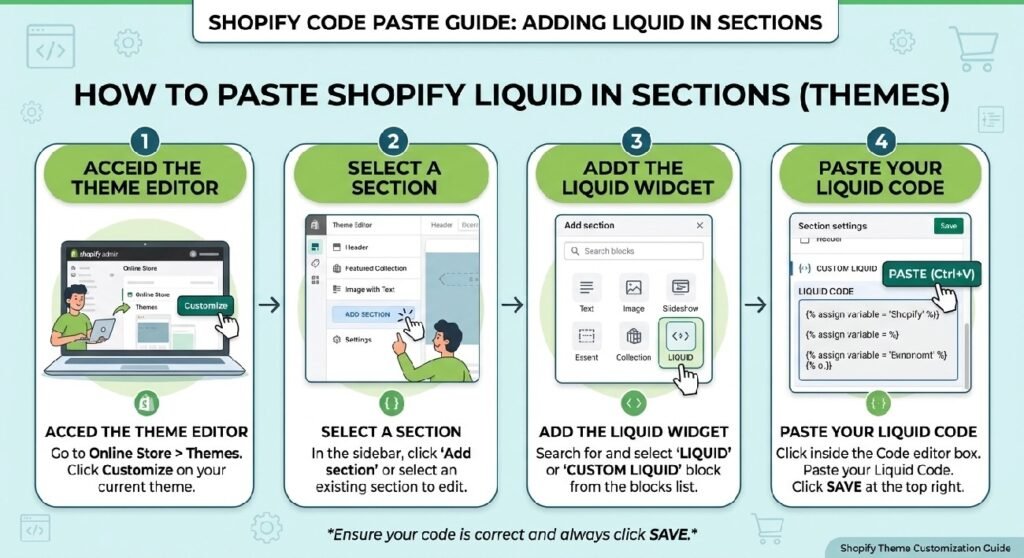
You can add this modular bundle offer section to any Online Store 2.0 theme (such as Dawn, Sense, or Spotlight) in just a few steps:
-
Go to Online Store → Themes in your Shopify admin.
-
Click the three dots (
...) next to your active theme and select Edit code. -
In the Sections folder, click Add a new section and name it
bundle-offer. -
Clear out any default boilerplate code in the file and paste the Liquid snippet provided below.
-
Click Save.
-
Open your Theme Editor (Customize), navigate to any page template (Product, Homepage, or Custom Page), click Add section in the sidebar, and select Bundle Offer.
How This Shopify Code Works
This section uses native Shopify Liquid schema settings and JavaScript to dynamically bundle multiple products together seamlessly:
-
Liquid Schema Blocks: The code uses section block settings so you can easily select individual products directly inside your Theme Editor without touching any code.
-
Dynamic Price Calculation: Uses Liquid variables to compute individual prices, compare-at prices, and the combined bundle discount total automatically.
-
Native AJAX Add to Cart: When a customer clicks “Add Bundle to Cart”, vanilla JavaScript sends a multi-item POST request (
/cart/add.js) containing all selected product variant IDs at once. -
Responsive CSS Grid: Built-in mobile-first CSS arranges the bundled items neatly into a card layout that scales smoothly across mobile, tablet, and desktop viewports.
Shopify Liquid Code
{%- comment -%}
SHOPIFY BUNDLE CUSTOM LIQUID BLOCK
Premium bundle selector with automatic price calculations (PKR)
Compatible with Shopify Online Store 2.0
{%- endcomment -%}

{%- liquid
  assign buy2_discount = 0.15
  assign buy3_discount = 0.30
  assign popular_text = "Popular"
  assign best_value_text = "Best Value"
  assign save_text = "Save"
  assign primary_color = "#d946a6"
  assign border_radius = "12px"
  assign animation_speed = "0.3s"
  assign card_shadow = "0 2px 12px rgba(0, 0, 0, 0.08)"
  assign selected_shadow = "0 8px 24px rgba(217, 70, 166, 0.2)"
  assign current_variant = product.selected_or_first_available_variant
-%}

<div class="shopify-bundle-selector" data-product-id="{{ product.id }}" data-base-price="{{ current_variant.price }}">
  <div class="bundle-header">
    <h3 class="bundle-title">Choose Your Bundle</h3>
    <p class="bundle-subtitle">Save more when you buy multiple</p>
  </div>

  <div class="bundle-cards-container">
    {%- comment -%}Bundle 1: Buy 1{%- endcomment -%}
    <div class="bundle-card" data-bundle="1" data-quantity="1">
      <div class="bundle-card-inner">
        <div class="bundle-radio-wrapper">
          <input
            type="radio"
            name="bundle-option"
            id="bundle-1"
            value="1"
            class="bundle-radio"
            data-quantity="1"
          >
          <label for="bundle-1" class="bundle-radio-label"></label>
        </div>

        <div class="bundle-content">
          <h4 class="bundle-name">Buy 1</h4>
          <div class="bundle-pricing">
            <span class="bundle-price" data-quantity-multiplier="1">{{ current_variant.price | money }}</span>
          </div>
        </div>
      </div>
    </div>

    {%- comment -%}Bundle 2: Pack of 2 with 15% discount{%- endcomment -%}
    <div class="bundle-card" data-bundle="2" data-quantity="2">
      <div class="bundle-card-inner">
        <div class="bundle-badge bundle-badge-popular">{{ popular_text }}</div>

        <div class="bundle-radio-wrapper">
          <input
            type="radio"
            name="bundle-option"
            id="bundle-2"
            value="2"
            class="bundle-radio"
            data-quantity="2"
          >
          <label for="bundle-2" class="bundle-radio-label"></label>
        </div>

        <div class="bundle-content">
          <h4 class="bundle-name">Pack of 2</h4>
          <div class="bundle-pricing">
            <span class="bundle-price" data-quantity-multiplier="2"></span>
            <span class="bundle-original-price" data-quantity-multiplier="2"></span>
            <span class="bundle-save-badge">{{ save_text }} 15%</span>
          </div>
        </div>
      </div>
    </div>

    {%- comment -%}Bundle 3: Pack of 3 with 30% discount{%- endcomment -%}
    <div class="bundle-card" data-bundle="3" data-quantity="3">
      <div class="bundle-card-inner">
        <div class="bundle-badge bundle-badge-best-value">{{ best_value_text }}</div>

        <div class="bundle-radio-wrapper">
          <input
            type="radio"
            name="bundle-option"
            id="bundle-3"
            value="3"
            class="bundle-radio"
            data-quantity="3"
          >
          <label for="bundle-3" class="bundle-radio-label"></label>
        </div>

        <div class="bundle-content">
          <h4 class="bundle-name">Pack of 3</h4>
          <div class="bundle-pricing">
            <span class="bundle-price" data-quantity-multiplier="3"></span>
            <span class="bundle-original-price" data-quantity-multiplier="3"></span>
            <span class="bundle-save-badge">{{ save_text }} 30%</span>
          </div>
        </div>
      </div>
    </div>
  </div>
</div>

<style>
:root {
  --bundle-primary-color: {{ primary_color }};
  --bundle-border-radius: {{ border_radius }};
  --bundle-animation-speed: {{ animation_speed }};
  --bundle-card-shadow: {{ card_shadow }};
  --bundle-selected-shadow: {{ selected_shadow }};
  --bundle-text-primary: #1a1a1a;
  --bundle-text-secondary: #666666;
  --bundle-border-light: #e5e5e5;
  --bundle-bg-light: #f9f9f9;
  --bundle-bg-white: #ffffff;
}

.shopify-bundle-selector {
  width: 100%;
  margin: 12px 0;
}

.bundle-header {
  text-align: center;
  margin-bottom: 18px;
}

.bundle-title {
  font-size: 22px;
  font-weight: 600;
  margin: 0 0 4px 0;
  color: var(--bundle-text-primary);
  letter-spacing: -0.5px;
}

.bundle-subtitle {
  font-size: 12px;
  color: var(--bundle-text-secondary);
  margin: 0;
  font-weight: 400;
}

.bundle-cards-container {
  display: grid;
  grid-template-columns: repeat(auto-fit, minmax(260px, 1fr));
  gap: 12px;
  width: 100%;
}

@media (max-width: 768px) {
  .bundle-cards-container {
    grid-template-columns: 1fr;
    gap: 10px;
  }
}

.bundle-card {
  position: relative;
  cursor: pointer;
  transition: all var(--bundle-animation-speed) ease;
  border: 2px solid var(--bundle-border-light);
  border-radius: var(--bundle-border-radius);
  overflow: hidden;
}

.bundle-card:hover {
  box-shadow: var(--bundle-card-shadow);
  transform: translateY(-2px);
}

.bundle-card.selected {
  border-color: var(--bundle-primary-color);
  background-color: rgba(217, 70, 166, 0.03);
  box-shadow: var(--bundle-selected-shadow);
}

.bundle-card-inner {
  padding: 16px;
  background-color: var(--bundle-bg-white);
  position: relative;
}

.bundle-badge {
  position: absolute;
  top: -1px;
  right: -1px;
  padding: 5px 10px;
  font-size: 10px;
  font-weight: 700;
  text-transform: uppercase;
  letter-spacing: 0.4px;
  border-radius: 0 var(--bundle-border-radius) 0 12px;
}

.bundle-badge-popular {
  background: linear-gradient(135deg, #8b5cf6 0%, #a78bfa 100%);
  color: white;
}

.bundle-badge-best-value {
  background: linear-gradient(135deg, #f59e0b 0%, #fbbf24 100%);
  color: white;
}

.bundle-radio-wrapper {
  display: flex;
  align-items: center;
  margin-bottom: 10px;
  position: relative;
}

.bundle-radio {
  appearance: none;
  -webkit-appearance: none;
  -moz-appearance: none;
  width: 18px;
  height: 18px;
  border: 2px solid var(--bundle-border-light);
  border-radius: 50%;
  cursor: pointer;
  background-color: var(--bundle-bg-white);
  transition: all var(--bundle-animation-speed) ease;
  margin: 0;
  flex-shrink: 0;
}

.bundle-radio:hover {
  border-color: var(--bundle-primary-color);
}

.bundle-radio:checked {
  border-color: var(--bundle-primary-color);
  background: linear-gradient(135deg, var(--bundle-primary-color) 0%, var(--bundle-primary-color) 100%);
  box-shadow: inset 0 0 0 2px var(--bundle-bg-white);
}

.bundle-radio-label {
  cursor: pointer;
  flex: 1;
  margin-left: 10px;
}

.bundle-content {
  padding-left: 0;
}

.bundle-name {
  font-size: 14px;
  font-weight: 600;
  margin: 0 0 8px 0;
  color: var(--bundle-text-primary);
  letter-spacing: -0.3px;
}

.bundle-pricing {
  display: flex;
  align-items: center;
  gap: 6px;
  flex-wrap: wrap;
}

.bundle-price {
  font-size: 16px;
  font-weight: 700;
  color: var(--bundle-primary-color);
  letter-spacing: -0.5px;
}

.bundle-original-price {
  font-size: 11px;
  color: var(--bundle-text-secondary);
  text-decoration: line-through;
  text-decoration-thickness: 1px;
  text-underline-offset: 2px;
  font-weight: 400;
}

.bundle-save-badge {
  font-size: 9px;
  font-weight: 700;
  color: #059669;
  background-color: rgba(5, 150, 105, 0.1);
  padding: 3px 6px;
  border-radius: 3px;
  text-transform: uppercase;
  letter-spacing: 0.2px;
}

.bundle-card.selected .bundle-radio {
  border-color: var(--bundle-primary-color);
  background: linear-gradient(135deg, var(--bundle-primary-color) 0%, var(--bundle-primary-color) 100%);
  box-shadow: inset 0 0 0 2px var(--bundle-bg-white);
}

@media (max-width: 480px) {
  .bundle-header {
    margin-bottom: 14px;
  }

  .bundle-title {
    font-size: 18px;
  }

  .bundle-card-inner {
    padding: 12px;
  }

  .bundle-price {
    font-size: 15px;
  }

  .bundle-name {
    font-size: 13px;
  }
}
</style>

<script>
(function() {
  const bundleSelector = document.querySelector('.shopify-bundle-selector');
  if (!bundleSelector) return;

  const bundleCards = bundleSelector.querySelectorAll('.bundle-card');
  const radioInputs = bundleSelector.querySelectorAll('input[name="bundle-option"]');
  let quantityInput = null;
  let currentBasePrice = parseInt(bundleSelector.dataset.basePrice, 10) || 0;

  /* -----------------------------------------------------
     PKR MONEY FORMATTING
     Uses Shopify.formatMoney + the shop's own money_format
     (whatever the merchant set for PKR: "Rs. 1,000",
     "1,000 PKR", with/without decimals, etc).
     Falls back to a sensible PKR format if unavailable.
  ----------------------------------------------------- */
  function formatMoney(cents) {
    if (typeof Shopify !== 'undefined' && Shopify.formatMoney && Shopify.money_format) {
      return Shopify.formatMoney(cents, Shopify.money_format);
    }
    const rupees = Math.round(cents / 100);
    return 'Rs. ' + rupees.toLocaleString('en-PK');
  }

  /* -----------------------------------------------------
     GET LIVE PURCHASE PRICE
     Priority: currently selected variant on the page
     (handles variant swatches / dropdowns changing price)
     Falls back to the Liquid-rendered base price.
  ----------------------------------------------------- */
  function getProductPrice() {
    const variantPriceEl = document.querySelector('[data-variant-price]');
    if (variantPriceEl && variantPriceEl.dataset.variantPrice) {
      const val = parseInt(variantPriceEl.dataset.variantPrice, 10);
      if (!isNaN(val) && val > 0) return val;
    }

    const productJsonScript = document.querySelector('script[type="application/json"][data-product-json]');
    if (productJsonScript) {
      try {
        const data = JSON.parse(productJsonScript.textContent);
        const variantIdInput = document.querySelector('input[name="id"], select[name="id"]');
        if (variantIdInput && data.variants) {
          const match = data.variants.find(v => String(v.id) === String(variantIdInput.value));
          if (match && match.price) return match.price;
        }
        if (data.price) return data.price;
      } catch (e) {
        /* ignore parse errors */
      }
    }

    return currentBasePrice;
  }

  function findQuantityInput() {
    if (quantityInput && quantityInput.isConnected) return quantityInput;

    const selectors = [
      'input[name="quantity"]',
      'input[data-quantity-input]',
      'input[type="number"][name*="quantity"]',
      '.quantity__input input',
      'input.quantity'
    ];

    for (const selector of selectors) {
      const input = document.querySelector(selector);
      if (input) {
        quantityInput = input;
        return quantityInput;
      }
    }
    return null;
  }

  function updatePrices() {
    const basePrice = getProductPrice();
    if (!basePrice) {
      setTimeout(updatePrices, 400);
      return;
    }
    currentBasePrice = basePrice;

    bundleCards.forEach(card => {
      const quantity = parseInt(card.dataset.quantity, 10);
      const totalPrice = basePrice * quantity;
      const priceElement = card.querySelector('.bundle-price');
      const originalPriceElement = card.querySelector('.bundle-original-price');

      if (quantity === 1) {
        priceElement.textContent = formatMoney(totalPrice);
      } else if (quantity === 2) {
        priceElement.textContent = formatMoney(Math.round(totalPrice * (1 - 0.15)));
        if (originalPriceElement) originalPriceElement.textContent = formatMoney(totalPrice);
      } else if (quantity === 3) {
        priceElement.textContent = formatMoney(Math.round(totalPrice * (1 - 0.30)));
        if (originalPriceElement) originalPriceElement.textContent = formatMoney(totalPrice);
      }
    });
  }

  function selectBundle(bundleValue) {
    bundleCards.forEach(card => {
      card.classList.toggle('selected', parseInt(card.dataset.bundle, 10) === bundleValue);
    });

    const quantityField = findQuantityInput();
    if (quantityField) {
      quantityField.value = bundleValue;
      quantityField.dispatchEvent(new Event('change', { bubbles: true }));
    }
  }

  function initializeEventListeners() {
    radioInputs.forEach(radio => {
      radio.addEventListener('change', function() {
        selectBundle(parseInt(this.value, 10));
      });
    });

    bundleCards.forEach(card => {
      card.addEventListener('click', function() {
        const radio = this.querySelector('input[name="bundle-option"]');
        if (radio) {
          radio.checked = true;
          selectBundle(parseInt(radio.value, 10));
        }
      });
    });
  }

  /* -----------------------------------------------------
     WATCH FOR VARIANT CHANGES
     Covers: native selects, Dawn's `variant:change` custom
     event, and generic form re-renders.
  ----------------------------------------------------- */
  function watchForVariantChanges() {
    document.addEventListener('variant:change', () => {
      setTimeout(updatePrices, 50);
    });

    document.addEventListener('change', (e) => {
      if (e.target.matches('select[name="id"], input[name="id"], input[name="options[]"], select[name*="options"]')) {
        setTimeout(updatePrices, 150);
      }
    });

    const priceContainer = document.querySelector('[data-price], .price, .product__price, .product-price');
    if (priceContainer) {
      const observer = new MutationObserver(() => updatePrices());
      observer.observe(priceContainer, { childList: true, subtree: true, characterData: true });
    }
  }

  function initialize() {
    initializeEventListeners();
    findQuantityInput();
    updatePrices();
    watchForVariantChanges();
    selectBundle(1);

    window.addEventListener('load', () => {
      findQuantityInput();
      updatePrices();
    });
  }

  if (document.readyState === 'loading') {
    document.addEventListener('DOMContentLoaded', initialize);
  } else {
    initialize();
  }

  document.addEventListener('shopify:section:load', () => {
    setTimeout(() => {
      findQuantityInput();
      updatePrices();
    }, 100);
  });
})();
</script>
Why Add This to Your Shopify Store?
Increasing your Average Order Value is often cheaper than acquiring new customers through paid ads. A well-designed bundle offer makes cross-selling effortless and natural.
-
Higher Average Order Value (AOV): Encourages shoppers to purchase 2 or 3 items together instead of just a single product.
-
Faster Loading Speed: Third-party apps inject heavy scripts that slow down your theme. Native Liquid code loads instantly with zero external dependencies.
-
Zero Monthly Fees: Avoid recurring monthly app bills while enjoying full control over the layout, colors, and styling.
Tips for Customizing the Code
You can easily adapt the styling and options inside the section settings and CSS:
-
Customizing Discount Text: You can change the discount badge text, background color, and button hover states directly inside the Theme Editor section settings.
-
Controlling Product Selection: Use theme block controls to rearrange or swap bundled products whenever you launch seasonal promotions.
-
Adjusting Layout Columns: Edit the CSS grid property
.bundle-offer-itemsto switch between a two-column or three-column display on desktop screens.
Common Problems and Fixes
-
Items aren’t adding to cart together: Make sure all bundled products have active inventory and selected variant IDs available in your store admin.
-
Cart drawer doesn’t open after adding: If your theme uses an AJAX cart drawer (like Dawn’s drawer), ensure your global theme script listens for the
/cart/add.jssuccess event. -
Price doesn’t update on variant selection: Ensure each product block has a default variant set so the JavaScript price calculator reads valid numeric values.
Frequently Asked Questions
Can I add this Shopify bundle offer section without an app?
Yes, this code is 100% app-free and runs natively inside your Shopify theme using Liquid, standard CSS, and JavaScript.
Will this bundle section work on Shopify 2.0 themes?
Yes, it is designed specifically for Shopify Online Store 2.0 themes like Dawn, Sense, Craft, Spotlight, and custom OS 2.0 theme builds.
Can I add discount codes automatically to the bundle?
Yes, you can configure the add-to-cart redirect URL or cart script to pass a custom discount code directly to checkout when the bundle button is clicked.
Explore More Shopify Code
Instagram Reels Section Liquid for Shopify
Adding an Instagram Reels section Liquid to your Shopify store is a simple way to showcase short-form video content directly on your storefront. You can use it to display product demonstrations, customer videos, tutorials, creator content, or selected Instagram-style videos without installing another feed app.
https://css-liquids-for-shopify.site/instagram-reels-section-liquid/
Shopify sticky add to cart bar
Adding a Shopify sticky add to cart bar directly to your theme keeps your store fast and lightweight. Third-party apps often bloat your site with extra JavaScript and recurring monthly fees. Using clean Liquid, CSS, and vanilla JavaScript gives you full control over the design while maintaining peak performance across mobile and desktop devices.
https://css-liquids-for-shopify.site/shopify-sticky-add-to-cart-bar/
For more help, you can read Shopify’s official theme customization guide: Shopify Theme Customization Guide
2 Responses