
This is our Shopify Liquid code library, containing useful code snippets and customisation solutions for Shopify stores. If you’re a beginner who is learning Shopify Liquid or if you’re an experienced store owner in need of a quick customisation, then this library was created with the aim of making Shopify development easier. Rather than spending a lot of time going through lengthy tutorials or attempting to create each customisation from scratch, you can find ready-to-use snippets of Shopify Liquid code, CSS code, and JavaScript solutions all in one place. The snippets are designed for specific Shopify customisation tasks so that you can easily locate the code you need.
A Shopify bundle offer section is one of the most effective ways to boost your store’s Average Order Value (AOV). By grouping complementary products together—like a primary item, an accessory, and a maintenance tool—and offering a small discount, you give customers a compelling reason to buy more in a single
Looking for a Shopify sticky add to cart bar to keep your buy button visible as shoppers scroll down your product pages? A sticky purchase bar stays pinned to the top or bottom of the screen when customers explore long product descriptions, media galleries, or customer reviews. Instead of forcing
Adding an Instagram Reels section Liquid to your Shopify store is a simple way to showcase short-form video content directly on your storefront. You can use it to display product demonstrations, customer videos, tutorials, creator content, or selected Instagram-style videos without installing another feed app. This Instagram Reels section Liquid
A Shopify customer reviews section can make your store feel more trustworthy without requiring a separate review app. This customization gives you a clean way to display customer feedback, star ratings, names, and short testimonials directly on your storefront. It works particularly well on product pages, homepages, and landing pages
A Live Visitors Counter for Shopify displays a small message showing how many people are currently viewing a product, such as “12 people are viewing this product.” This type of storefront element is commonly used as social proof. It can make a product page feel more active and draw attention
Using a snippet is simple.
First, search for the Shopify customization you need or select a category from the filter above. Open the relevant snippet and read the instructions before copying the code.
Check where to paste the code, understand what the snippet changes, and review any customization instructions provided with the example. Then add the code to your duplicate or development theme and test the result.
If the snippet does not work immediately, check whether your theme uses different class names, section structures, or theme files. A small adjustment may be required depending on your Shopify theme.
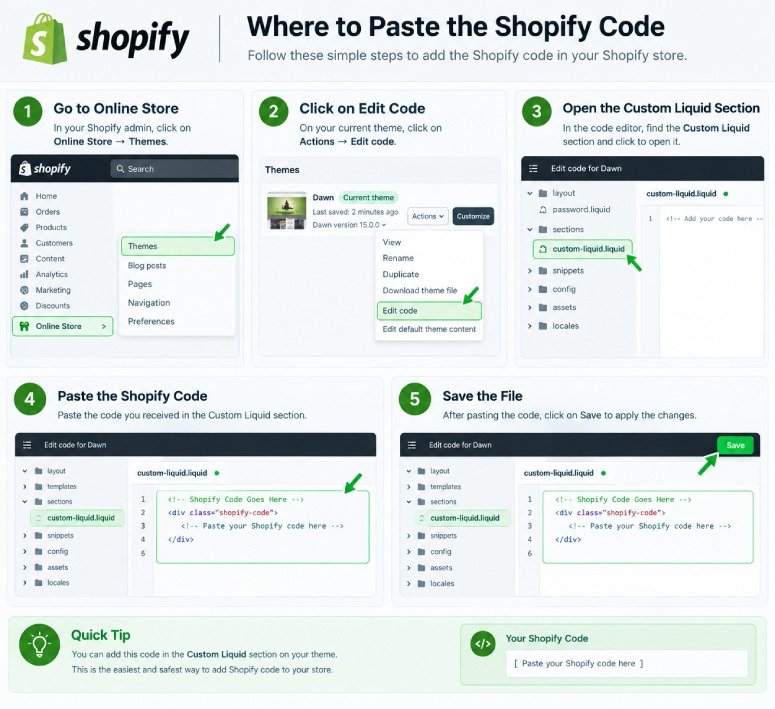
A Shopify Liquid Code Library is a collection of ready-to-use code snippets for customizing Shopify stores. It can include Liquid, CSS, and JavaScript examples for product pages, carts, collections, sections, buttons, and other theme features.
Yes. Our library provides free Shopify code snippets that you can copy, test, and customize for your Shopify store. Always review the instructions and test the code before using it on a live theme.
Yes. Many snippets are created with beginners in mind and include simple instructions about what the code does and where it should be added. More advanced snippets may require basic knowledge of Shopify themes and Liquid.
The correct location depends on the snippet. Some Liquid code can be added through Shopify's Custom Liquid section, while other snippets may need to be placed in a specific theme file or section. Always follow the installation instructions provided with the individual snippet.
Not necessarily. Shopify themes can use different HTML structures, CSS classes, section settings, and theme files. A snippet may work differently between themes and sometimes requires small adjustments.
Yes. If you cannot find the customization you need, you can contact us with your idea. We can use common requests and useful customization ideas to create future Shopify code tutorials and snippets.
Not at all; this is a standalone resource designed to assist Shopify store owners and developers in learning about and carrying out theme customisations. It has no association with Shopify and is not officially endorsed by the company.