
This is our Shopify Liquid code library, containing useful code snippets and customisation solutions for Shopify stores. If you’re a beginner who is learning Shopify Liquid or if you’re an experienced store owner in need of a quick customisation, then this library was created with the aim of making Shopify development easier. Rather than spending a lot of time going through lengthy tutorials or attempting to create each customisation from scratch, you can find ready-to-use snippets of Shopify Liquid code, CSS code, and JavaScript solutions all in one place. The snippets are designed for specific Shopify customisation tasks so that you can easily locate the code you need.
A Shopify guarantee section builds instant trust and eliminates purchase hesitation directly on your product pages or homepage. Displaying clear trust badges—such as a 30-day money-back guarantee, free returns, secure checkout, or lifetime warranty—helps convert uncertain shoppers who might otherwise bounce without purchasing. Instead of installing heavy third-party trust badge
A Shopify size guide box is a crucial feature for apparel, footwear, and accessory stores. Sizing uncertainty is one of the leading causes of abandoned product pages and costly return requests. By providing a clean, accessible sizing modal or popup right next to the variant selectors, you give shoppers the
A Shopify Before After Image Slider section is an essential visual tool for stores selling skincare, fitness gear, cleaning supplies, or home transformation products. By allowing customers to drag an interactive slider over two side-by-side images, you provide instant, undeniable visual proof of your product’s effectiveness. Instead of paying recurring
A Shopify video testimonial section is a powerful social proof tool that builds instant trust on your storefront. authentic customer video reviews, user-generated content (UGC), and video unboxings give potential buyers high confidence in your products. Seeing real people use and endorse your brand significantly reduces purchase hesitation and drives
A Shopify product benefits grid is a clean, visual layout that highlights the core features, value propositions, and key selling points of your product. Instead of overwhelming potential customers with dense blocks of technical text, a benefit grid uses structured cards, icons, and short titles to make your product’s value
A Premium Hero Banner Liquid section gives your Shopify homepage a strong visual starting point without requiring a page-builder app. This snippet creates a large, modern hero area with a gradient background, headline, supporting text, two call-to-action buttons, and trust indicators for delivery, checkout, payment, and product quality. The design
A Shopify recently purchased popup can display small social-proof notifications while customers browse a product page. This advanced snippet creates a floating notification card that can show recent-purchase messages, current viewers, low-stock notices, bestseller messages, popular-choice alerts, and customer-favorite notifications. It also uses real Shopify product information such as the
A Shopify free shipping progress bar is a simple way to show customers how close they are to qualifying for free delivery. Instead of displaying a plain shipping message, this design uses a visual progress bar, shipping status, and supporting trust points such as fast shipping, secure checkout, and cash
A well-structured FAQ can answer common customer questions without taking up a large amount of space on your Shopify page. This Shopify FAQ accordion uses the native HTML <details> and <summary> elements to create expandable questions and answers without JavaScript. The section includes a clean heading area, expandable FAQ cards,
A Shopify floating WhatsApp button gives store visitors a quick way to contact you without searching for a contact page or support link. This snippet creates a fixed WhatsApp button that stays visible while customers browse the storefront, with a WhatsApp-style green design, floating animation, pulse effect, and responsive mobile
Adding a clear trust section to a Shopify store can make important reassurance information easier for shoppers to notice. This Shopify trust badges section uses Liquid-compatible HTML and CSS to create a polished three-card layout for delivery, secure checkout, and customer support. The section is designed without an app and
A Shopify countdown timer creates real urgency and scarcity on your product pages, sale landing pages, or promotional banners. By displaying a dynamic, ticking clock next to flash sales, limited-time discounts, or upcoming product drops, you encourage hesitant buyers to take action immediately rather than postponing their purchase decision. Instead
Using a snippet is simple.
First, search for the Shopify customization you need or select a category from the filter above. Open the relevant snippet and read the instructions before copying the code.
Check where to paste the code, understand what the snippet changes, and review any customization instructions provided with the example. Then add the code to your duplicate or development theme and test the result.
If the snippet does not work immediately, check whether your theme uses different class names, section structures, or theme files. A small adjustment may be required depending on your Shopify theme.
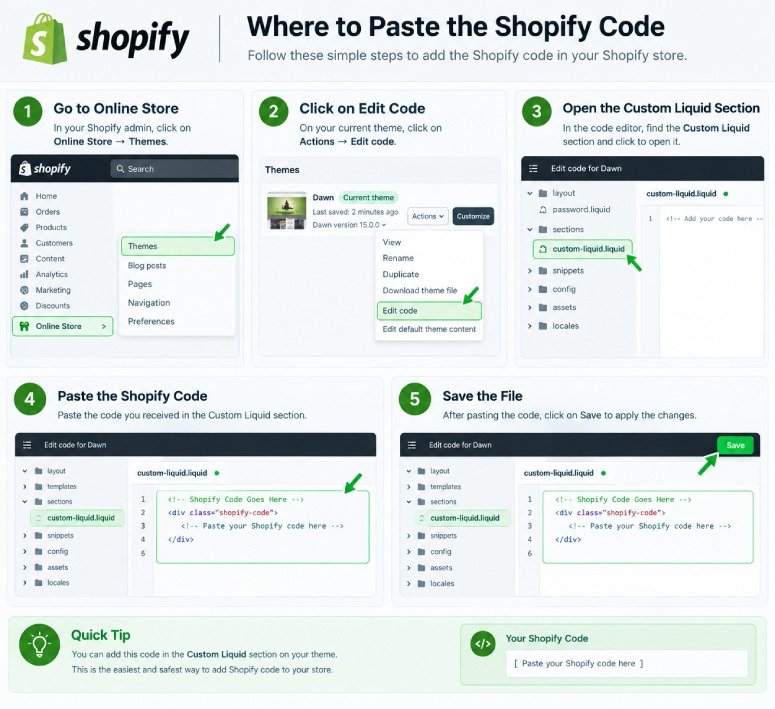
A Shopify Liquid Code Library is a collection of ready-to-use code snippets for customizing Shopify stores. It can include Liquid, CSS, and JavaScript examples for product pages, carts, collections, sections, buttons, and other theme features.
Yes. Our library provides free Shopify code snippets that you can copy, test, and customize for your Shopify store. Always review the instructions and test the code before using it on a live theme.
Yes. Many snippets are created with beginners in mind and include simple instructions about what the code does and where it should be added. More advanced snippets may require basic knowledge of Shopify themes and Liquid.
The correct location depends on the snippet. Some Liquid code can be added through Shopify's Custom Liquid section, while other snippets may need to be placed in a specific theme file or section. Always follow the installation instructions provided with the individual snippet.
Not necessarily. Shopify themes can use different HTML structures, CSS classes, section settings, and theme files. A snippet may work differently between themes and sometimes requires small adjustments.
Yes. If you cannot find the customization you need, you can contact us with your idea. We can use common requests and useful customization ideas to create future Shopify code tutorials and snippets.
Not at all; this is a standalone resource designed to assist Shopify store owners and developers in learning about and carrying out theme customisations. It has no association with Shopify and is not officially endorsed by the company.