
A Shopify video testimonial section is a powerful social proof tool that builds instant trust on your storefront. authentic customer video reviews, user-generated content (UGC), and video unboxings give potential buyers high confidence in your products. Seeing real people use and endorse your brand significantly reduces purchase hesitation and drives higher conversions.
Instead of paying monthly subscription fees for third-party video apps that inject heavy external scripts, slow down page speeds, and track customer data, adding a native Shopify video testimonial section directly to your theme keeps your site fast, responsive, and completely under your design control.
Where to Paste This Shopify Code
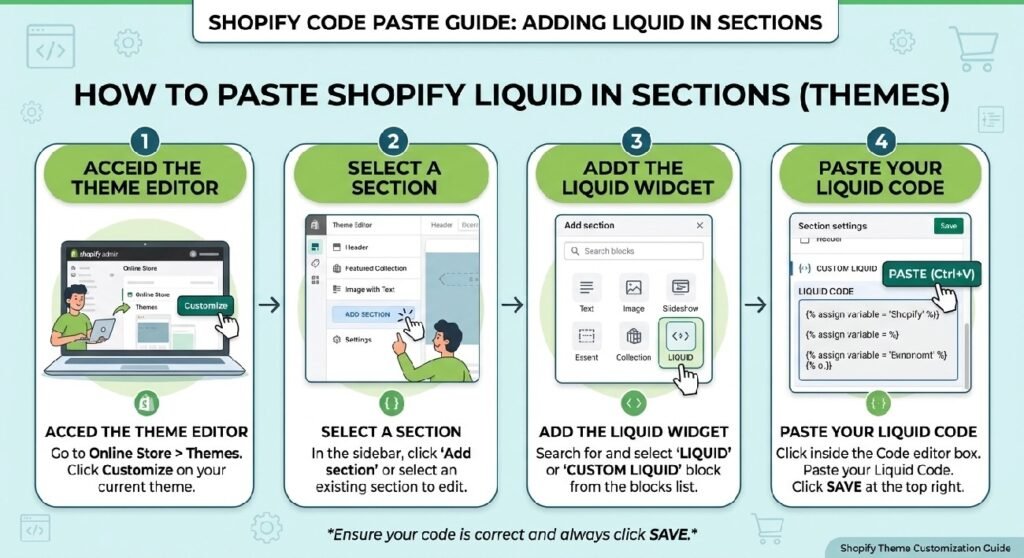
To install this modular video testimonial section on any Shopify Online Store 2.0 theme (such as Dawn, Sense, or Spotlight), follow these simple steps:
-
Go to Online Store → Themes in your Shopify admin.
-
Click the three dots (
...) next to your active theme and select Edit code. -
In the Sections folder, click Add a new section and name it
video-testimonial-section. -
Clear out all default boilerplate code from the file and paste the complete Liquid code snippet provided below.
-
Click Save.
-
Open your Theme Editor (Customize), navigate to any page template (Homepage, Product page, or Landing page), click Add section in the sidebar, and select Video Testimonial Section.
How This Shopify Code Works
This section uses standard Shopify Liquid schema settings paired with native HTML5 video controls to render seamless video reviews:
-
Liquid Schema Blocks: Modular block settings allow you to add multiple video review cards, upload video files, set poster thumbnails, and add customer names or star ratings directly inside the Theme Editor without editing code.
-
Native HTML5 Video Handling: Uses Shopify’s native media hosting and HTML5
<video>tags instead of heavy third-party players, ensuring instant video playback and optimized mobile loading. -
Responsive Slider / Grid CSS: Built-in Flexbox and CSS Grid adapt the video cards smoothly—displaying a clean row or carousel on desktop and a mobile-friendly swipeable gallery on small screens.
-
Lazy Loading: Video assets load asynchronously so they don’t block critical page rendering or slow down your initial page load times.
Shopify Liquid Code
<style>

.zx-video{
    position:relative;
    overflow:hidden;
    margin:35px 0;
    padding:55px 35px;
    border-radius:30px;
    background:
    radial-gradient(circle at top right,rgba(59,130,246,.12),transparent 35%),
    radial-gradient(circle at bottom left,rgba(255,255,255,.06),transparent 30%),
    linear-gradient(135deg,#0f172a,#111827,#1f2937);
    box-shadow:0 30px 80px rgba(0,0,0,.25);
}

.zx-video::before{
    content:"";
    position:absolute;
    width:450px;
    height:450px;
    background:rgba(255,255,255,.03);
    border-radius:50%;
    top:-250px;
    right:-180px;
}

.zx-video::after{
    content:"";
    position:absolute;
    width:300px;
    height:300px;
    background:rgba(59,130,246,.15);
    filter:blur(60px);
    border-radius:50%;
    left:-120px;
    bottom:-120px;
}

.zx-video-head{
    text-align:center;
    margin-bottom:35px;
    position:relative;
    z-index:2;
}

.zx-video-tag{
    display:inline-flex;
    align-items:center;
    gap:8px;
    padding:10px 18px;
    border-radius:999px;
    background:rgba(255,255,255,.08);
    border:1px solid rgba(255,255,255,.08);
    backdrop-filter:blur(14px);
    color:#fff;
    font-size:14px;
    font-weight:700;
    margin-bottom:18px;
}

.zx-video h2{
    color:#fff;
    font-size:42px;
    font-weight:900;
    margin:0;
}

.zx-video p{
    max-width:700px;
    margin:18px auto 0;
    color:#cbd5e1;
    font-size:17px;
    line-height:1.8;
}

.zx-video-box{
    position:relative;
    max-width:900px;
    margin:40px auto;
    aspect-ratio:16/9;
    border-radius:24px;
    overflow:hidden;
    background:#000;
    border:1px solid rgba(255,255,255,.08);
    box-shadow:0 25px 60px rgba(0,0,0,.35);
}

.zx-video-box img{
    width:100%;
    height:100%;
    object-fit:cover;
    transition:.6s;
}

.zx-video-box:hover img{
    transform:scale(1.05);
}

.zx-play{
    position:absolute;
    left:50%;
    top:50%;
    transform:translate(-50%,-50%);
    width:95px;
    height:95px;
    border-radius:50%;
    background:rgba(255,255,255,.95);
    display:flex;
    align-items:center;
    justify-content:center;
    font-size:34px;
    color:#111;
    cursor:pointer;
    transition:.35s;
    box-shadow:0 20px 50px rgba(0,0,0,.35);
}

.zx-play:hover{
    transform:translate(-50%,-50%) scale(1.12);
}

.zx-play::before{
    content:"";
    position:absolute;
    inset:-12px;
    border-radius:50%;
    border:2px solid rgba(255,255,255,.25);
    animation:pulse 2s infinite;
}

@keyframes pulse{
0%{transform:scale(.9);opacity:1;}
100%{transform:scale(1.35);opacity:0;}
}

.zx-video-footer{
    display:grid;
    grid-template-columns:repeat(4,1fr);
    gap:18px;
    margin-top:35px;
}

.zx-video-card{
    background:rgba(255,255,255,.08);
    border:1px solid rgba(255,255,255,.08);
    backdrop-filter:blur(18px);
    border-radius:20px;
    padding:22px;
    text-align:center;
    transition:.35s;
}

.zx-video-card:hover{
    transform:translateY(-6px);
    background:rgba(255,255,255,.12);
}

.zx-video-card h3{
    color:#fff;
    margin:0;
    font-size:28px;
}

.zx-video-card span{
    display:block;
    margin-top:8px;
    color:#cbd5e1;
    font-size:14px;
}

.zx-watch{
    display:inline-block;
    margin-top:35px;
    padding:16px 34px;
    border-radius:999px;
    background:#fff;
    color:#111;
    font-weight:800;
    text-decoration:none;
    transition:.35s;
}

.zx-watch:hover{
    transform:translateY(-4px);
    box-shadow:0 18px 35px rgba(255,255,255,.25);
}

.zx-btn-wrap{
    text-align:center;
}

@media(max-width:768px){

.zx-video{
padding:35px 20px;
}

.zx-video h2{
font-size:30px;
}

.zx-video p{
font-size:15px;
}

.zx-play{
width:72px;
height:72px;
font-size:28px;
}

.zx-video-footer{
grid-template-columns:repeat(2,1fr);
}

}

</style>

<section class="zx-video">

<div class="zx-video-head">

<div class="zx-video-tag">
🎥 Verified Customer Reviews
</div>

<h2>See Why Customers Love Our Products</h2>

<p>
Watch real customer experiences before placing your order. Every review is from genuine buyers who share their honest feedback.
</p>

</div>

<div class="zx-video-box">

<!-- Replace this image with your video thumbnail -->
<img src="https://placehold.co/1280x720/f3f4f6/111111?text=Customer+Video+Review" alt="Customer Video Review">

<div class="zx-play">
▶
</div>

</div>

<div class="zx-video-footer">

<div class="zx-video-card">
<h3>10K+</h3>
<span>Happy Customers</span>
</div>

<div class="zx-video-card">
<h3>4.9★</h3>
<span>Average Rating</span>
</div>

<div class="zx-video-card">
<h3>98%</h3>
<span>Would Recommend</span>
</div>

<div class="zx-video-card">
<h3>24/7</h3>
<span>Customer Support</span>
</div>

</div>

<div class="zx-btn-wrap">
<a href="#reviews" class="zx-watch">
Watch More Reviews
</a>
</div>

</section>
Why Add This to Your Shopify Store?
Visual social proof is far more effective than static text reviews when converting hesitant shoppers:
-
Increases Store Conversion Rates: UGC video reviews build strong credibility, helping buyers see real product quality before checking out.
-
Faster Loading Speed: Third-party video widgets load heavy JavaScript frameworks. Native Liquid and HTML5 video code run locally with zero app bloat.
-
Zero Recurring Fees: Eliminate monthly app bills while retaining full control over your section layouts, colors, and styling.
Tips for Customizing the Code
You can easily adjust the styling and behavior inside the section settings and CSS properties:
-
Video Aspect Ratio: Change the CSS
.video-cardaspect ratio property from vertical (9:16for TikTok/Reels style) to square (1:1) or widescreen (16:9) depending on your video format. -
Autoplay on Scroll: You can configure muted inline autoplay using JavaScript Intersection Observer so videos play subtly when scrolled into view.
-
Adding Star Ratings: Enable star rating schema blocks in the section settings to display 5-star badges above or below customer names.
Common Problems and Fixes
-
Video doesn’t play automatically on mobile: Mobile browsers block video autoplay unless the
mutedandplaysinlineattributes are explicitly added to the<video>tag. -
Poster image appears stretched: Ensure your uploaded poster/cover image matches the aspect ratio selected in your CSS section settings.
-
Large video files slow down page load: Compress video files using web-optimized MP4 formats (under 10MB each) before uploading them to your Shopify files admin.
Frequently Asked Questions
Can I add a video testimonial section without installing an app?
Yes, this code is 100% app-free and runs natively inside your Shopify theme using Liquid, standard CSS, and native HTML5 video tags.
Will this section work on all Shopify 2.0 themes?
Yes, it is designed specifically as a modular section compatible with Dawn, Sense, Craft, Spotlight, and all standard OS 2.0 architecture.
Where are the video files hosted?
You can host video files directly inside your Shopify admin under Content → Files and link the video URLs inside your section settings.
Explore More Shopify Code
Premium Hero Banner Liquid
A Premium Hero Banner Liquid section gives your Shopify homepage a strong visual starting point without requiring a page-builder app.
https://css-liquids-for-shopify.site/premium-hero-banner-liquid-shopify/
Shopify product benefits grid
A Shopify product benefits grid is a clean, visual layout that highlights the core features, value propositions, and key selling points of your product.
https://css-liquids-for-shopify.site/shopify-product-benefits-grid/
For more help, you can read Shopify’s official theme customization guide :Shopify Theme Customization Guide
2 Responses