
A Premium Hero Banner Liquid section gives your Shopify homepage a strong visual starting point without requiring a page-builder app. This snippet creates a large, modern hero area with a gradient background, headline, supporting text, two call-to-action buttons, and trust indicators for delivery, checkout, payment, and product quality.
The design uses standard HTML and CSS, so it is lightweight and easy to customize. You can change the heading, description, buttons, colors, spacing, and trust messages to fit your store. The responsive styles also adapt the banner for smaller screens, making this Premium Hero Banner Liquid useful for both desktop and mobile Shopify storefronts.
Where to Paste This Shopify Code
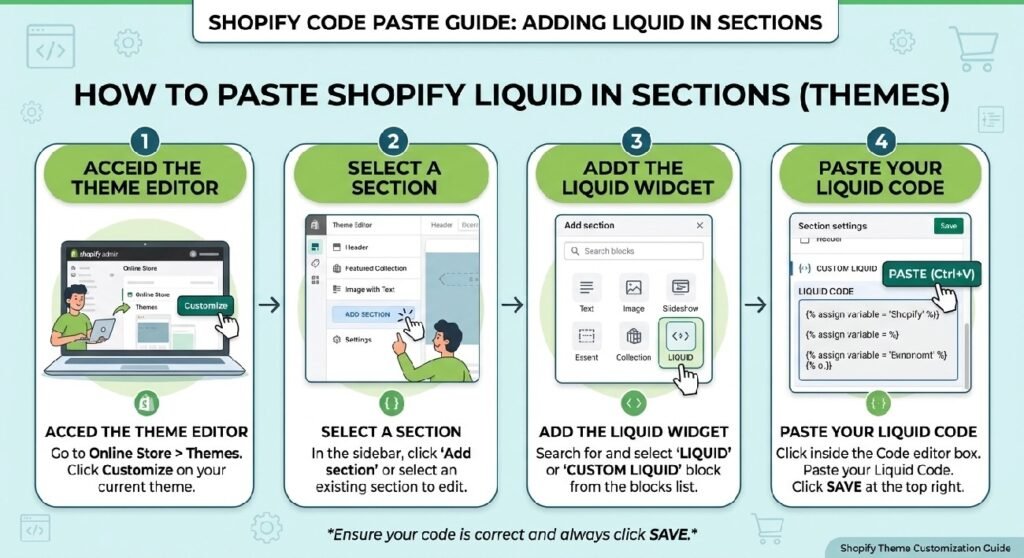
Because this code is a complete storefront section, the best approach is to create a dedicated Shopify section.
- Open your Shopify Admin.
- Go to Online Store → Themes.
- Select Edit code for your active theme.
- Open the Sections folder.
- Select Add a new section.
- Name the file
premium-hero-banner. - Paste the supplied code into the new section.
- Save the file.
- Open Customize.
- Add the new Premium Hero Banner section to your homepage.
The supplied code does not contain Shopify section schema, so it will not automatically appear as a configurable section in the Theme Editor until schema is added. If you are using it exactly as supplied, you can also place the markup and CSS in an appropriate theme template or custom section according to your theme setup.
How This Premium Hero Banner Liquid Works
The Premium Hero Banner Liquid code is primarily a frontend HTML and CSS customization. It does not use Liquid variables or JavaScript in its current form.
Hero Container
The .zx-hero class creates the main banner. It uses multiple gradients, rounded corners, padding, a shadow, and hidden overflow to create the premium card-style appearance.
Background Effects
Two pseudo-elements, :before and :after, add large circular decorative effects behind the content. Combined with the gradients, they create a layered background without requiring additional image files.
Badge
The .zx-badge element displays the customer-trust message at the top of the banner.
Heading and Description
The h1 provides the main headline while the paragraph underneath explains the store’s offer.
Call-to-Action Buttons
There are two links:
- Shop Collection links to
/collections/all. - Read Reviews links to
#reviews.
Make sure those destinations actually exist in your store before publishing.
Trust Indicators
The .zx-trust area displays four short selling points:
- Fast Delivery
- 100% Secure Checkout
- Cash on Delivery
- Premium Quality
Responsive Design
The media query activates below 768px. The heading becomes smaller, buttons stack vertically, and trust items expand to the available mobile width.
Shopify Liquid Code
<style>

.zx-hero{
    position:relative;
    overflow:hidden;
    border-radius:32px;
    padding:70px 40px;
    margin:30px 0;
    background:
        radial-gradient(circle at top right,#3b82f620,transparent 40%),
        radial-gradient(circle at bottom left,#ffffff15,transparent 35%),
        linear-gradient(135deg,#0f172a,#111827,#1e3a8a);
    color:#fff;
    text-align:center;
    box-shadow:0 30px 80px rgba(0,0,0,.25);
}

.zx-hero:before{
    content:"";
    position:absolute;
    width:500px;
    height:500px;
    background:rgba(255,255,255,.05);
    border-radius:50%;
    top:-250px;
    right:-180px;
}

.zx-hero:after{
    content:"";
    position:absolute;
    width:350px;
    height:350px;
    background:rgba(59,130,246,.18);
    border-radius:50%;
    bottom:-180px;
    left:-120px;
    filter:blur(40px);
}

.zx-badge{
    display:inline-flex;
    align-items:center;
    gap:8px;
    padding:10px 18px;
    border-radius:999px;
    background:rgba(255,255,255,.12);
    backdrop-filter:blur(15px);
    border:1px solid rgba(255,255,255,.15);
    font-size:14px;
    font-weight:700;
    margin-bottom:25px;
}

.zx-hero h1{
    font-size:58px;
    line-height:1.1;
    margin:0;
    font-weight:900;
}

.zx-hero p{
    max-width:700px;
    margin:22px auto;
    font-size:20px;
    color:#dbe4ff;
    line-height:1.7;
}

.zx-buttons{
    display:flex;
    justify-content:center;
    gap:16px;
    margin-top:35px;
    flex-wrap:wrap;
}

.zx-btn-primary,
.zx-btn-secondary{
    text-decoration:none;
    padding:16px 34px;
    border-radius:999px;
    font-weight:800;
    transition:.35s;
}

.zx-btn-primary{
    background:#fff;
    color:#111;
}

.zx-btn-primary:hover{
    transform:translateY(-4px);
    box-shadow:0 15px 35px rgba(255,255,255,.35);
}

.zx-btn-secondary{
    border:1px solid rgba(255,255,255,.3);
    color:#fff;
    background:rgba(255,255,255,.08);
    backdrop-filter:blur(10px);
}

.zx-btn-secondary:hover{
    background:#fff;
    color:#111;
}

.zx-trust{
    display:flex;
    justify-content:center;
    gap:28px;
    margin-top:45px;
    flex-wrap:wrap;
}

.zx-trust div{
    display:flex;
    align-items:center;
    gap:10px;
    background:rgba(255,255,255,.08);
    padding:14px 18px;
    border-radius:16px;
    border:1px solid rgba(255,255,255,.08);
}

.zx-trust span{
    font-size:22px;
}

.zx-trust b{
    font-size:15px;
    font-weight:700;
}

@media(max-width:768px){

.zx-hero{
padding:50px 25px;
border-radius:24px;
}

.zx-hero h1{
font-size:38px;
}

.zx-hero p{
font-size:17px;
}

.zx-buttons{
flex-direction:column;
}

.zx-btn-primary,
.zx-btn-secondary{
display:block;
width:100%;
}

.zx-trust{
gap:14px;
}

.zx-trust div{
width:100%;
justify-content:center;
}

}

</style>

<section class="zx-hero">

<div class="zx-badge">
🔥 Trusted by 10,000+ Happy Customers
</div>

<h1>
Experience Premium Shopping Like Never Before
</h1>

<p>
Discover premium-quality products, lightning-fast delivery, secure checkout, and customer-first service—all designed to give you a seamless shopping experience.
</p>

<div class="zx-buttons">

<a href="/collections/all" class="zx-btn-primary">
🛒 Shop Collection
</a>

<a href="#reviews" class="zx-btn-secondary">
⭐ Read Reviews
</a>

</div>

<div class="zx-trust">

<div>
<span>🚚</span>
<b>Fast Delivery</b>
</div>

<div>
<span>🔒</span>
<b>100% Secure Checkout</b>
</div>

<div>
<span>💳</span>
<b>Cash on Delivery</b>
</div>

<div>
<span>⭐</span>
<b>Premium Quality</b>
</div>

</div>

</section>
Why Add a Premium Hero Banner to Your Shopify Store?
A Premium Hero Banner Liquid section can make the first part of your homepage more useful by immediately communicating what your store offers and giving visitors a clear next action.
A good hero section should answer three basic questions quickly:
- What does the store offer?
- Why should shoppers pay attention?
- What should they do next?
This code addresses those points with a headline, supporting description, primary shopping button, secondary review button, and trust indicators.
Put Your Main Offer Above the Fold
The hero area is one of the first sections visitors see. Use the headline for your most important message rather than filling it with unnecessary information.
For example, instead of:
Welcome to Our Store
you could use something more specific to your product category.
Give Shoppers a Clear CTA
The Shop Collection button provides an obvious next step. If your store has a specific best-selling collection, you can replace /collections/all with the relevant collection URL.
Display Useful Trust Information
The trust row gives shoppers quick information about delivery, checkout, payment, and product quality.
Only display claims that are accurate for your business. For example, don’t advertise Cash on Delivery unless your store actually provides it.
7 Tips for Customizing the Premium Hero Banner Liquid
1. Change the Main Heading
Replace the default heading with a concise message describing your products or offer.
Keep it readable on both desktop and mobile.
2. Customize the Gradient
The background uses several CSS gradients. You can replace the existing color values with your brand colors.
A dark navy and blue combination works well for professional stores, while other combinations can be used to match your existing theme.
3. Update the CTA Links
The first button currently points to:
/collections/all
The second button points to:
#reviews
Change these destinations if your store uses a different collection or review section.
4. Adjust the Border Radius
The desktop banner uses a 32px radius and the mobile version uses 24px. Lower values create a sharper appearance, while larger values produce a softer card design.
5. Modify the Hero Height
The vertical size is primarily controlled through padding. Increase the padding for a larger hero or reduce it if you want more products to remain visible below the banner.
6. Improve the Trust Messages
Replace generic trust statements with benefits that are genuinely relevant to your store.
For example:
- Free Shipping
- Easy Returns
- Secure Payments
- Customer Support
7. Check Mobile Appearance
Always preview the Premium Hero Banner Liquid on a mobile device or through your browser’s responsive preview. Large headings and long CTA text can require adjustment on smaller screens.
Common Problems and Fixes
The Banner Does Not Appear in the Theme Editor
The supplied code does not include Shopify section schema. If you want it to become an addable section inside the Theme Editor, the code needs valid {% schema %} configuration.
The Shop Collection Button Goes to the Wrong Place
The button currently uses /collections/all. Replace that path with your actual collection destination.
The Review Button Does Nothing
The #reviews link expects an element with the corresponding id="reviews" somewhere on the page. If your review section uses another ID, update the link accordingly.
The Hero Looks Too Large on Mobile
Reduce the mobile heading size or decrease the mobile padding inside the @media(max-width:768px) rule.
The Trust Items Do Not Fit Correctly
The mobile CSS changes each trust item to full width. If you prefer two items per row, the mobile grid/flex layout can be customized.
Frequently Asked Questions
What is a Premium Hero Banner Liquid section?
A Premium Hero Banner Liquid section is a custom Shopify storefront banner that combines a prominent heading, supporting content, CTA buttons, and visual styling in one hero area.
Can I use this hero banner without a Shopify app?
Yes. The supplied design uses HTML and CSS and does not require an external page-builder app.
Can I change the colors of the hero banner?
Yes. The background gradients, buttons, text, decorative circles, and other visual elements can be changed directly in the CSS.
Does this hero banner work on mobile?
Yes. The supplied CSS includes a responsive media query that changes the heading size, button layout, and trust indicators for screens below 768px.
Can I add an image to this hero banner?
Yes. The current version uses CSS gradients rather than a background image. You can modify the design to include a product image, lifestyle image, or responsive image while keeping the existing structure.
External Shopify Resources
For official Shopify theme development information, readers can also refer to the Shopify Theme Development documentation for guidance on sections, Liquid, and theme architecture.
Use a normal DoFollow external link to the relevant official Shopify documentation page when publishing the article. Avoid linking to unrelated third-party sites simply to increase the number of external links.
Explore More Shopify Code
Shopify free shipping progress bar
A Shopify free shipping progress bar is a simple way to show customers how close they are to qualifying for free delivery.
Shopify recently purchased popup
A Shopify recently purchased popup can display small social-proof notifications while customers browse a product page.
https://css-liquids-for-shopify.site/shopify-recently-purchased-popup/
For more help, you can read Shopify’s official theme customization guide :Shopify Theme Customization Guide
3 Responses