
This is our Shopify Liquid code library, containing useful code snippets and customisation solutions for Shopify stores. If you’re a beginner who is learning Shopify Liquid or if you’re an experienced store owner in need of a quick customisation, then this library was created with the aim of making Shopify development easier. Rather than spending a lot of time going through lengthy tutorials or attempting to create each customisation from scratch, you can find ready-to-use snippets of Shopify Liquid code, CSS code, and JavaScript solutions all in one place. The snippets are designed for specific Shopify customisation tasks so that you can easily locate the code you need.
An AI Video Showcase Liquid section can be useful when you want to give a Shopify homepage a strong visual break and direct attention toward a product demo, founder message, brand film, tutorial, or promotional video. The supplied snippet has a polished dark-blue presentation: a large heading, a centered video-style
A Premium Footer Trust Liquid section can add a quiet layer of reassurance near the bottom of a Shopify store, especially when shoppers want quick answers about delivery, checkout security, support, or store credibility before they leave the page. The supplied design takes a more editorial approach than the usual
A Brand Story Section Liquid can give a Shopify store something product grids and discount banners cannot: context. It explains why the brand exists, what it values, and how the business wants customers to remember it. The supplied design goes well beyond a short “About us” paragraph. It combines a
A Pricing Table Section Liquid is useful when a Shopify store sells services, memberships, subscriptions, packages, or products that need side-by-side comparison. Instead of making visitors jump between separate pages, a pricing table puts the important differences in one place: plan name, price, included features, and the next action. The
A Customer Gallery Section Liquid is a useful way to show real customer photos, project examples, user-generated content, or community submissions inside a Shopify store. The supplied design keeps the gallery deliberately simple: a heading, a short introduction, eight square gallery cards, a project count, and a View all link.
An Upsell Recommendation Box Liquid section gives Shopify stores a simple way to guide shoppers toward related products or collections without adding another full product grid to the page. The supplied design uses a clean white card with a dark icon, supporting copy, three compact tags, and an Explore Collection
A Shopify Delivery Info Box is a small piece of product-page UI, but it can answer an important question before a customer reaches checkout: How much do I need to spend to qualify for free delivery? The supplied snippet keeps that message compact. It displays a custom SVG icon beside
A Collection Showcase Liquid section can make a Shopify homepage easier to browse when you want to send shoppers toward a few important product groups without building a large menu or image-heavy grid. The supplied snippet takes a very simple approach: three large cards for New Arrivals, Best Sellers, and
A Contact CTA Section Liquid block is useful when a shopper has reached the point where one unanswered question could stop the sale. Maybe they are unsure about sizing, compatibility, delivery, or which product suits them best. Instead of making them hunt through a footer or contact page, this section
Estimated reading time: 7 minutes Product Tabs Section Liquid gives Shopify product pages a cleaner way to organize information such as descriptions, shipping details, returns, warranties, materials, care instructions, and other buying information. The supplied snippet uses native HTML <details> and <summary> elements to create a premium accordion-style layout without
Announcement Bar Pro Liquid section will allow Shopify stores to boldly and clearly promote a promotion, important information, short-term offers, shipping information and any call to action. This custom section is designed to generate a professional announcement block without the need for a separate app, using HTML and CSS. The
A Statistics Counter Liquid section is a simple way to display Important store numbers like customer count, ratings, support availability, orders or other business statistics can be displayed using a Statistics Counter Liquid section. This layout will not require a big banner; instead, it will showcase the most important figures
Using a snippet is simple.
First, search for the Shopify customization you need or select a category from the filter above. Open the relevant snippet and read the instructions before copying the code.
Check where to paste the code, understand what the snippet changes, and review any customization instructions provided with the example. Then add the code to your duplicate or development theme and test the result.
If the snippet does not work immediately, check whether your theme uses different class names, section structures, or theme files. A small adjustment may be required depending on your Shopify theme.
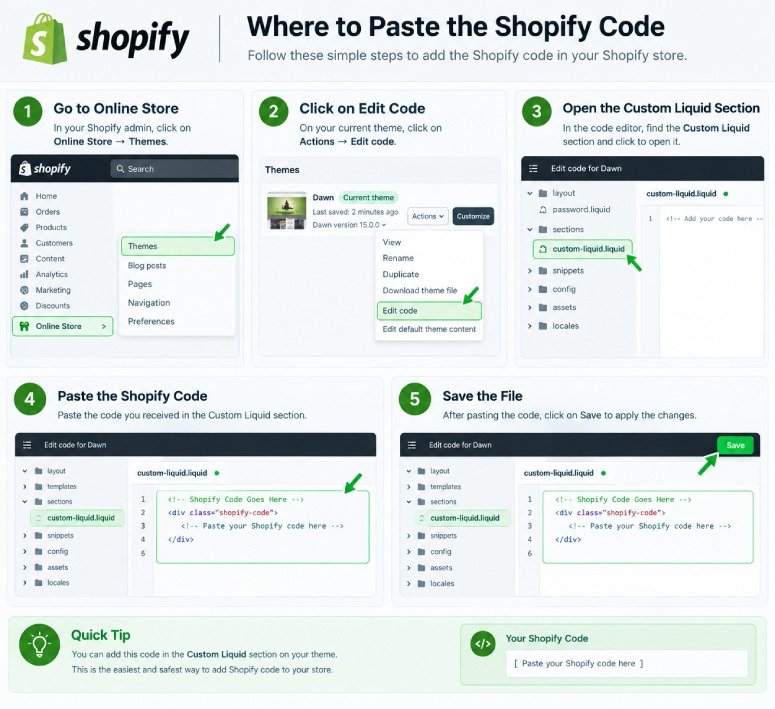
A Shopify Liquid Code Library is a collection of ready-to-use code snippets for customizing Shopify stores. It can include Liquid, CSS, and JavaScript examples for product pages, carts, collections, sections, buttons, and other theme features.
Yes. Our library provides free Shopify code snippets that you can copy, test, and customize for your Shopify store. Always review the instructions and test the code before using it on a live theme.
Yes. Many snippets are created with beginners in mind and include simple instructions about what the code does and where it should be added. More advanced snippets may require basic knowledge of Shopify themes and Liquid.
The correct location depends on the snippet. Some Liquid code can be added through Shopify's Custom Liquid section, while other snippets may need to be placed in a specific theme file or section. Always follow the installation instructions provided with the individual snippet.
Not necessarily. Shopify themes can use different HTML structures, CSS classes, section settings, and theme files. A snippet may work differently between themes and sometimes requires small adjustments.
Yes. If you cannot find the customization you need, you can contact us with your idea. We can use common requests and useful customization ideas to create future Shopify code tutorials and snippets.
Not at all; this is a standalone resource designed to assist Shopify store owners and developers in learning about and carrying out theme customisations. It has no association with Shopify and is not officially endorsed by the company.