
Adding a clear trust section to a Shopify store can make important reassurance information easier for shoppers to notice. This Shopify trust badges section uses Liquid-compatible HTML and CSS to create a polished three-card layout for delivery, secure checkout, and customer support.
The section is designed without an app and uses simple CSS for the visual effects. It includes responsive behavior for mobile screens, hover animations on desktop, rounded cards, icons, and a highlighted heading area. You can use it on a product page, homepage, or another storefront section where you want to communicate key shopping benefits.
Where to Paste This Shopify Code
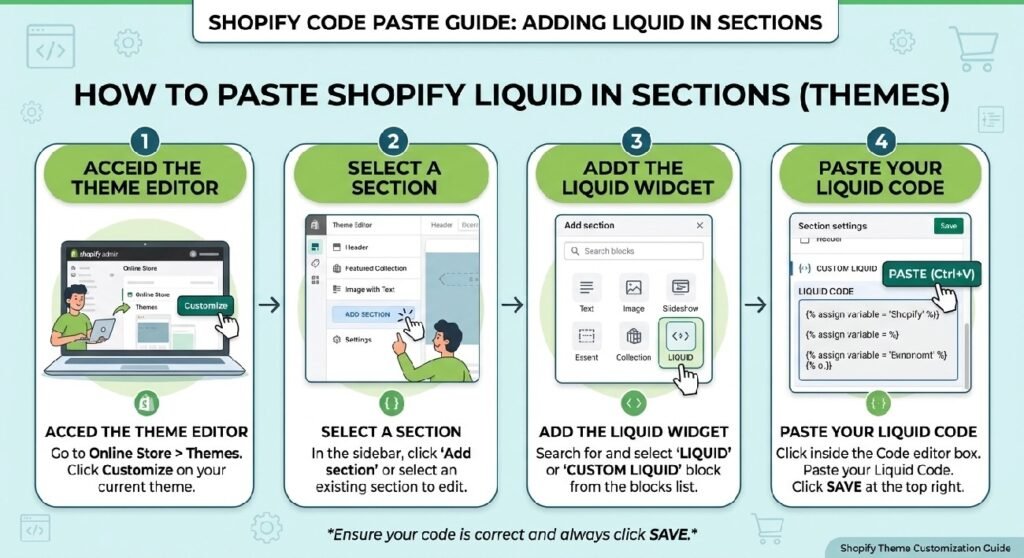
This snippet is suitable for a Custom Liquid section/block when your theme allows the required markup and CSS there.
For a Shopify 2.0 theme:
- Open Shopify Admin.
- Go to Online Store → Themes.
- Click Customize on your active theme.
- Open the page where you want the trust section.
- Add a Custom Liquid section or block.
- Paste the complete code below.
- Save the changes.
- Preview the page on both desktop and mobile.
If your theme’s Custom Liquid area does not accept the styling as expected, you can instead create a dedicated section file through Online Store → Themes → Edit code and place the code there.
How This Shopify Code Works
The snippet combines HTML and CSS to create the trust-badge layout. There is no JavaScript and no external library required.
The main parts are:
.dg-trust-boxcreates the large rounded container with a subtle shadow..dg-headingcontrols the title, badge, and introductory text..dg-gridcreates a three-column layout on larger screens..dg-cardcreates each individual trust card..dg-iconprovides the dark rounded icon area.- The
:hoverrules add a small lift effect when a desktop visitor moves over a card. - The media query changes the three-column grid to a single-column layout on screens below 768px.
- CSS variables at the beginning make some design values easier to manage.
The finished section displays three customer reassurance points:
- Fast Delivery
- 100% Secure Checkout
- 24/7 Support
Because the code uses regular HTML elements rather than Shopify-specific product objects, it does not depend on a particular product, collection, or metafield.
Shopify Liquid Code
<style>
:root{
    --dg-primary:#111111;
    --dg-secondary:#ffffff;
    --dg-border:#e8e8e8;
    --dg-text:#444;
    --dg-gradient:linear-gradient(135deg,#111,#2d2d2d);
}

/*==============================
        PREMIUM BOX
==============================*/

.dg-trust-section{
    margin:40px 0;
}

.dg-trust-box{

    position:relative;

    background:var(--dg-secondary);

    border:1px solid rgba(0,0,0,.08);

    border-radius:28px;

    overflow:hidden;

    box-shadow:
    0 20px 50px rgba(0,0,0,.08);

}

.dg-trust-box::before{

content:"";

position:absolute;

top:0;
left:0;
right:0;

height:5px;

background:linear-gradient(90deg,#111,#444,#111);

}

/*==============================
          HEADER
==============================*/

.dg-heading{

padding:35px 25px 15px;

text-align:center;

}

.dg-badge{

display:inline-flex;

align-items:center;

gap:8px;

padding:8px 16px;

border-radius:999px;

background:#f5f5f5;

font-size:13px;

font-weight:700;

margin-bottom:16px;

}

.dg-heading h2{

margin:0;

font-size:34px;

font-weight:800;

color:#111;

letter-spacing:-.5px;

}

.dg-heading p{

margin:12px auto 0;

max-width:600px;

font-size:16px;

color:#666;

line-height:1.7;

}

/*==============================
          GRID
==============================*/

.dg-grid{

display:grid;

grid-template-columns:repeat(3,1fr);

gap:22px;

padding:30px;

}

.dg-card{

background:#fff;

border:1px solid var(--dg-border);

border-radius:22px;

padding:28px;

transition:.35s;

position:relative;

overflow:hidden;

}

.dg-card:hover{

transform:translateY(-8px);

box-shadow:
0 18px 35px rgba(0,0,0,.10);

}

.dg-card::after{

content:"";

position:absolute;

left:0;
top:0;

width:100%;

height:4px;

background:var(--dg-gradient);

transform:scaleX(0);

transition:.35s;

transform-origin:left;

}

.dg-card:hover::after{

transform:scaleX(1);

}

.dg-icon{

width:70px;
height:70px;

margin:auto;

display:flex;

align-items:center;
justify-content:center;

border-radius:18px;

background:linear-gradient(135deg,#111,#333);

font-size:30px;

color:#fff;

margin-bottom:20px;

}

.dg-card h3{

margin:0 0 10px;

font-size:20px;

color:#111;

font-weight:800;

text-align:center;

}

.dg-card p{

margin:0;

font-size:15px;

color:#666;

line-height:1.7;

text-align:center;

}

/*==============================
         MOBILE
==============================*/

@media(max-width:768px){

.dg-grid{

grid-template-columns:1fr;

padding:18px;

}

.dg-heading{

padding:25px 18px 5px;

}

.dg-heading h2{

font-size:28px;

}

.dg-card{

padding:22px;

}

}
</style>

<section class="dg-trust-section">

<div class="dg-trust-box">

<div class="dg-heading">

<div class="dg-badge">
✔ Premium Shopping Experience
</div>

<h2>Why Customers Trust Us</h2>

<p>
Every order is backed by secure payments, fast shipping, and responsive customer support to ensure a smooth shopping experience.
</p>

</div>

<div class="dg-grid">

<div class="dg-card">

<div class="dg-icon">
🚚
</div>

<h3>Fast Delivery</h3>

<p>
Quick dispatch and reliable nationwide shipping directly to your doorstep.
</p>

</div>

<div class="dg-card">

<div class="dg-icon">
🔒
</div>

<h3>100% Secure Checkout</h3>

<p>
Your payment information is protected using industry-standard encryption.
</p>

</div>

<div class="dg-card">

<div class="dg-icon">
💬
</div>

<h3>24/7 Support</h3>

<p>
Need help? Our customer support team is always ready to assist you.
</p>

</div>

</div>

</div>

</section>
Why Add This to Your Shopify Store?
A trust section is useful when customers need quick reassurance before continuing through your store. Instead of placing shipping, checkout, and support information in separate areas, this layout puts the three messages together in a visually noticeable block.
Make important information easier to scan
Visitors often scan a product or homepage rather than reading every paragraph. Short cards such as Fast Delivery and 100% Secure Checkout let shoppers understand your main service benefits quickly.
Reinforce the shopping experience
The section works particularly well near product information, add-to-cart areas, or other points where shoppers are deciding whether to continue with a purchase.
No app is required
This customization is built with HTML and CSS, so you don’t need to install another Shopify app simply to display these three trust messages.
That can be useful if you want to keep a theme lightweight and avoid adding another app for a relatively simple visual component.
Works beyond product pages
Although trust information is common on product pages, you can also place this section on:
- Shopify homepages
- Landing pages
- Collection pages
- Promotional pages
- Custom sales pages
- Other theme sections where reassurance is useful
Tips for Customizing the Code
The code is intentionally straightforward, so you can adapt the content and appearance without changing its overall structure.
Change the trust messages
You can replace:
- Fast Delivery
- 100% Secure Checkout
- 24/7 Support
with benefits that accurately describe your own store.
For example, a store could use:
- Easy Returns
- Free Shipping
- Customer Assistance
Only use claims that are actually true for your business. A trust section should clarify your real policies rather than make unsupported promises.
Change the colors
The CSS starts with variables such as:
--dg-primary
--dg-secondary
--dg-border
--dg-text
You can adjust these values to better match your Shopify theme.
The current design uses a black, white, and gray palette, which makes it relatively easy to adapt to different storefront designs.
Change the icons
The current cards use emoji icons:
- 🚚
- 🔒
- 💬
You can replace these with other symbols or an icon system already used by your theme. If you use external icon resources, make sure they are properly supported by your theme before adding another dependency.
Adjust the card layout
On desktop, the cards appear in three columns. On screens below 768px, the layout automatically changes to one column.
If you want two columns on tablets, the media-query rules can be adjusted, but the existing one-column mobile layout is a sensible default for readability.
Common Problems and Fixes
The section looks too wide
The code does not define a fixed maximum width for .dg-trust-box. If your theme’s surrounding container is wide, the section may also appear wide.
In that case, you can add a max-width and use margin-left and margin-right to center it.
The styling conflicts with my theme
The classes use the dg- prefix, such as .dg-card and .dg-heading, which helps reduce the chance of conflicts with common theme class names.
However, theme CSS can still override some properties. If something looks different from the preview, inspect the affected element and check whether the theme has a more specific CSS rule.
The cards do not stack on mobile
Make sure the complete @media(max-width:768px) portion of the CSS is included. That section changes .dg-grid from three columns to one.
The trust section appears without the expected Shopify editor controls
This code is a custom visual section rather than a fully schema-driven Shopify section. If you want editable fields directly inside the Shopify Theme Editor, the code would need to be converted into a proper Shopify section with a {% schema %} configuration.
Can I use this on a Shopify 2.0 theme?
Yes. The markup and CSS themselves are not tied to an older Shopify theme architecture. For the easiest implementation, add them through a compatible Custom Liquid area or create a dedicated theme section.
Frequently Asked Questions
Can I add Shopify trust badges without an app?
Yes. This trust-badge layout can be added directly to a Shopify theme using HTML and CSS, so an app is not required for this particular customization.
Does this Shopify trust section work on mobile?
Yes. The included media query changes the three-column layout into a single-column layout on screens narrower than 768px.
Can I change the trust badge text?
Yes. You can edit the heading, descriptions, and card titles directly in the markup. Make sure any shipping, security, support, or refund claims accurately reflect your store’s actual policies.
Does this code use JavaScript?
No. The provided customization uses HTML and CSS only. The hover animation is handled through CSS transitions.
Can I use this on a product page?
Yes. A trust section like this can be useful below product information or near an add-to-cart area where customers may benefit from seeing delivery, checkout, and support information.
Explore More Shopify Code
Shopify bundle offer section
A Shopify bundle offer section is one of the most effective ways to boost your store’s Average Order Value (AOV). By grouping complementary products together—like a primary item, an accessory, and a maintenance tool—and offering a small discount, you give customers a compelling reason to buy more in a single transaction.
https://css-liquids-for-shopify.site/shopify-bundle-offer-section/
Shopify countdown timer
A Shopify countdown timer creates real urgency and scarcity on your product pages, sale landing pages, or promotional banners. By displaying a dynamic, ticking clock next to flash sales, limited-time discounts, or upcoming product drops, you encourage hesitant buyers to take action immediately rather than postponing their purchase decision.
https://css-liquids-for-shopify.site/shopify-countdown-timer-pro/
Suggested Internal Link
For more help, you can read Shopify’s official theme customization guide: Shopify Theme Customization Guide
2 Responses