
A Shopify Delivery Info Box is a small piece of product-page UI, but it can answer an important question before a customer reaches checkout: How much do I need to spend to qualify for free delivery?
The supplied snippet keeps that message compact. It displays a custom SVG icon beside the text “Free Shipping & Returns: On orders above 2,999 PKR” inside a soft green notice box. There’s no JavaScript, external icon library, or Shopify app involved. Everything is handled with HTML and CSS.
The design is deliberately understated. That suits product pages well because delivery information should be easy to notice without competing with the product title, price, gallery, or Add to Cart button.
One detail matters before you publish it: the 2,999 PKR threshold and the free-returns statement are hard-coded. They need to match your store’s real shipping and returns policy.
Where to Paste This Shopify Code
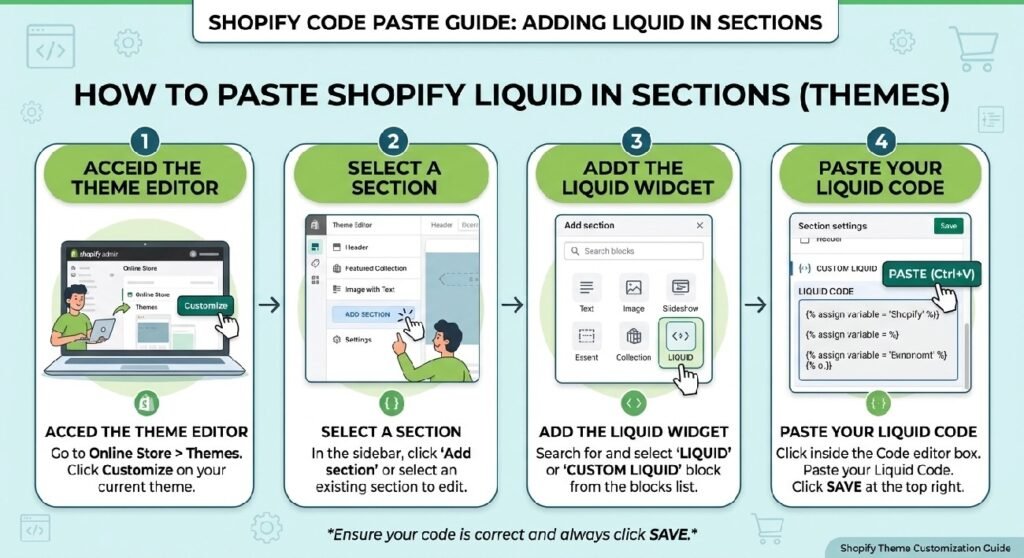
The simplest option is to use this snippet inside a Custom Liquid block on your product template.
Open Shopify Admin → Online Store → Themes → Customize, load your product template, then add a Custom Liquid block in the area where you want the shipping message to appear.
A useful position is close to the product price or purchase controls. Customers usually look for delivery information while deciding whether to add an item to the cart, so hiding this message near the bottom of a long product page reduces its usefulness.
If you prefer keeping custom snippets in theme files, you can also create a reusable section such as:
delivery-info-box.liquid
and add the code there.
Duplicate your live theme before editing theme files. It takes a few seconds and gives you an easy rollback point if another theme style interferes with the box.
How the Shopify Delivery Info Box Works
This snippet is simpler than many of the sections we’ve covered.
The .shyd-shipping-note class controls the outer box. It uses Flexbox to keep the SVG icon and shipping text aligned horizontally.
The background is #F5F8F2, while the border uses #DCEAC7. Those pale green tones communicate the message without making the box feel like an error alert or an aggressive promotion.
The icon is an inline SVG. Because it uses stroke="currentcolor", its line color follows the CSS color value applied to the SVG:
#3B6D11
That makes the icon easy to recolor later. You don’t need to edit every individual SVG line.
The text is contained inside .shipping-text. The main sentence uses a small 12.5px font, while the <strong> element makes Free Shipping & Returns: darker and heavier than the threshold information.
There is also a dedicated mobile rule at 480px. Padding, gap, icon size, and font size all decrease slightly so the message remains compact on narrow phones.
Shopify Liquid Code
<style>
  .shyd-shipping-note {
    display: flex;
    align-items: center;
    gap: 10px;
    background: #F5F8F2;
    border: 1px solid #DCEAC7;
    border-radius: 10px;
    padding: 10px 14px;
    margin: 14px 0;
    font-family: Arial, sans-serif;
  }
  .shyd-shipping-note svg {
    width: 24px;
    height: 18px;
    flex-shrink: 0;
    color: #3B6D11;
  }
  .shyd-shipping-note .shipping-text {
    font-size: 12.5px;
    line-height: 1.5;
    color: #333;
  }
  .shyd-shipping-note .shipping-text strong {
    color: #1a1a1a;
    font-weight: 700;
  }
  @media (max-width: 480px) {
    .shyd-shipping-note { padding: 9px 12px; gap: 8px; }
    .shyd-shipping-note svg { width: 20px; height: 16px; }
    .shyd-shipping-note .shipping-text { font-size: 11.5px; }
  }
</style>

<p class="shyd-shipping-note">
  <svg xmlns="http://www.w3.org/2000/svg" width="27.969" height="21.5" viewbox="0 0 27.969 21.5">
    <g transform="translate(-1025.238 -1129.238)">
      <rect width="26.469" height="20" rx="3" transform="translate(1025.988 1129.988)" fill="none" stroke="currentcolor" stroke-linecap="round" stroke-width="1.5"></rect>
      <line x2="26.469" transform="translate(1025.988 1134.55)" fill="none" stroke="currentcolor" stroke-linecap="round" stroke-width="1.5"></line>
      <line x2="12.4" transform="translate(1031.041 1138.374)" fill="none" stroke="currentcolor" stroke-linecap="round" stroke-width="1.5"></line>
      <line x2="16.364" transform="translate(1031.041 1142.115)" fill="none" stroke="currentcolor" stroke-linecap="round" stroke-width="1.5"></line>
      <line x2="13.721" transform="translate(1031.041 1145.855)" fill="none" stroke="currentcolor" stroke-linecap="round" stroke-width="1.5"></line>
    </g>
  </svg>
  <span class="shipping-text"><strong>Free Shipping & Returns:</strong> On orders above 2,999 PKR</span>
</p>
The Most Important Thing to Fix Before Publishing
The code currently says:
Free Shipping & Returns: On orders above 2,999 PKR
That sentence makes two promises.
The first is free shipping above a certain order value. The second is free returns.
Those are not automatically connected.
A store can offer free shipping over 2,999 PKR while still asking customers to pay return postage. Another store might allow free returns only for defective items. Some stores may not accept certain product categories for return at all.
So don’t treat this as placeholder marketing copy.
If only shipping is free, change the label to something such as:
Free Shipping: On orders above 2,999 PKR
If both shipping and returns genuinely qualify under the same terms, the original wording can stay.
Accuracy here matters more than making the message sound generous.
7 Practical Ways to Improve This Delivery Info Box
1. Put it close to the buying decision
This type of message works best around the price, variant selector, quantity field, or Add to Cart area.
Imagine someone is looking at a product priced at 2,450 PKR. Seeing that free shipping starts at 2,999 PKR can influence what they do next. They might add another useful product rather than discover the threshold only after reaching checkout.
That context is valuable.
Putting the same notice halfway down an About page would not have the same effect.
2. Make the threshold match your actual shipping setup
The amount is currently written directly into the HTML.
That means changing your Shopify shipping rules will not automatically change this message.
If your free-shipping threshold moves from 2,999 PKR to 3,499 PKR and nobody updates this snippet, the product page will be showing outdated information.
Treat the visible threshold and Shopify’s shipping configuration as two things that need to stay in sync.
For a store where promotions change frequently, a future version of this section would be better with a Theme Editor setting instead of a hard-coded number.
3. Think carefully about multiple currencies
2,999 PKR is perfectly clear for a Pakistan-focused store using Pakistani rupees.
It becomes less straightforward if the storefront displays USD, GBP, AED, EUR, or several localized currencies.
The current snippet does not perform currency conversion. It always shows the exact text written in the markup.
If you operate internationally, either adapt the section to your market setup or use wording that cannot contradict the customer’s displayed currency.
This is one of those details that is easy to miss during development because the design still looks correct.
4. Keep the message short
This component is not the place for your complete shipping policy.
Its job is to communicate one useful fact quickly.
Something like:
Free Shipping: Orders over 2,999 PKR
works because the customer can understand it almost instantly.
Delivery regions, exceptions, courier details, processing times, and full return conditions belong on dedicated policy pages or inside a more detailed product information area.
If you already use the [INTERNAL LINK NEEDED: Product Tabs Section Liquid], that section is a better place for extended Shipping & Delivery information. The small delivery box can present the headline rule, while the accordion provides the detail.
5. Keep the visual hierarchy subtle
The current design gets this right.
The box doesn’t use a giant heading, flashing animation, or oversized icon. The shipping offer is useful information, but it is still secondary to the product itself.
That balance is worth keeping.
The pale background creates separation from the surrounding content. The darker bold label tells the reader what the message is about, and the rest of the text supplies the condition.
There’s very little visual noise.
6. Use a support CTA for complicated delivery questions
Some shipping questions cannot be answered with one line.
Customers may ask whether delivery is available to a particular city, whether an item can arrive before a certain date, or how oversized products are handled.
That’s where [INTERNAL LINK NEEDED: Contact CTA Section Liquid] becomes more useful than trying to squeeze extra information into this box.
The delivery note can state the basic offer. A separate contact CTA gives customers somewhere to go when their question depends on their location or order.
Those two components serve different purposes and work well together.
7. Don’t turn every shipping message into urgency
There is no countdown timer here, and that’s a good thing.
Free-shipping information is usually an ongoing store condition, not something that needs “Hurry!” or “Ends soon!” attached to it.
If the free-delivery threshold is genuinely part of a temporary campaign, your [INTERNAL LINK NEEDED: Announcement Bar Pro Liquid] is a better place to promote the limited-time offer across the store.
Keep this smaller box focused on practical purchase information.
Why the Inline SVG Is a Good Choice
The icon is embedded directly inside the markup.
That has a few practical advantages.
You don’t need to load an icon font or an external image just to show a small symbol. The CSS also controls its size and color cleanly.
Because the icon uses currentcolor, changing this:
color: #3B6D11;
updates the SVG strokes without editing the SVG paths individually.
That makes theme matching easier.
The icon itself looks closer to a card, label, or information panel than a traditional delivery truck, so if you want shipping to be immediately recognizable, you could later replace it with a truck or parcel SVG.
That’s a design choice rather than a functional requirement.
This Isn’t a Dynamic Shipping Calculator
The phrase “delivery info box” can sound more advanced than the code actually is.
This snippet does not calculate:
- the customer’s cart total
- how much more they need to spend
- delivery estimates
- the customer’s location
- shipping rates
- available couriers
It simply displays a fixed message.
That simplicity is useful when your only goal is communicating a store policy.
If you eventually want something like:
You’re 550 PKR away from free shipping
then you need cart data and additional Liquid or JavaScript logic. That would be a different component.
Being clear about that distinction prevents readers from installing this snippet expecting behavior that isn’t there.
Using It With a Collection Showcase
The [INTERNAL LINK NEEDED: Collection Showcase Liquid] section can also support a free-shipping strategy indirectly.
For example, if your store has a collection of lower-priced accessories, customers who are close to the threshold may want an easy way to browse additional items.
I would not automatically add a collection link inside this tiny notice box, though. That would make the component busier.
Keep the delivery message simple and let other sections handle browsing.
Mobile Styling Is Already Included
At widths below 480px, the snippet reduces:
- outer padding
- space between the icon and text
- SVG dimensions
- text size
That keeps the element compact.
Still, test the real version on a phone before publishing. If you replace the current sentence with a much longer shipping policy, the box can become several lines tall.
The CSS can adapt to that, but the result may no longer feel like the compact notice it was designed to be.
FAQ
Does this Shopify delivery box calculate free shipping automatically?
No. The amount is static text. Changing your Shopify shipping settings will not automatically update the 2,999 PKR value inside this snippet.
Does the code need JavaScript?
No. The supplied version uses only HTML, inline SVG, and CSS.
Can I change the shipping amount?
Yes. Edit the amount inside the .shipping-text content and make sure it matches the actual threshold configured for your store.
Can I remove “Free Returns”?
Yes, and you should remove it if your store does not genuinely offer free returns under the stated conditions.
Is this code mobile responsive?
Yes. It includes a media query for screens below 480px that reduces spacing, text size, and icon dimensions.
Explore More Shopify Code
Contact CTA Section Liquid
A Contact CTA Section Liquid block is useful when a shopper has reached the point where one unanswered question could stop the sale.
https://css-liquids-for-shopify.site/contact-cta-section-liquid/
Collection Showcase Liquid
A Collection Showcase Liquid section can make a Shopify homepage easier to browse when you want to send shoppers toward a few important product groups without building a large menu or image-heavy grid.
https://css-liquids-for-shopify.site/collection-showcase-liquid/
For more help, you can read Shopify’s official theme customization guide :Shopify Theme Customization Guide
One Response