
A Shopify Social Proof Popup Liquid can create a small floating notification that appears near the bottom of the screen and rotates through recent activity messages.
The supplied fake-sales-pop-up.txt snippet uses a fixed toast-style card with a check icon, customer-style name text, location text, and a purchase-time message. It appears after a short delay, stays visible for a few seconds, slides away, and then cycles through another entry.
Visually, the component is simple and polished.
The problem is the data.
The script contains a long hard-coded list of names, Pakistani cities, and purchase messages such as “purchased just now,” “purchased 5 minutes ago,” and “purchased today.” Nothing in the code connects those messages to real Shopify orders.
That means the popup is presenting simulated purchases as if they were genuine customer activity.
For a real store, I would not publish it that way.
A better implementation should use truthful, privacy-safe social proof or neutral messaging that does not pretend a sale happened when it did not.
Where to Paste This Shopify Code
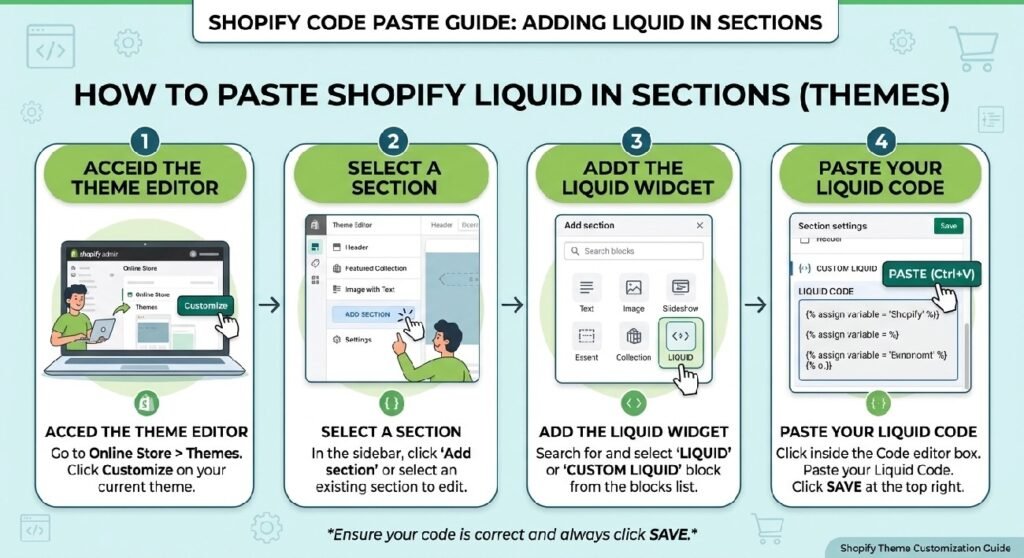
The supplied snippet is written as a Custom Liquid block.
A practical Shopify setup would be:
- Open Shopify Admin → Online Store → Themes.
- Duplicate the theme you want to edit.
- Open Customize.
- Add a Custom Liquid block in the product template or another supported area.
- Paste the cleaned snippet.
- Save and test it on desktop and mobile.
You could also convert it into a reusable file such as:
social-proof-popup.liquid
and place it in the Snippets or Sections folder depending on how you want to manage it.
The popup uses position:fixed, so it is not tied visually to the exact place where the code is rendered. Once loaded, it appears near the lower-left corner of the viewport.
How the Shopify Social Proof Popup Liquid Works
The snippet has three parts:
- Liquid configuration
- CSS styling
- JavaScript rotation logic
At the top, Liquid variables define colors and the border radius.
The popup itself is:
<div class="pdpx-proof" ...>
Inside it is:
- a check-circle SVG
- a main text line
- a smaller supporting line
The JavaScript then takes items from the data array and inserts them into:
.n
and:
.s
The class .on slides the popup into view.
Without .on, the popup sits off-screen with:
transform: translateX(-130%);
When .on is added, it becomes:
transform: translateX(0);
The first notification starts after about 2.5 seconds.
Each message stays visible for about 4.5 seconds.
A new message is triggered every 9 seconds.
That timing gives the component a repeating toast-notification feel.
Shopify Liquid Code
{%- comment -%}
============================================================
  PDP — SOCIAL PROOF POPUP  (Custom Liquid block)
  Floating "X from City purchased…" toast that cycles.
  Edit the entries in the `data` array in the script below.
============================================================
{%- endcomment -%}
{%- liquid
  assign c_border = '#e6e7eb'
  assign c_title  = '#16181d'
  assign c_muted  = '#6b7280'
  assign c_trust  = '#1f7a4d'
  assign radius   = '14px'
-%}
{%- style -%}
  .pdpx-proof{ --bd:{{ c_border }}; --ti:{{ c_title }}; --mu:{{ c_muted }}; --tr:{{ c_trust }};
    position:fixed; left:16px; bottom:16px; z-index:40; max-width:280px;
    display:flex; gap:10px; align-items:center; padding:11px 13px; background:#fff;
    border:1px solid var(--bd); border-radius:{{ radius }}; box-shadow:0 6px 20px rgba(0,0,0,.14);
    transform:translateX(-130%); transition:transform .45s ease; }
  .pdpx-proof.on{ transform:translateX(0); }
  .pdpx-proof svg{ width:22px; height:22px; flex:0 0 auto; color:var(--tr); }
  .pdpx-proof .n{ font-size:12px; font-weight:600; color:var(--ti); }
  .pdpx-proof .s{ font-size:10px; color:var(--mu); }
  @media (max-width:600px){ .pdpx-proof{ bottom:84px; } }
{%- endstyle -%}
<div class="pdpx-proof" id="pdpxProof-{{ section.id }}" aria-live="polite">
  <svg viewBox="0 0 24 24" fill="none" stroke="currentColor" stroke-width="2" stroke-linecap="round" stroke-linejoin="round"><circle cx="12" cy="12" r="9"/><path d="M9 12l2 2 4-4"/></svg>
  <div><div class="n"></div><div class="s"></div></div>
</div>
<script>
(function(){
  var box=document.getElementById('pdpxProof-{{ section.id }}');
  if(!box) return;
  var data=[
    {n:'Ahmed from Lahore',     s:'purchased 2 hours ago'},
    {n:'Ali from Karachi',      s:'purchased today'},
    {n:'Fatima from Islamabad', s:'purchased yesterday'},
    {n:'Sara from Multan',      s:'purchased 5 hours ago'},
    {n:'Ahmed from Multan',          s:'purchased just now'},
    {n:'Bilal from Jhelum',          s:'purchased 5 minutes ago'},
    {n:'Faisal from Karachi',        s:'purchased 12 minutes ago'},
    {n:'Usman from Sukkur',          s:'purchased 20 minutes ago'},
    {n:'Ayesha from Peshawar',       s:'purchased 35 minutes ago'},
    {n:'Hassan from Lahore',         s:'purchased an hour ago'},
    {n:'Zeeshan from Gujrat',        s:'purchased 2 hours ago'},
    {n:'Omar from Quetta',           s:'purchased 3 hours ago'},
    {n:'Tariq from Faisalabad',      s:'purchased 4 hours ago'},
    {n:'Fatima from Mardan',         s:'purchased this morning'},
    {n:'Saad from Hyderabad',        s:'purchased today'},
    {n:'Daniyal from Sargodha',      s:'purchased 6 hours ago'},
    {n:'Hamza from Islamabad',       s:'purchased yesterday'},
    {n:'Asad from Sialkot',          s:'purchased 8 hours ago'},
    {n:'Mahnoor from Dera Ghazi Khan', s:'purchased 45 minutes ago'},
    {n:'Kamran from Rawalpindi',     s:'purchased just now'},
    {n:'Junaid from Gujranwala',     s:'purchased 10 minutes ago'},
    {n:'Rizwan from Bahawalpur',     s:'purchased 25 minutes ago'},
    {n:'Naveed from Abbottabad',     s:'purchased an hour ago'},
    {n:'Sana from Rahim Yar Khan',   s:'purchased 2 hours ago'},
    {n:'Imran from Karachi',         s:'purchased 3 hours ago'},
    {n:'Waqar from Multan',          s:'purchased today'},
    {n:'Adnan from Jhelum',          s:'purchased 5 hours ago'},
    {n:'Shahid from Peshawar',       s:'purchased yesterday'},
    {n:'Hira from Lahore',           s:'purchased 15 minutes ago'},
    {n:'Furqan from Sukkur',         s:'purchased just now'},
    {n:'Asim from Gujrat',           s:'purchased 40 minutes ago'},
    {n:'Noman from Faisalabad',      s:'purchased an hour ago'},
    {n:'Yasir from Quetta',          s:'purchased 2 hours ago'},
    {n:'Maryam from Hyderabad',      s:'purchased this morning'},
    {n:'Arsalan from Mardan',        s:'purchased 4 hours ago'},
    {n:'Shahzeb from Sargodha',      s:'purchased today'},
    {n:'Wajid from Sialkot',         s:'purchased 6 hours ago'},
    {n:'Sohail from Islamabad',      s:'purchased 30 minutes ago'},
    {n:'Zarmina from Rawalpindi',    s:'purchased yesterday'},
    {n:'Abdullah from Dera Ghazi Khan', s:'purchased just now'},
    {n:'Nasir from Bahawalpur',      s:'purchased 18 minutes ago'},
    {n:'Farhan from Gujranwala',     s:'purchased an hour ago'},
    {n:'Zubair from Rahim Yar Khan', s:'purchased 3 hours ago'},
    {n:'Gul from Abbottabad',        s:'purchased 5 hours ago'},
    {n:'Aamir from Lahore',          s:'purchased today'},
    {n:'Bilawal from Karachi',       s:'purchased 8 hours ago'},
    {n:'Kashif from Multan',         s:'purchased yesterday'},
    {n:'Faraz from Jhelum',          s:'purchased 22 minutes ago'},
    {n:'Sania from Peshawar',        s:'purchased just now'},
    {n:'Haris from Gujrat',          s:'purchased 50 minutes ago'},
    {n:'Talha from Sukkur',          s:'purchased an hour ago'},
    {n:'Saqib from Faisalabad',      s:'purchased 2 hours ago'},
    {n:'Usama from Hyderabad',       s:'purchased 4 hours ago'},
    {n:'Nimra from Quetta',          s:'purchased this morning'},
    {n:'Adil from Sargodha',         s:'purchased today'},
    {n:'Hamza from Mardan',          s:'purchased 6 hours ago'},
    {n:'Bilal from Islamabad',       s:'purchased 14 minutes ago'},
    {n:'Rehan from Sialkot',         s:'purchased just now'},
    {n:'Aqsa from Rawalpindi',       s:'purchased 38 minutes ago'},
    {n:'Numan from Bahawalpur',      s:'purchased an hour ago'},
    {n:'Shoaib from Dera Ghazi Khan', s:'purchased 3 hours ago'},
    {n:'Asad from Gujranwala',       s:'purchased yesterday'},
    {n:'Waleed from Abbottabad',     s:'purchased 5 hours ago'},
    {n:'Kinza from Rahim Yar Khan',  s:'purchased today'},
    {n:'Mubashir from Karachi',      s:'purchased 7 hours ago'},
    {n:'Hassan from Lahore',         s:'purchased just now'},
    {n:'Saif from Jhelum',           s:'purchased 16 minutes ago'},
    {n:'Tahir from Multan',          s:'purchased an hour ago'},
    {n:'Rabia from Peshawar',        s:'purchased 2 hours ago'},
    {n:'Imtiaz from Faisalabad',     s:'purchased this morning'},
    {n:'Wajahat from Sukkur',        s:'purchased 4 hours ago'},
    {n:'Ali from Gujrat',            s:'purchased today'},
    {n:'Sajjad from Quetta',         s:'purchased yesterday'},
    {n:'Sonia from Hyderabad',       s:'purchased 28 minutes ago'},
    {n:'Faizan from Mardan',         s:'purchased just now'},
    {n:'Asfandyar from Islamabad',   s:'purchased 42 minutes ago'},
    {n:'Hammad from Sargodha',       s:'purchased an hour ago'},
    {n:'Shahmir from Rawalpindi',    s:'purchased 3 hours ago'},
    {n:'Amna from Sialkot',          s:'purchased 6 hours ago'},
    {n:'Ibrahim from Bahawalpur',    s:'purchased today'},
    {n:'Tabish from Gujranwala',     s:'purchased 8 hours ago'},
    {n:'Murad from Dera Ghazi Khan', s:'purchased yesterday'},
    {n:'Hassan from Abbottabad',     s:'purchased 24 minutes ago'},
    {n:'Hina from Rahim Yar Khan',   s:'purchased just now'},
    {n:'Danish from Karachi',        s:'purchased 11 minutes ago'},
    {n:'Salman from Multan',         s:'purchased an hour ago'},
    {n:'Awais from Lahore',          s:'purchased 2 hours ago'},
    {n:'Bilal from Peshawar',        s:'purchased this morning'},
    {n:'Iqra from Jhelum',           s:'purchased 4 hours ago'},
    {n:'Haider from Faisalabad',     s:'purchased today'},
    {n:'Usman from Quetta',          s:'purchased 5 hours ago'},
    {n:'Talha from Sukkur',          s:'purchased yesterday'},
    {n:'Fahad from Hyderabad',       s:'purchased 33 minutes ago'},
    {n:'Saba from Gujrat',           s:'purchased just now'},
    {n:'Zohaib from Sargodha',       s:'purchased 48 minutes ago'},
    {n:'Mujahid from Mardan',        s:'purchased an hour ago'},
    {n:'Asad from Sialkot',          s:'purchased 3 hours ago'},
    {n:'Hamza from Islamabad',       s:'purchased 6 hours ago'},
    {n:'Areeba from Rawalpindi',     s:'purchased today'},
    {n:'Ghulam Mustafa from Bahawalpur', s:'purchased 7 hours ago'},
    {n:'Jamshed from Gujranwala',    s:'purchased yesterday'},
    {n:'Abid from Dera Ghazi Khan',  s:'purchased 19 minutes ago'},
    {n:'Naveed from Abbottabad',     s:'purchased just now'},
    {n:'Noreen from Rahim Yar Khan', s:'purchased an hour ago'}
  ];
  var i=0, n=box.querySelector('.n'), s=box.querySelector('.s');
  function cyc(){
    var p=data[i%data.length]; i++;
    n.textContent=p.n; s.textContent=p.s;
    box.classList.add('on');
    setTimeout(function(){ box.classList.remove('on'); }, 4500);
  }
  setTimeout(function(){ cyc(); setInterval(cyc, 9000); }, 2500);
})();
</script>
The Main Problem: The Purchases Are Fabricated
The code contains entries such as:
Ahmed from Lahore — purchased 2 hours ago
Bilal from Jhelum — purchased 5 minutes ago
Kamran from Rawalpindi — purchased just now
Hina from Rahim Yar Khan — purchased just now
and many more.
These are not generated from Shopify order data.
They are simply written into a JavaScript array.
That matters because the popup is not framed as a fictional demo. It visually tells shoppers that named people in specific cities made recent purchases.
If those transactions did not happen, the message is misleading.
Social proof can help when it reflects something real.
Fake social proof damages trust the moment a customer recognizes that the activity is simulated.
7 Safe Ways to Improve This Social Proof Popup
1. Replace fake purchases with real, verifiable signals
The cleanest fix is to stop showing made-up purchase activity.
If you want to show recent order activity, connect the popup to a legitimate data source and only display events your store is allowed to use.
Even then, be careful with customer privacy.
A safer pattern could look like:
Recent order from Lahore
instead of:
Ahmed from Lahore purchased just now
That removes unnecessary personal detail while still communicating genuine activity.
If real-time order data is not available, use another type of social proof.
For example:
Free shipping available over your threshold
Secure checkout
Easy returns
Popular category this week
Only use the last one if you can support it with real data.
2. Do not invent urgency with “just now” or “5 minutes ago”
Time-based wording makes the popup feel highly current.
That is exactly why it needs to be truthful.
The current array repeatedly uses phrases such as:
purchased just now
purchased 10 minutes ago
purchased 35 minutes ago
Those times are not calculated.
They are static strings.
A visitor can leave the page open and the same entry can later appear with “just now” even though it was never tied to an event in the first place.
If you cannot provide a genuine timestamp, remove the timestamp.
A neutral message is better than false precision.
3. Protect customer privacy if you use real order data
Switching from fake names to real names creates a different problem.
Customer purchase history is personal information.
Do not automatically expose identifiable names, precise locations, or order behavior simply because the data exists in Shopify.
If you use real social proof, consider anonymized formats such as:
A customer in Lahore placed an order
or:
Recent purchase from Karachi
You can also use aggregated proof:
Over 100 verified orders this month
but only if that number is accurate and your data practices support the claim.
The goal is truthful proof, not maximum personal detail.
4. Use block.id or another unique identifier if needed
The popup ID is built with:
pdpxProof-{{ section.id }}
That helps prevent a plain global ID such as pdpxProof.
However, if multiple copies of this block appear inside the same Shopify section, they can still share the same section.id.
That can create duplicate IDs.
A block-aware implementation could use block.id where available, or another unique identifier tied to the actual component instance.
This is especially relevant if you turn the code into a reusable block rather than a one-off Custom Liquid snippet.
5. Keep the aria-live behavior, but do not overuse it
The wrapper contains:
aria-live="polite"
That means assistive technology may announce the changing popup text without immediately interrupting the user.
That is a thoughtful accessibility choice.
The downside is repetition.
A notification appearing every 9 seconds can become noisy for someone using a screen reader.
If the content is not essential, consider:
- reducing the frequency
- limiting the number of announcements
- giving the user a dismiss option
- stopping after a small number of messages
Social proof should not dominate the shopping experience.
6. Add a close button or session-level dismissal
The popup currently keeps cycling automatically.
There is no visible close control.
For some visitors, especially on mobile, a fixed notification can become distracting.
A stronger version would include a small dismiss button and remember that choice for the current session.
That way the visitor can close the popup once instead of waiting for it to disappear every cycle.
If you store the dismissal state, use a simple session or local preference and keep the implementation lightweight.
7. Reconsider the mobile position
On screens below 600px, the popup moves to:
bottom:84px
That is probably intended to avoid a sticky bottom bar.
It may still conflict with:
- Add to Cart bars
- chat widgets
- cookie banners
- accessibility controls
- browser UI
- WhatsApp buttons
Because the popup uses position:fixed and z-index:40, test it with every other floating element on the storefront.
A component can look fine by itself and still create a poor mobile experience when combined with apps and theme controls.
What the Code Does Well
The visual implementation is lightweight.
The CSS is compact, and the popup does not require an external library.
The entrance animation is also simple.
Rather than fading in multiple layers or running a large animation framework, the component only changes transform.
That is generally efficient.
The check-circle icon is an inline SVG, so there is no dependency on an external icon font.
The text sizes are deliberately small, which helps the popup stay compact.
These are all useful design choices.
The data model is the part that needs changing.
The Timing Logic Is Easy to Understand
The cycle function selects the next object from the array:
data[i % data.length]
and increments the index.
Then it:
- inserts the name text
- inserts the status text
- adds the
.onclass - removes
.onafter 4.5 seconds
The first cycle starts after 2.5 seconds.
After that, setInterval(cyc, 9000) repeats the process every 9 seconds.
That means there is roughly a 4.5-second visible period followed by a gap before the next popup.
For a real social proof component, I would probably slow that down further.
A popup every few seconds can feel like an ad layer rather than useful reassurance.
There Is No Randomization
Although the list is very long, the code does not choose entries randomly.
It starts from the first item and moves through the array in order.
So every new visitor sees the same sequence:
first Lahore, then Karachi, then Islamabad, and so on.
That predictable behavior is another sign that the popup is simulated.
If you move to legitimate data, the display order should reflect real event timing or a deliberately chosen sampling method rather than a fake static queue.
Randomizing fabricated events would not solve the underlying problem.
Truthfulness matters more than randomness.
This Is Not Connected to Shopify Orders
The snippet does not use:
customerorder- Shopify Ajax APIs
- app proxies
- Shopify Functions
- webhooks
- Storefront API
- Admin API
It is entirely client-side.
That is why the popup can run on any page without knowing whether a purchase ever happened.
For a blog tutorial, this distinction should be explicit.
Calling it a “sales popup” does not mean it reads sales data.
It only displays sales-like text.
Better Content Ideas for the Same Popup Design
You can keep the floating toast design without using fake purchase claims.
The same component could show truthful store information such as:
Free shipping available
Orders above your actual threshold
Secure checkout
Payment handled through Shopify checkout
Easy returns
Use your real returns window
Need help?
Contact support
New collection live
Link to a real collection
That preserves the visual benefit of the popup while removing deceptive social proof.
If you want actual customer proof, verified reviews or real aggregate order counts are better options when implemented responsibly.
Social Proof Popup vs. Premium Footer Trust
The [INTERNAL LINK NEEDED: Premium Footer Trust Liquid] and this popup both try to reduce uncertainty.
The footer trust section does it with persistent store-policy badges.
The social proof popup does it with temporary activity messages.
For many stores, the footer trust section is the safer default because it can communicate stable facts:
Secure Checkout
Tracked Delivery
Customer Support
A recent-purchase popup only makes sense when the purchase activity is genuine.
Social Proof Popup vs. Statistics Counter
The [INTERNAL LINK NEEDED: Statistics Counter Liquid] is a better place for real aggregate proof.
For example:
5,000+ orders
4.8 average rating
10 years in business
Those figures should still be accurate, but aggregate statistics avoid pretending that a named customer bought something five minutes ago.
If your store has credible numbers, a statistics section can feel more trustworthy than constant floating notifications.
Social Proof Popup vs. Upsell Recommendation Box
The [INTERNAL LINK NEEDED: Upsell Recommendation Box Liquid] is built to influence what the customer considers buying next.
This popup should not try to do the same job.
If you use it, keep the content focused on reassurance rather than pushing another offer every few seconds.
Too many persuasive widgets on the same product page can make the storefront feel noisy and manipulative.
Naming the File
The current filename is:
fake-sales-pop-up.txt
For your code library, I would not publish the final snippet under that name.
Use something clearer and more appropriate, such as:
social-proof-popup.liquid
or:
recent-activity-popup.liquid
If the final version uses only genuine events, a name such as:
recent-sales-popup.liquid
can also make sense.
The filename should describe the finished feature, not the misleading demo data.
FAQ
Is this popup connected to real Shopify orders?
No. The supplied version uses a hard-coded JavaScript array.
Are the customer names and purchases real?
The code provides no evidence that they are. They should be treated as demo/fabricated entries unless replaced with verified data.
Can I use fake names instead of real customers?
You should not present invented purchases as real customer activity. Use truthful anonymized data or neutral store messages instead.
Does the popup require an app?
No. The current version is Liquid, CSS, SVG, and JavaScript.
Why does it use aria-live="polite"?
It allows assistive technology to announce changing messages without using the more disruptive assertive mode.
Does it work on mobile?
Yes, but the fixed position can conflict with sticky carts, chat tools, and other floating UI. Test it carefully.
Can I keep the same design but remove sales claims?
Yes. The toast design can display shipping, support, returns, collection, or other truthful store information.
Explore More Shopify Code
These existing tutorials are useful alternatives or companions:
- Shopify Bundle Selector Liquid
A Shopify Bundle Selector Liquid block can make a product page more useful when you want customers to choose between buying one item, a pack of two, or a larger quantity without leaving the product page.https://css-liquids-for-shopify.site/shopify-bundle-selector-liquid/
- Shopify Estimated Delivery Section
A Shopify Estimated Delivery Section can answer one of the questions shoppers ask most often before ordering: When will this arrive?https://css-liquids-for-shopify.site/shopify-estimated-delivery-section/
For more help, you can read Shopify’s official theme customization guide :Shopify Theme Customization Guide
One Response