
A Shopify product benefits grid is a clean, visual layout that highlights the core features, value propositions, and key selling points of your product. Instead of overwhelming potential customers with dense blocks of technical text, a benefit grid uses structured cards, icons, and short titles to make your product’s value instantly scannable.
Adding a native Shopify product benefits grid directly to your theme keeps your store fast, responsive, and completely under your control. Third-party apps that build feature lists often load unnecessary tracking scripts, slow down page speeds, and charge recurring monthly fees. Using clean Liquid and CSS allows you to showcase key product features while maintaining peak performance.
Where to Paste This Shopify Code
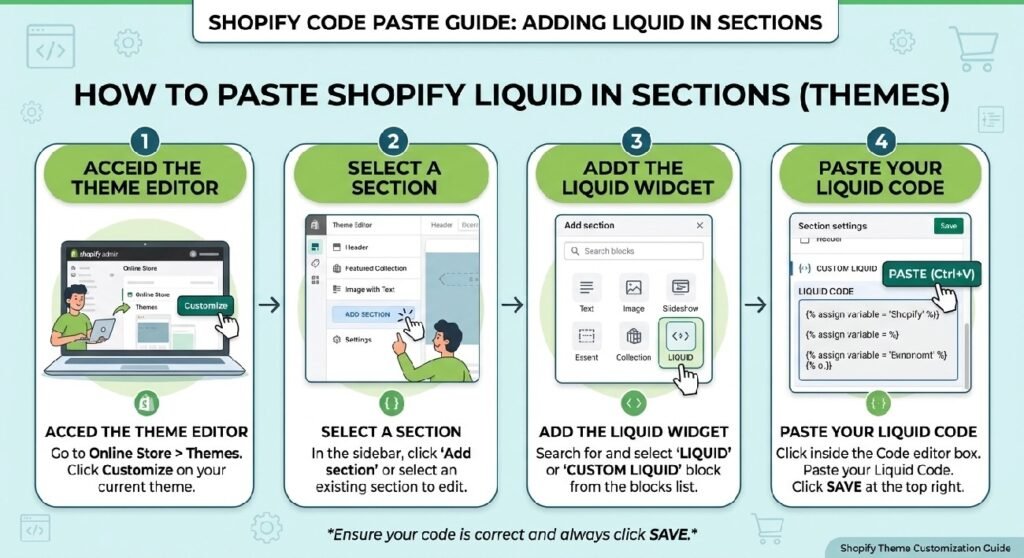
To install this modular product benefits grid section on any Shopify Online Store 2.0 theme (such as Dawn, Sense, or Spotlight), follow these simple steps:
-
Go to Online Store → Themes in your Shopify admin.
-
Click the three dots (
...) next to your active theme and select Edit code. -
In the Sections folder, click Add a new section and name it
product-benefits-grid. -
Clear out all default boilerplate code in the new file and paste the Liquid code snippet provided below.
-
Click Save.
-
Open your Theme Editor (Customize), navigate to your Default product template or Homepage, click Add section in the sidebar, and select Product Benefits Grid.
How This Shopify Code Works
This section combines standard Shopify Liquid schema settings with responsive CSS to display dynamic benefit cards effortlessly:
-
Liquid Schema Blocks: Uses modular block settings inside the schema, allowing you to add, remove, and reorder benefit cards directly from the Theme Editor without touching any code.
-
Dynamic SVG Icon Support: Supports native Shopify image pickers or custom inline SVG icon uploads for each benefit card.
-
Responsive CSS Grid: Built-in CSS grid layout automatically adjusts column counts based on screen size—displaying 3–4 columns on desktop and stacking neatly into a 1–2 column view on mobile devices.
-
Theme Editor Integration: Allows you to customize section headings, card background colors, borders, and text alignment live inside the theme visual customizer.
Shopify Liquid Code
<style>

.zx-benefits{
    display:grid;
    grid-template-columns:repeat(3,1fr);
    gap:18px;
    margin:30px 0;
}

.zx-benefit{
    position:relative;
    background:#fff;
    border:1px solid #ececec;
    border-radius:24px;
    padding:28px 22px;
    text-align:center;
    overflow:hidden;
    transition:.35s ease;
    box-shadow:0 10px 30px rgba(0,0,0,.05);
}

.zx-benefit::before{
    content:"";
    position:absolute;
    top:0;
    left:0;
    width:100%;
    height:5px;
    background:linear-gradient(90deg,#111,#444,#111);
}

.zx-benefit:hover{
    transform:translateY(-8px);
    box-shadow:0 20px 45px rgba(0,0,0,.12);
}

.zx-benefit-icon{
    width:72px;
    height:72px;
    margin:auto;
    border-radius:50%;
    background:linear-gradient(135deg,#111,#333);
    display:flex;
    align-items:center;
    justify-content:center;
    font-size:34px;
    color:#fff;
    margin-bottom:18px;
}

.zx-benefit h3{
    margin:0;
    font-size:21px;
    color:#111;
    font-weight:800;
}

.zx-benefit p{
    margin:12px 0 0;
    color:#666;
    line-height:1.6;
    font-size:15px;
}

@media(max-width:768px){

.zx-benefits{
grid-template-columns:1fr;
}

}

</style>

<div class="zx-benefits">

<div class="zx-benefit">

<div class="zx-benefit-icon">
💎
</div>

<h3>Premium Quality</h3>

<p>
Made using carefully selected premium materials for long-lasting performance and reliability.
</p>

</div>

<div class="zx-benefit">

<div class="zx-benefit-icon">
⚡
</div>

<h3>Fast Delivery</h3>

<p>
Quick processing and nationwide shipping so your order reaches you as soon as possible.
</p>

</div>

<div class="zx-benefit">

<div class="zx-benefit-icon">
🛡️
</div>

<h3>Trusted Store</h3>

<p>
Thousands of happy customers choose us for our quality products and dependable service.
</p>

</div>

</div>
Why Add This to Your Shopify Store?
Highlighting product benefits clearly is one of the most effective ways to lower bounce rates and improve conversion rates:
-
Improves Readability: Breaks down long product descriptions into digestible visual cards that mobile shoppers can scan in seconds.
-
Increases Buyer Trust: Clearly communicates warranty details, material quality, eco-friendly practices, or key product performance features.
-
App-Free Speed: Eliminates heavy external scripts and monthly subscription fees, helping your storefront load faster and score higher on Google PageSpeed Insights.
Tips for Customizing the Code
You can easily adapt the grid styling and layout inside the section settings and CSS properties:
-
Adjusting Column Layouts: Edit the CSS grid property
.benefits-grid-containerto switch between a 2-column, 3-column, or 4-column layout on desktop viewports. -
Customizing Card Backgrounds: Update the background color, padding, and border-radius settings inside the Theme Editor panel to align with your brand aesthetics.
-
Adding Hover Effects: Enhance user interaction by adding a subtle CSS transform scale or box-shadow transition when users hover over individual benefit cards.
Common Problems and Fixes
-
Icons appear misaligned or oversized: Ensure your uploaded SVG or PNG icon assets share identical square aspect ratios (e.g., 48x48px or 64x64px) for visual consistency.
-
Section doesn’t show up on mobile: Check that your CSS media queries don’t accidentally apply a
display: none;rule to small screen breakpoints. -
Text overflows card container: Add
word-break: break-word;or adjust card padding inside the CSS style tag to accommodate longer benefit descriptions.
Frequently Asked Questions
Can I add this product benefits grid without an app?
Yes, this code runs natively inside your Shopify theme using Liquid, CSS, and HTML without requiring any third-party app installations.
Will this section work on all Shopify 2.0 themes?
Yes, it is designed specifically as a modular section compatible with Dawn, Sense, Craft, Spotlight, and all standard Shopify OS 2.0 architecture.
Can I use custom icons for each benefit card?
Yes, you can upload custom SVG/PNG icons or use theme settings to select icons directly within the Shopify Theme Editor.
Explore More Shopify Code
Shopify recently purchased popup
A Shopify recently purchased popup can display small social-proof notifications while customers browse a product page.
https://css-liquids-for-shopify.site/shopify-recently-purchased-popup/
Premium Hero Banner Liquid
A Premium Hero Banner Liquid section gives your Shopify homepage a strong visual starting point without requiring a page-builder app.
https://css-liquids-for-shopify.site/premium-hero-banner-liquid-shopify/
For more help, you can read Shopify’s official theme customization guide :Shopify Theme Customization Guide
2 Responses