
This is our Shopify Liquid code library, containing useful code snippets and customisation solutions for Shopify stores. If you’re a beginner who is learning Shopify Liquid or if you’re an experienced store owner in need of a quick customisation, then this library was created with the aim of making Shopify development easier. Rather than spending a lot of time going through lengthy tutorials or attempting to create each customisation from scratch, you can find ready-to-use snippets of Shopify Liquid code, CSS code, and JavaScript solutions all in one place. The snippets are designed for specific Shopify customisation tasks so that you can easily locate the code you need.
A Shopify Trust Badge on Product Page can give shoppers a quick summary of ratings and purchase confidence without taking up much space around the main buying area. The supplied snippet is a compact Ratings & Trust block. It displays five gold stars, a 4.8 Rating out of 5, Based
A Shopify Scrolling Reviews Liquid section can give a product page or homepage a more dynamic review experience without relying on a slider library. The supplied scrolling-reviews.txt snippet creates an automatically moving row of customer review cards. Each card includes a star rating, written review, initials avatar, customer name, location,
A Shopify Compact Trust Section Liquid can place several trust signals into a very small area of the storefront. The supplied snippet combines two pieces: a dark social-proof header showing “10,000+ Happy Customers” with a pulsing Live badge, and a continuously scrolling trust bar underneath. The marquee includes claims such
A Shopify Scrolling Marquee Liquid section is a good fit when you want to add movement to a storefront without bringing in a slider library or extra JavaScript. The supplied section is more complete than a basic one-line marquee. It has two independently scrolling lanes, separate directions and speeds, editable
A Shopify Live Review Widget Liquid can make a product page feel more active by showing customer-style comments in a rotating chat bubble. The supplied live-comment.liquid snippet is designed for a product detail page. It includes a “Let Our Customers Speak For Us!” heading, a 5-star aggregate line, a verified-buyer
A Shopify Free Shipping Notice Liquid block provides the consumers with a fast reminder of the days on which they can get free shipping or free returns. This is a short piece of code that displays an icon as an “inline” SVG and this message: Free Shipping & Returns: For
A Shopify Product Benefits Liquid block is a simple way to show the reasons someone may like a product without forcing them to read a long description. The supplied snippet is built for a product detail page and uses a clean “Why you’ll love it” heading followed by four compact
A Shopify Social Proof Popup Liquid can create a small floating notification that appears near the bottom of the screen and rotates through recent activity messages. The supplied fake-sales-pop-up.txt snippet uses a fixed toast-style card with a check icon, customer-style name text, location text, and a purchase-time message. It appears
A Shopify Estimated Delivery Section can answer one of the questions shoppers ask most often before ordering: When will this arrive? The supplied snippet does this with a compact three-step timeline for Order, Dispatch, and Delivery. JavaScript fills in the dates automatically from the shopper’s current date, while the CSS
A Shopify Bundle Selector Liquid block can make a product page more useful when you want customers to choose between buying one item, a pack of two, or a larger quantity without leaving the product page. The supplied bundles.liquid code is more advanced than most of the snippets we have
A Premium Contact Form Liquid section can give a Shopify store a cleaner, more polished way to collect customer questions without sending visitors to a plain default form. The supplied design already looks strong. It uses a soft white gradient, rounded fields, a full-width dark submit button, subtle blue focus
A Mega Menu Showcase Liquid section can give Shopify shoppers a fast way to jump into important product groups without digging through a long navigation menu. The supplied snippet uses a clean Shop By Category block with three pill-shaped links for New, Sale, and Bundles. The styling is polished: soft
Using a snippet is simple.
First, search for the Shopify customization you need or select a category from the filter above. Open the relevant snippet and read the instructions before copying the code.
Check where to paste the code, understand what the snippet changes, and review any customization instructions provided with the example. Then add the code to your duplicate or development theme and test the result.
If the snippet does not work immediately, check whether your theme uses different class names, section structures, or theme files. A small adjustment may be required depending on your Shopify theme.
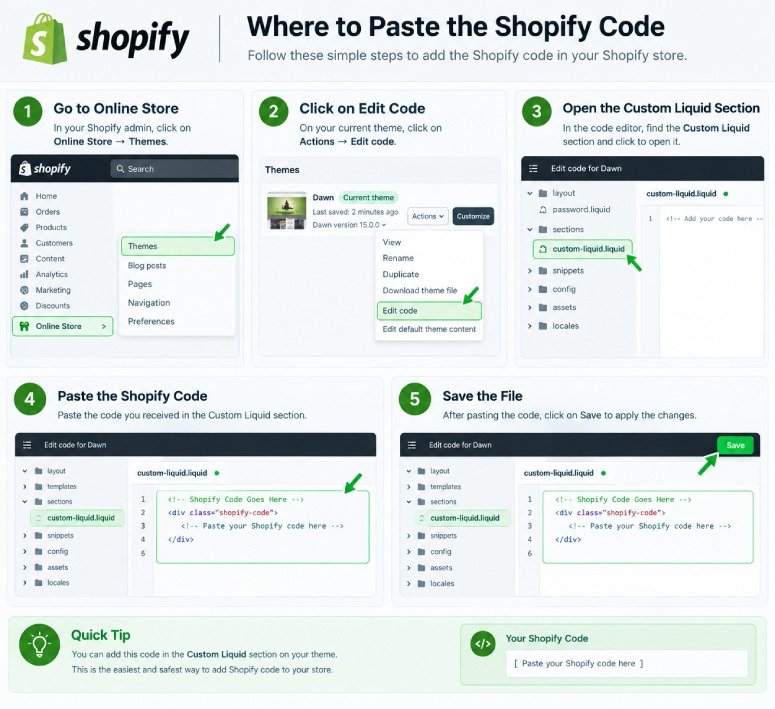
A Shopify Liquid Code Library is a collection of ready-to-use code snippets for customizing Shopify stores. It can include Liquid, CSS, and JavaScript examples for product pages, carts, collections, sections, buttons, and other theme features.
Yes. Our library provides free Shopify code snippets that you can copy, test, and customize for your Shopify store. Always review the instructions and test the code before using it on a live theme.
Yes. Many snippets are created with beginners in mind and include simple instructions about what the code does and where it should be added. More advanced snippets may require basic knowledge of Shopify themes and Liquid.
The correct location depends on the snippet. Some Liquid code can be added through Shopify's Custom Liquid section, while other snippets may need to be placed in a specific theme file or section. Always follow the installation instructions provided with the individual snippet.
Not necessarily. Shopify themes can use different HTML structures, CSS classes, section settings, and theme files. A snippet may work differently between themes and sometimes requires small adjustments.
Yes. If you cannot find the customization you need, you can contact us with your idea. We can use common requests and useful customization ideas to create future Shopify code tutorials and snippets.
Not at all; this is a standalone resource designed to assist Shopify store owners and developers in learning about and carrying out theme customisations. It has no association with Shopify and is not officially endorsed by the company.